DH101

Introduction to Digital Humanities

Month: October 2015 (page 4 of 18)

US Death Rates Caused by Homicide and Suicide

deathratesusgraph

I chose to visualize the United States death rate data sourced from the Statistical Abstract of the United States.  The data provides statistics of various causes of death in each state as well as information on related factors.

In my visualization, I compared the death rates caused by suicide and homicide per state by using Tableau’s side-by-side bar graph function.  I thought it was very interesting to see that in most states suicide was a greater cause of death than homicide except for the District of Columbia, Louisiana, and Maryland.   It was also fascinating that the District of Columbia had a tremendously large amount of homicides compared to every other state.  From viewing the data in this way it made me wonder if the data has any correlation in the citizens’ of the various states outlook on their quality of life or safety of where they live.  Also, if the data provided information on the death rates from year to year it would be interesting to see how/if the rates were affected by major events that occurred in the state each year.


Blog #4 Digital Visualization Dija S&P


Untitled


Before I begin to discuss what the data visualization provides I want to discuss why Tableau was the best tool to analyze this data. I began by trying to input the data into the RAW web program but I ran into the issue that the software more useful in mapping correlation on single cases rather than then compare changes over time. This is when I realized that the right program to represent this data was Tableau for its flexibility on portraying data.

From the Tableau program was able to plot the two sets of data against each other. We looked at the data from two different markets and compared them over time. There are a couple of advantages of being able to compare the data visually as opposed to mathematically on an excel sheet. To begin with, when the data is represented visually one can see trends without having to think about the changes. This allows for people who are viewing the data to be able to think about the implications that the data may show instead of having to think about what the trends are. Also the changes in the graphs are easier to note when portrayed accurately. In class we discussed ways in which some data can be presented certain ways in order to create certain effects that may fool the observer.

What the data shows as opposed to the excel is that there is general consistency between the DIJA and the S&P. This could help in the field of economics in the way that one understands the economy is consistent amongst most companies. There is not one set of companies that constantly out perform all others but rather there is a economic trends that effect an entire country all at once. With excel sheets, the similarities can also be observed but not with the same amount of clarity. There is a small difference in between both data sets which is that in general S&P chart at times does better than the Dija but they tend to continuously fall back into equilibrium. This might be harder to see if one was to look at just once data point. One might assume that the S&P is more successful than the Dija but with a visual representation of the data over time, one can see that in reality the two markets are basically the same in terms of performance over time.

Death Data Visualization

Data set’s provide our societies with valuable pieces of information that helps us understand many things about trends and norms. This information is essential to our survival in a world where things are constantly fluctuating and changing. By analyzing data set’s, our society can understand why things have happened in the past, analyze current trends and predict changes in trends to better prepare for the future. For example, when I first looked at the “Death Data” data set, it was quite overwhelming because of the multiplicity of causes of death around the country. The excel sheet alone does not help me (or any other individual for that matter) understand the data other than being able to view a bunch of numbers that correspond to each state in the United States. However, by using visualization tools to analyze the data and put it into a format that will ultimately help me draw inferences based on the visualization that has been created by a specific software.

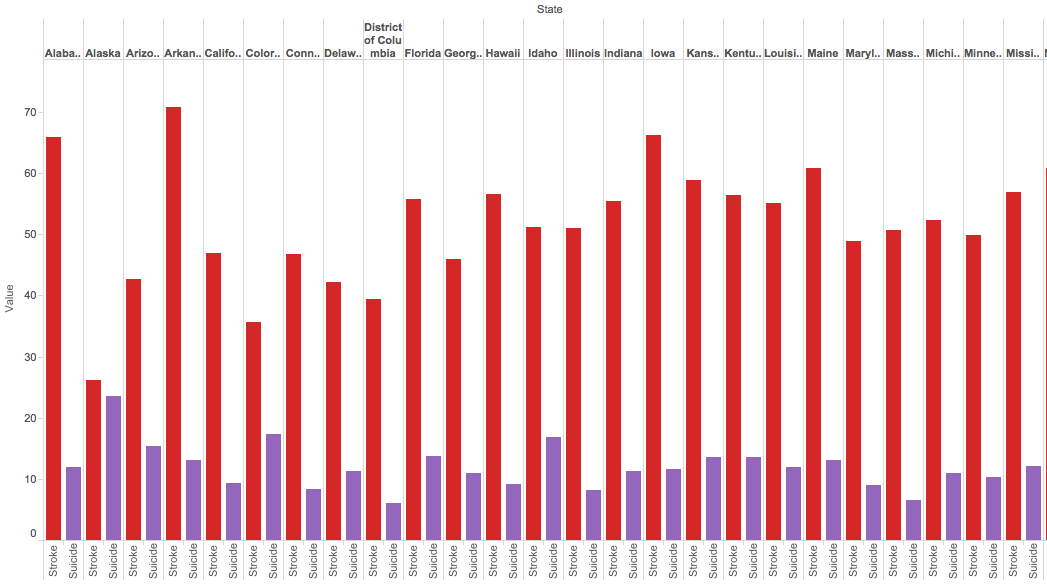
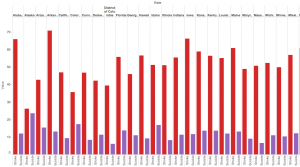
I used Tableau Public to create a visualization of my data set. Since their are so many causes of death, it was difficult to understand the raw data set on the excel sheet. One way to analyze the data, is using a simple side by side bar graph to compare the different states and the various causes of deaths that the data set provided. For example, the picture below depicts the simplest of bar graphs to analyze just a portion of the dataset. In the picture, you can see a comparison, state by state, of the amount of deaths due to suicides in comparison to deaths due to strokes. The visualization allows the viewer to immediately make an inference and conclude that their are more deaths associated with strokes than with suicides without needing to look too much into the raw data itself.
Screen Shot 2015-10-25 at 8.13.18 PM

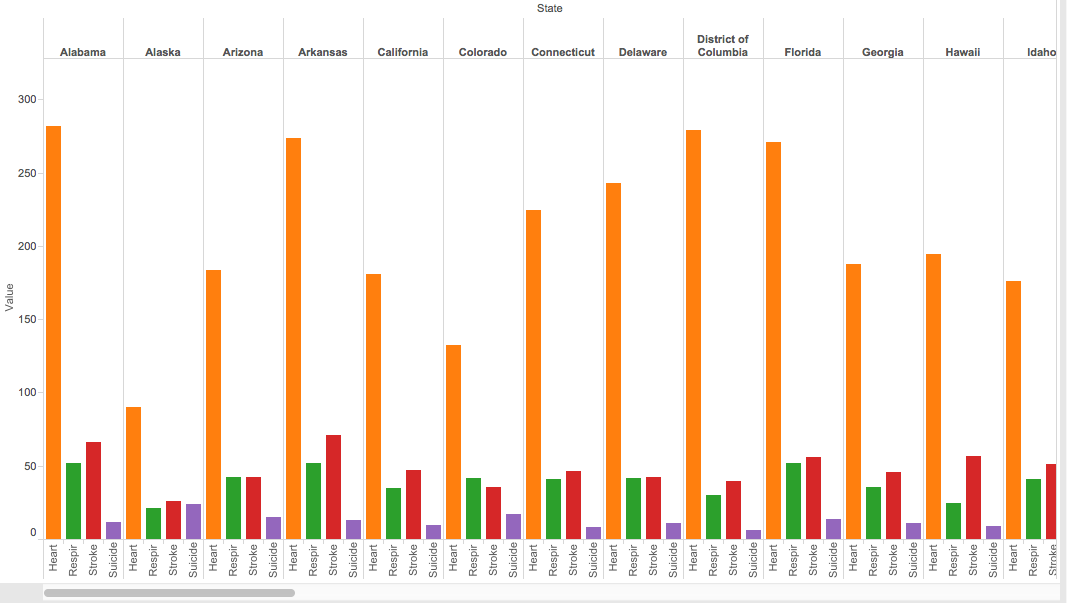
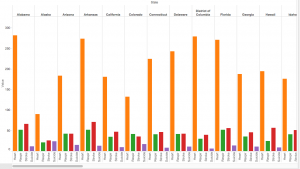
A bar graph can also easily compare more data by simply using various colors to differentiate between the types of categories, in this case types of deaths by state. As you can see in the picture below, the amount of deaths related to heart, respiration, strokes and suicide are easily compared by taking a quick glance at the side by side bar graph; yet, with the raw data from the excel sheet, one would not be able to determine this information as quickly as it is done with the bar graph.
Screen Shot 2015-10-25 at 8.18.01 PM

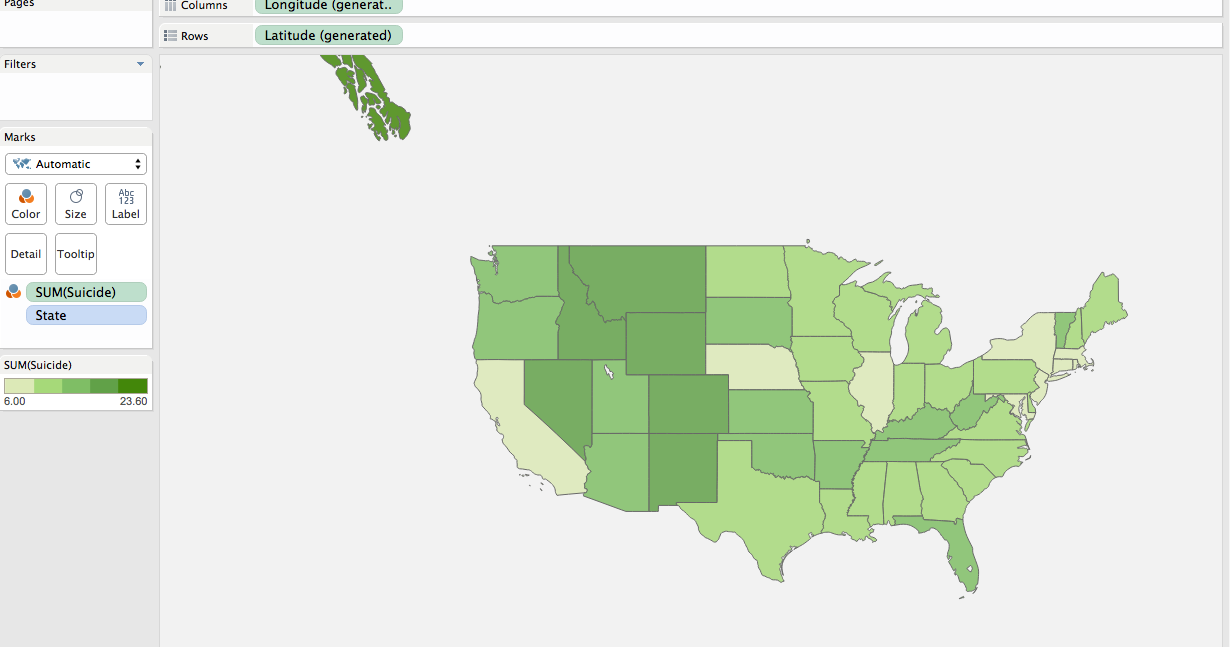
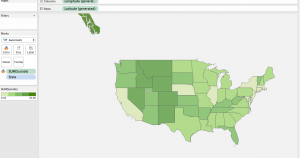
Another way the data can easily be analyzed is by using a filled map to quickly see the potential trends in any part of the world. In the case we’ve been discussing, one can see how predominant suicides have been across the country and where suicide deaths are more prevalent. After quickly looking at the map, you would find that suicide deaths are more predominant in the midwest regions.
Screen Shot 2015-10-25 at 10.20.33 PM

Overall, visualization tools are very effective because they help viewers understand data sets in a quick and efficient manner so that analysts can make inferences to help our society.

Recreation in Florida

Screen Shot 2015-10-25 at 10.31.40 PMhttps://public.tableau.com/views/RecreationFlorida/Dashboard1?:embed=y&:display_count=yes&:showTabs=y


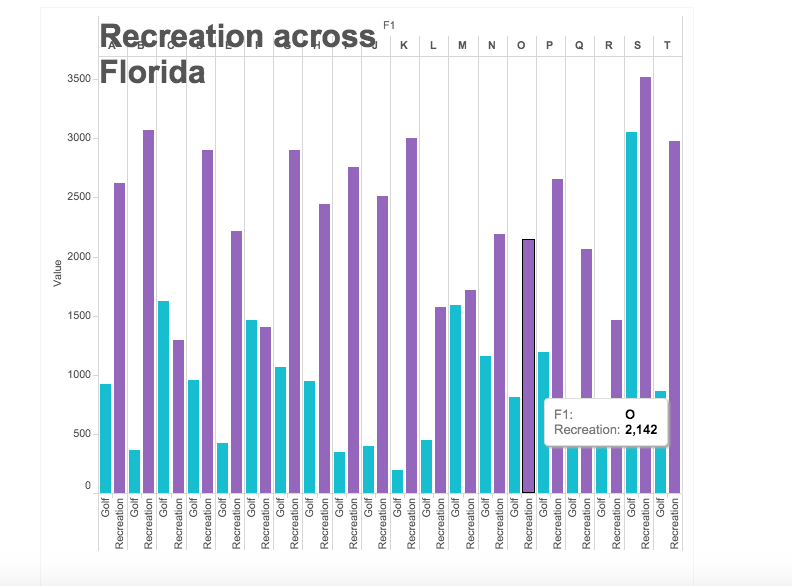
This data shows the amount of recreation done in each city when it is compared to the amount of people playing golf. Through this visualization, it is easier to see how much golf is played as a recreation, rather than just random number that you would see through simply looking at the data. With the visualization, both the number of recreational activities and the comparison are easily seen for each of the cities in Florida.

Blog 4 – Data Fever: Visualizing Normal Body Temperature

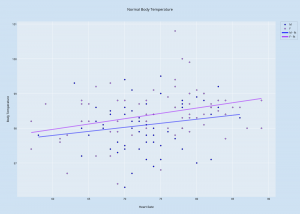
For this exercise in data visualization, I used the data set from an article in the Journal of the American Medical Association by Mackowiak et al, which recorded data on body temperature, gender, and heart rate. Using the service Plot.ly, I created a scatter plot of the data, as can be seen below.


Normal Body Temperature

This visualization shows the data listings in a more comprehensible way, laying out all the data in a single space that combines the three components. The x-axis shows the values for Heart Rate, the y-axis shows the values for Body Temperature, and the data points themselves are color-coded to differentiate between men and women. I also created two separate best-fit lines: one for women, and one for men. These lines help to show trends in the data, as looking at scatter points alone can be disorienting and unclear. Looking at these best-fit lines, it seems that there is a positive correlation between heart rate and body temperature; typically, the higher the person’s heart rate was, the higher his/her body temperature was.


Visualizing Baseball Statistics

For this assignment I chose to look at the Baseball Statistics data. I tried a few different data visualization tools including Palladio and Raw, which found problems with the data, suggesting the need for something like OpenRefine; Tableau, which didn’t offer the kind of direct comparison I was looking for; and Plot.ly, which I ultimately decided to use. In order to create a data visualization that wasn’t a chaotic jumble of lines  I decided to focus solely on the home run records of the SF Giants and the LA Dodgers, two National League rival teams located here in California.

newplot (1)

This line plot shows both teams’ home run records from 1901-2009, with the Giants in orange and the Dodgers in blue as indicated by the key on the right. You can visualize the successes of the teams in hitting home runs throughout their long-held rivalry, directly comparing their records with ease versus looking back and forth at the numerical data on a spreadsheet. Quickly glancing at the chart, you can see that though the teams have for the most part kept consistently close to each other in their home run tallies, the Giants look to have maintained the higher count for more years, a conclusion which would have been more difficult to make just looking at the data. The graph allows you to easily see the trends not only for each team but also the sport in general since it offers over a century’s worth of data, raising questions as to why certain years saw such low or high home run counts.


A Visualization on the Presidential Election

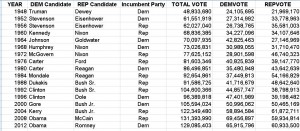
PresElec DatasetThe given data set of the Presidential Election is data taken from 18 years between 1948 and 2012. The data set consists of voting information and party representation.


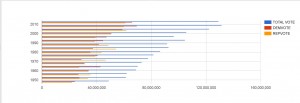
Using Google’s FusionTable, a software that creates a set of graphs from the data that the user imports. Using the Presidential Election dataset, FusionTable presented several graphs options that I could configure.

voting

This bar graph highlights the change in voting participation from 50 years ago. From bottom up, the blue bars visually represent the exponential increase in voting, with an exception in 1996, where there’s a visible dip. The surrounding years are all in the 100 million votes, while ’96 has less.

Another thing to note is the Republican/Democratic voting habits that can be taken from this graph. While the proportion of Republican and Democrats votes are around the same range, there are some notable years where one party dominated the other in votes. For example, in 1964, approximately 43 million democrats voted, while only 27 million republicans voted.

Death Rates (and especially suicide) Data Visualization

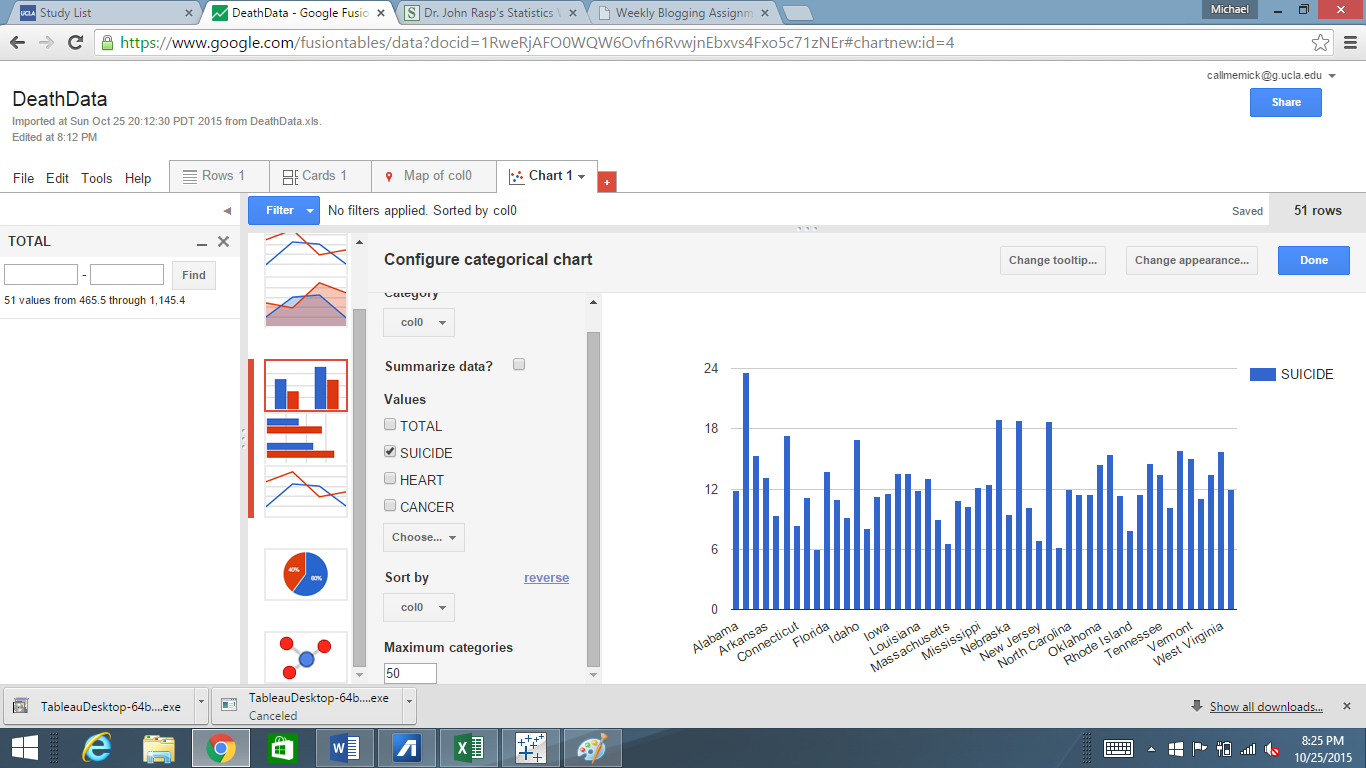
This week, I took the morbid route of examining the death rates that vary from state to state. Within each of these states, there are all various kinds of causes of death, such as stroke, car crashes, and heart failures. However, I was extremely interested in comparing the suicide rates side by side with one another that varies from state to state. The data that I received my information that I utilized can be found on http://www2.stetson.edu/~jrasp/data.htm. I decided to use the Google Fusion data visualization tool, as I feel that it does an excellent job of allowing the user to choose a way to visualize the data in order to show comparisons. I initially selected the data to be represented by a pie graph, but I felt like this was simply not sufficient in terms of grasping how the suicide rates differed from state to state. So I opted to visualize the data in the form of a bar graph which can be seen here:


Suicide Rates

One point of data that immediately sticks out like a sore thumb is Alabama. It seems absolutely wild that almost 25% of all of the deaths that occur in Alabama are due to a result of suicide. New Mexico, Nevada, and Montana are the next three states with the largest suicide rates, as they all amount to about 20% of all of the deaths there. This chart gives the user the unique ability to be able to be able to pinpoint the exact causes of death and be able to compare them to other states. This ability actually serves as a very useful function for those interested in solving these death problems. Take the way I chose to represent my data, for example. A field of psychologists now have the ability to see which states are in the most need of psychiatric treatment. They can ask, why exactly is it that Alabama has the highest rates of suicide, and what can we do to prevent it? If the data was left in the cluttered excel sheet it would be much more difficult to see the relational differences from state to state. I could have also went so many different routes with the google tools; for example, I could have decided to compare heart related deaths from state to state, and the bar chart would have immediately showed which states are in the most dire need of heart health education in as a preventative measure.

This same principle can be applied to any of the many causes of death that the data set records. By putting the data into a convenient bar graph health professionals can come to better understand which states we need to target and in these states which can kind of programs we need to enact in order to help people live a longer, fuller life. I never knew that by simply creating convenient visualizations of data, lives could possibly be saved.


-Michael Mathis, 10/25/2015

Blog #4 Poverty Dataset

Region 6

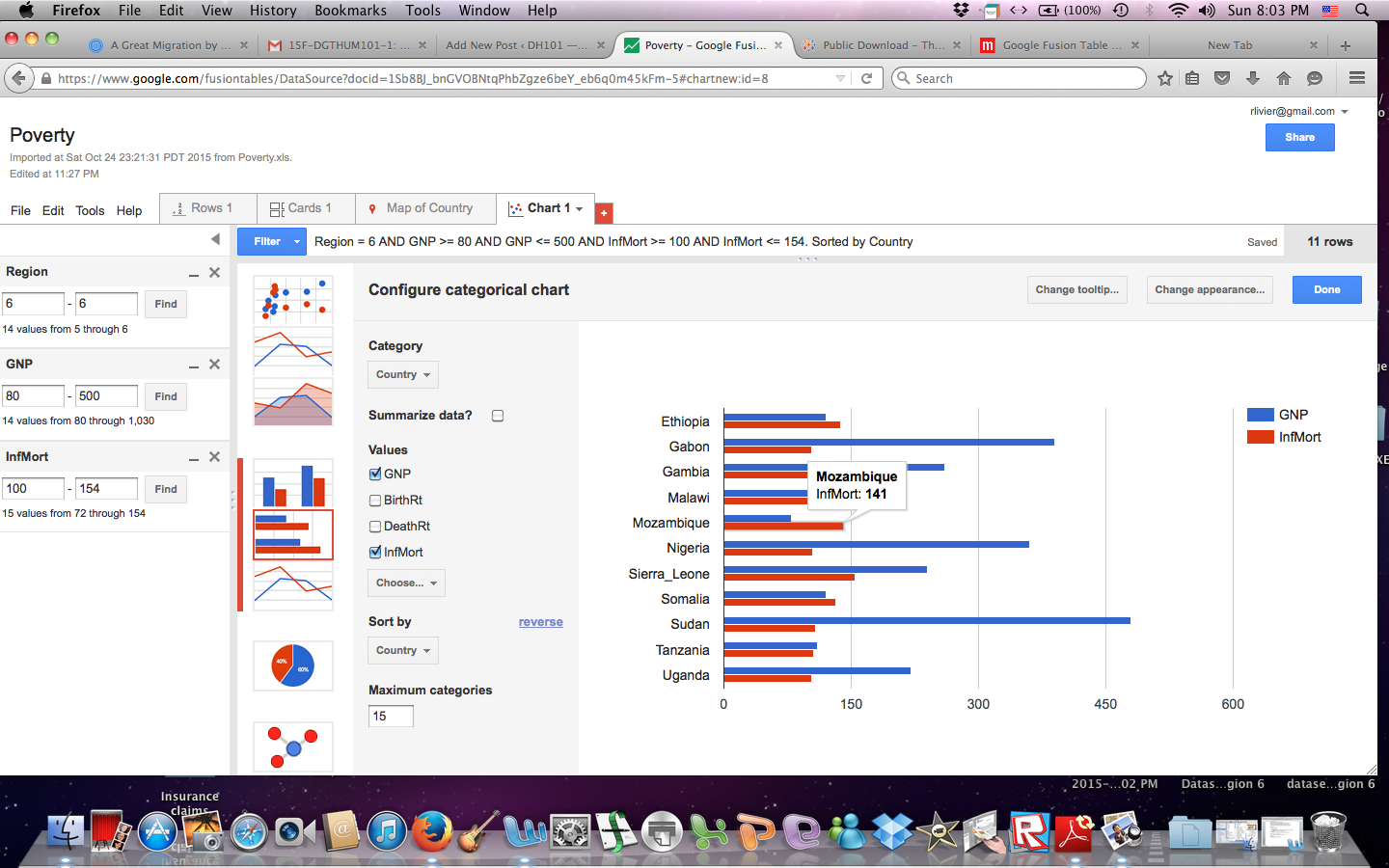
Visualizing the data immediately makes it more manageable. After trying a few different filters, I was able to see that the world’s region #6 (Africa) has the highest infant mortality rate. Then, I added the GNP filter to the same region and found that GNP does have a high correlation to the rate of infant mortality, but it is not exact. For example, Mozambique has the lowest GNP, but not the highest infant mortality rate. Sierra Leone has a higher GNP than Mozambique and a higher rate of infant mortality.

What this chart shows us is that although GNP and Infant Mortality Rates are directly proportional, there are other factors that come into play. I would want to know if this finding applies to other regions of the world.

Region 5

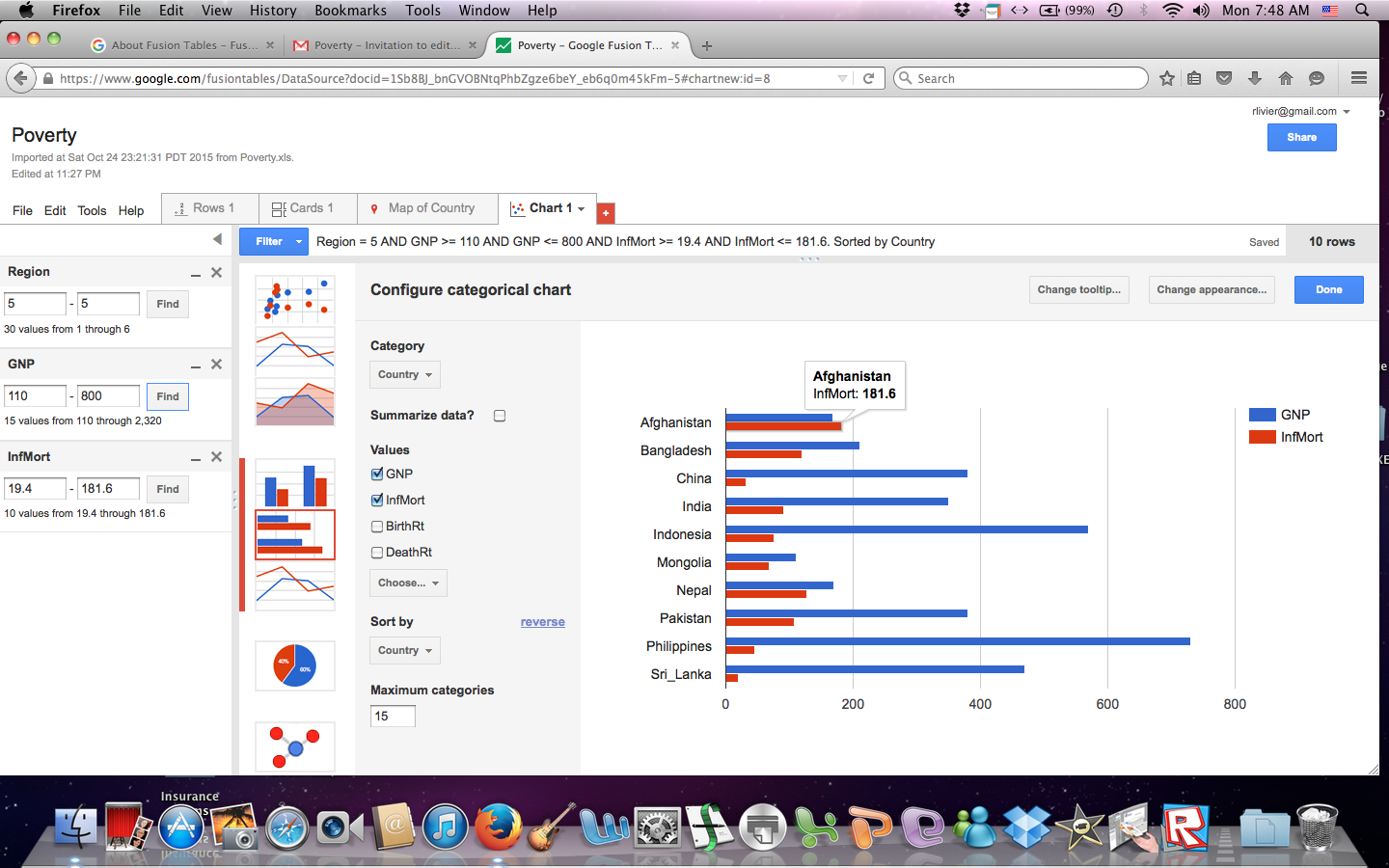
The above graph shows that the same pattern is true in region #5 where Afghanistan has a higher GNP than Mongolia yet it also has a higher Infant Mortality rate. Now I know that even though poverty is a high indicator of a country’s IMR, it isn’t the only factor.

Being able to visualize the data, I see nuances that were not apparent with just a table. It has opened up a series of other questions. Because of the conclusions drawn from these two charts, the question now is: What other factors contribute to a  country’s rate of infant mortality?  Is there a difference in education between these countries? What is the difference in their access to medicine? Does infrastructure play a role? Are there better roads to medical facilities in some countries verses others that may prevent timely access to medical help? Does one country lack clean water? Are there cultural differences that affect how a child is cleaned, nourished, and cared for in the first years of his or her life? Is one country at war while the other is at peace? Are both parents present? The answers to these questions can lead us to actionable solutions.

Organizing the GNP and Infant Mortality rate bars of the chart in different colors also helps us see and understand the relationship between the data more clearly. And, being able to chose the number of categories one wants to manage is also helpful. For example, even though I set my categories to fifteen, only eleven countries in region #6 fit into my predetermined filtered range.

Week 5 Blogpost

Death Rates from Heart Problems and Cancer

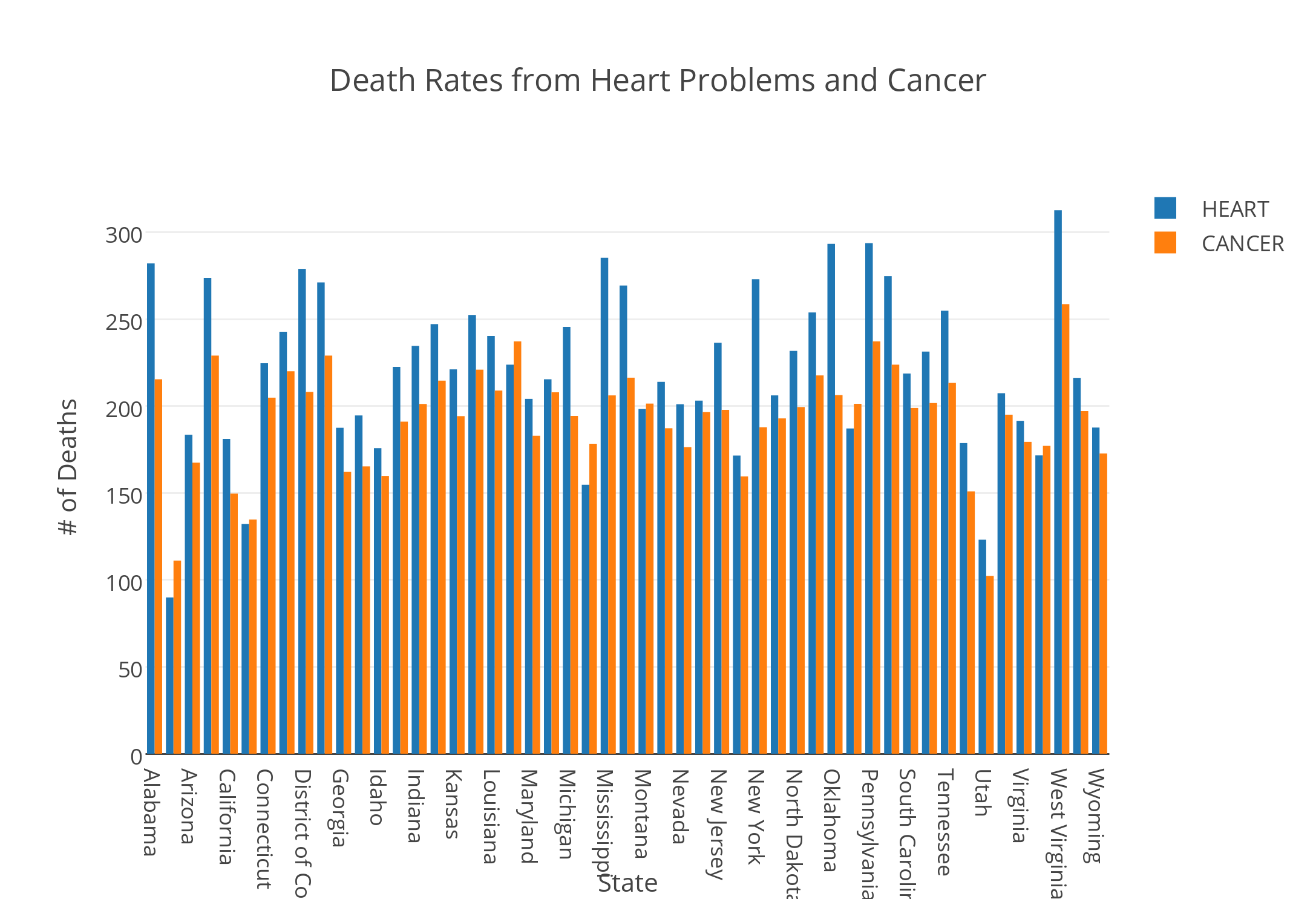
            The visualization tool I chose to use was Plotly. I created a double bar graph using the death rates data. The x-axis listed all of the states included in the data, and the y-axis contained values from 0 to 350 that represented the number of deaths in each state. Unfortunately, the year that this data was collected was not included in the file. I chose to represent the death rates caused by heart issues and cancer. By viewing these bars side by side, the user is able to discern a relationship or a potential correlation between the number of deaths caused by heart problems and cancer.

The juxtaposition of the two bars side by side reveal that spikes in the number of deaths caused by cancer were coupled with spikes in number of deaths caused by heart issues. States that exhibited these spikes included Alabama, Arkansas, Mississippi, Pennsylvania, and West Virginia. This bar graph could lead to more research in exploring the reasons for these spikes. I would assume that environmental factors coupled with lifestyle differences in these states led to these increases in heart conditions and cancer. However, I would need to conduct more research to confirm this.

Overall, the states have higher rates of death caused by heart conditions than deaths caused by cancer. There is one exception to this observation: Maine. Maine has a higher occurrence of cancer than heart issues. It would be interesting to explore this correlation. But, it is important to remember that these correlations do not imply causation. While a digital humanist can research factors in Maine that could lead to higher rates of cancer, these factors would not definitively provide a reason for the relationship of the data.

Despite this exception, there still seems to be a relationship between the number of deaths caused by heart problems and number of deaths caused by cancer. Both are proportionately increasing and decreasing across states. To further explore this relationship, one could research what similarities and differences persist across the states that could have caused these related fluctuations.

Ultimately, this data visualization tool revealed a relationship between the categories I plotted on the y-axis. In this way, it created new research questions and opened doors to discover more about the states themselves. Data visualization enables the researcher to view the data from a different perspective. This lens can enrich the conclusions that the researcher arrive at and answer questions that the data alone was not able to answer.

Older posts Newer posts

© 2026 DH101

Theme by Anders NorenUp ↑