Class Blog

Moma Data Visualization

For our group, we were given the data sets that correspond to MoMa’s collection of artworks. The data includes the artists name, artwork, the age of the artist, the gender of the artists and the nationality of the artist listed. One of our groups main focus points is to explore the relationship between the artists gender and the time period in which they were working. I chose to use Google Fusion Tables to create a data visualization describing this discretion between male and female artists. I used a bar chart to represent this data, showing how there was a total of 1,635.369 female artists working in the 1930’s that are present within the collection. In opposition to a total of 3,612.951 males within the collection.

data-visualization

As you can see by the alluvial graph there is a a large gap between the male artists kept in the collection and the female artists obtained. Not only can we see a disproportionate difference between male and female artists in the collection, but we can see that there is a higher concentration of women artists working in the late 90’s than any other period. Furthermore, we see instances where gender is unclassifiable due to collaboration.

This data visualization allows a more direct visual understanding of the data represented within the spread sheets. We are able to see a physical transition throughout 1943 to 2012 as to the gender of artists collected. With this information we are able to infer our own ideas about what this information can mean. Without a visually intuitive framework, such hypothesis would be difficult to draw.

Data Viz

I used the data set that my group was given for this blog post. I believed that by doing this, I would better familiarize myself with the data set and it would allow for a better understanding of how to work with the data itself. Due to the data set of the New York tenements, the options for data visualization were very limited as the data types consisted of static records, for the most part, when it came to the categorization of dates assigned to the photographs, which volume the images are collected in, where the image came from. The variables within the record set were the description of the item and the URL link to the image itself. I uploaded the data into a Fusion Table first and found that the visualization was messy and did not allow for a deeper understanding of the values. After uploading the data to Tableau, Palladio, Plotly, and RAW with no success,  I uploaded that data to Wordly, which actually did work. I only used the “description” column of the data set which contained the locations of the photographs. From here I learned that the largest concentrations of photographs were taken in Manhattan and Brooklyn. This is very important to know because I may be able to adjust my research question to better reflect these two specific cities in New York. Seeing the visualizations of location really helped me to understand where each photograph was taken and I can now consider how to compose a humanities research question based on location. In order to work further with the data, it is very important to clean the data table itself especially in the “description” column. It would be very useful to split the information provided in terms of city (Manhattan, Brooklyn, Bronx), specific types of housing (row houses, apartments, tenements) and if it’s either labeled as a interior or exterior image.

wordle

Week 5 Post–Pollution

This week I looked at the Pollution dataset that contains the air quality measurements on 41 U.S. cities, and this data is from “A Handbook of Small Data Sets”. For each city there is information on their SO2 levels, sulfur dioxide (a toxic gas in the atmosphere), population, temperature, wind, precipitation-in, and precipitation-day. I chose to focus on the SO2 levels, the population, and average temperature in the first 12 cities based on population.

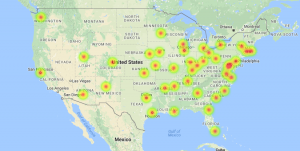
I used the Google Fusion Table to see the map of the city locations. As you can see, this visualization tool allows one to see the heat map of the city indicating the strength of the SO2 screen-shot-2016-10-24-at-11-05-31-am and temperature. The map allows the data to be visualized for an easier time identifying which cities were studied and where the SO2 and population levels are highest.

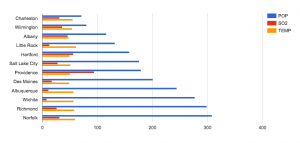
To get a more accurate, slightly less visual, idea of the data, I have the top 12 cities based on population (starting from lowest population). The blue line indicates the population, the red line measures the SO2 levels in that city, and the orange line indicates the average temperature. Although there are other variables in this dataset, I chose these particular variables to see if there was a causation of SO2 levels from increasingly populated cities. This data visualization answers this for us is screen-shot-2016-10-24-at-11-16-10-amthat the cities with higher populations does not necessarily have higher SO2 levels. I also included the temperature variable to show a data that is nearly stable throughout the whole data set. Ultimately we can see that having a large population is not direct causation of high SO2 levels. As a result, we raise more questions as to whether the SO2 levels has an effect on any changes of temperature, which we can find out if we compare and contrast this data with previous years’.


When I first set out to do this simple data visualization, I was expecting to see at least a correlation with high population and high SO2 levels. Of course, some cities like Chicago have high population and SO2 levels, but this is not the general trend. In order to determine the cause of SO2 levels, there needs to be much more data available to include as a variable. For example, state regulation on SO2 production may vary from state to state (it is used in winemaking, as a preservative, reducing agent, etc.)

In the end, it was great to use a simple visualization tool like Google Fusion Table to quickly see data in a map and chart. One can immediately start asking questions and notice major points from the data. Used more extensively, and in an advance visualization tool, one can definitely answer more difficult questions about the atmosphere in U.S. cities.


Homicide in America – Blog Post

This week, I decided to create data visualizations for the data set “DeathData.” Perhaps it was the girl in me that loves CSI and Dateline that drew me to this dataset, or maybe just simply an innate morbidity.  Either way, I was fascinated by the many causes of death listed and what it would say about the states and DC, and I knew that data visualization would be the best way to pull those narratives out of the numbers.

Because this data is listed in categories, I knew the best method of presentation for the data would be by bar chart, which, luckily, most data visualization tools can be used for.  I started with Tableau, which allowed me to make a bar chart rather easily, but I was surprised when it made my state’s bars different colors.  As Nathan Yau tells us, color is very important.  The color hue provides context, so if it is darker, our minds assume one thing, and if lighter, we assume the opposite.  I knew I wanted my data visualization to present the same data in the same darker color, so as to make it clear that we are only talking about one form of death and that the states are directly comparable.  Instead, I chose to use Google Fusion Tables, which allowed me to easily create my bar charts and directly compare causes of death with each other and the total death rate.

The first bar chart I made was in relation to homicide, which, as I said, was likely because I have always loved crime shows.

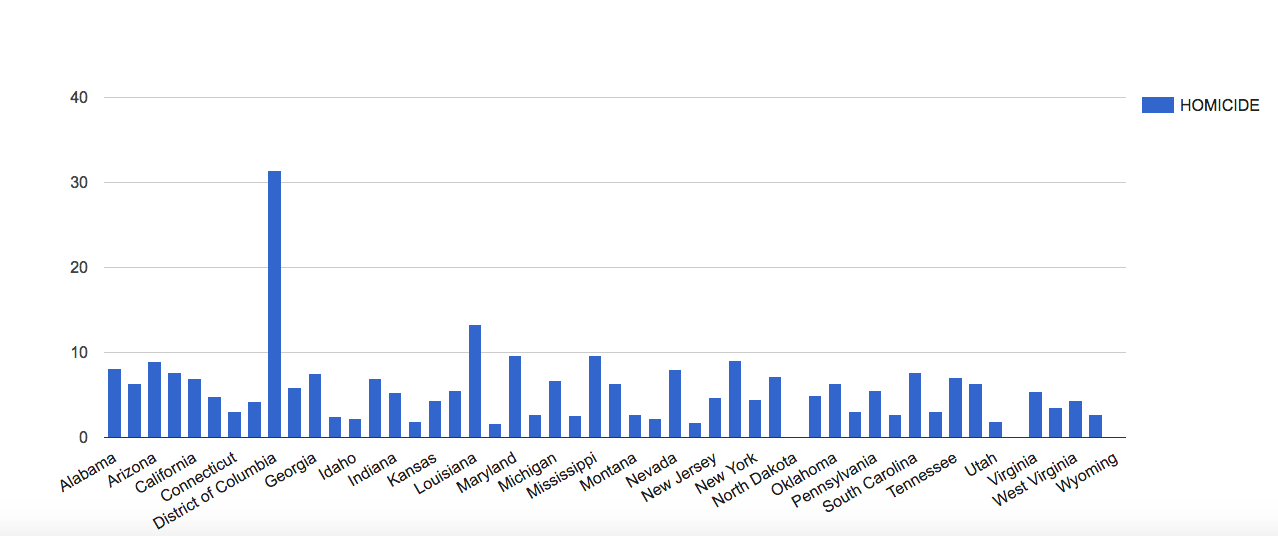
screen-shot-2016-10-24-at-11-29-41-am

Now, as you can see, there is one major outlier in the data, and that outlier is the District of Columbia, our nation’s capital.  This tells us that in DC, more than any other part of the US, there is a higher rate of homicide.  This could be because DC is a city, and cities tend to have a concentrated amount of crime, but there could be other factors at play that would require more research.  All I know is that my first assumption is that Frank Underwood has been up to something.

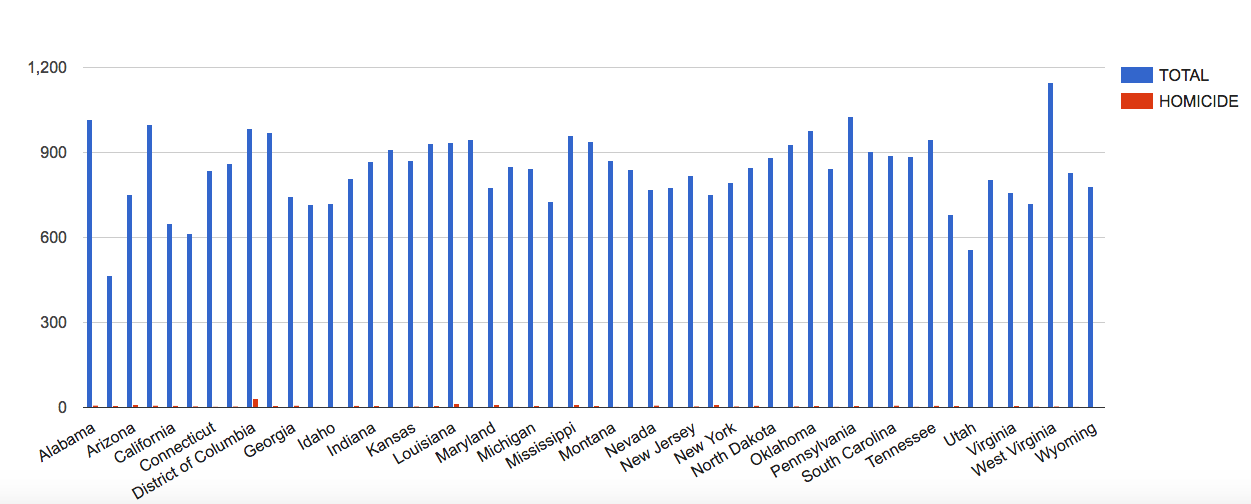
In order to look at this data in context, I compared the homicide rates to the total death rates.

screen-shot-2016-10-24-at-11-40-34-am

As you can see, homicide is not a major cause of death generally, but it is still a noticeable cause of death for DC.  This context is important, because if someone solely looked at the homicide death rates, as happens with the news, they might’ve assumed that homicide is a more major problem in America, and they would’ve never wanted to visit our nation’s capital.

It is important, when dealing with data visualizations, to not only look at one small aspect of the data and be done with it, but to also attempt to answer questions or concerns with the data through further visualization.  One data visualization doesn’t always tell the full story, but it does raise important questions about the status of what you’re analyzing and it offers new questions and narratives to be pulled from the data.


Post-World War II Election Data

For my blog post this week, I decided to examine the dataset that contained the presidential election voting results by party. This dataset includes the voting results from every post-World War II presidential election. The data is categorized by votes per party and votes per candidate. I thought that using this method for data visualization would show the voting trends by party lines over the course of seventy years better than any other form. This representation of the data allows the viewer to see how events in American history and reactions to certain presidencies changes overall voting.

From the data presented in this dataset, many correlations can be found between historical events and voting results and many trends can be viewed about the change in voting over time. There are many ways this dataset can be visualized due to the vast array of information presented. One can organize the data by republican candidate, democratic candidate, incumbent candidate, democratic total vote, republican total vote, or total vote. By having such a large list of categories to choose from, one can find many correlations of voting trends and habits based on different criteria.

One of the most evident trends that can be seen over time is the increase in voting as a nation. Many assumptions can be made about this increase in overall voting. One could postulate that this trend is solely due to the increasing population of America and the Baby Boom Era of the 1940s-1960s. If more data was presented along with this dataset such as economic details of the country or approval ratings of presidents, assumptions along the lines of an increasing national debt causing the general public to be more involved or a disdain for a certain president and want to change party could be posited.

screen-shot-2016-10-23-at-5-09-16-pmOther interesting trends can be seen when showing the total party vote for a certain candidate in a certain election. These trends can be used to show what attributes in a candidate are more effective when running for president and which ones are more deleterious. It can also show the margins by which a presidency was won and to what extent overall voter turnout had an effect on the outcome of the election.
screen-shot-2016-10-24-at-10-57-37-am
screen-shot-2016-10-24-at-10-58-03-amOverall, the vast amount of data that is presented by this data set allows the viewer to manipulate it in many different ways and achieve various outputs. This data allows the viewer to make many connections and even more assumptions about presidential voting in America. However, this dataset could be improved by the addition of a qualitative element to show historical events or controversial bills that presidents passed along with more quantitative elements such as approval ratings and economic descriptions of the eras. These would allow more concrete postulations to be made about the data

EconData: Post WWII US Election Years

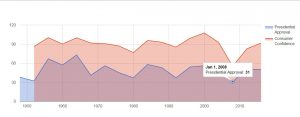
The EconData.XLS dataset includes the unemployment and inflation rate, as well as presidential approval (sourced from Gallup Poll) and consumer confidence (sourced from University of Michigan) ratings in post WWII election years (1948-2016).  This dataset follows a sequence of time, or a “time series”, so that once it was imported into Google Fusion Tables, the data was easily read, as Nathan Yau would predict, into the different “continuous variable “charts with the x-axis labeled as “year”, or post WWII years.econdata3

Time series data and analysis is typically used to extract hopefully meaningful connections or correlations between variables in the ways that they pool across time. In the continuous variable chart above, which plots presidential approval and consumer confidence ratings from 1948 to 2016, we can infer a few things fairly quickly that we may have struggled to read in the data alone:  one, that there is consistent positive correlation (points move in same direction rather than opposite) between the two polls, and two, we can much more easily identify those years when polls suggested that presidential approval and consumer confidence were at their lowest, namely, in 1952, and in 2008.

From these visualizations, we can locate those datapoints that may offer a window into a deeper understanding of the data. In the case of the exceptionally low rates in confidence and approval of the incumbent president in years 1952 and 2008, we may want to dig for how during each of these years, the data supports or contradicts election voter polls, upholds or opposes ideological norms of the time, and potentially what similarities or interesting contrasts there may be between the two election periods.
econdata2

Another useful way to look at the data could be through bar or categorical charts. In the chart above, I’ve filtered the categories down to unemployment and inflation, leaving the  x-axis as “year”. In this kind of chart, we get fairly clear comparative visualizations, both for when the relationship of unemployment rates to inflation rate changed dramatically, and when and for how long the change was gradual. Such visualizations might shift our focus towards such dramatic increase or decrease as when 1980 hits and inflation drops heavily from higher to lower than unemployment, and employment rises from lower to higher than inflation.

Week 4: Data Visualization of Stock Market Indexes

The dataset I worked on is the statistics of the Dow-Jones and S&P 500 stock market indexes from 1991 to 2011 based on Yahoo! Finance’s historical stock quotations page. The stock market indexes have been widely used as an indicator of the growth of the economy or the stability of the financial market. As their data is often used by investors to determine the optimal time for investment, the following data visualization is created in accordance with the visualization principles listed in Data Points.

screen-shot-2016-10-23-at-10-00-31-pmThe Cartesian coordinate system, with time on the x-axis and the values of the two indexes on the y-axis, creates the framework of observing the fluctuations of the stock market throughout time. In this framework, investors can easily pinpoint the rising or the dropping points of the stock market and therefore induct the factors that caused the stock indexes to fluctuate. For the same reason, direction is used as the visual cue so that investors can easily see the boom or bust periods of the stock market from the slope of the plots. The context of the visualization can be easily clarified with the title “Stock Market Indexes from 1991 to 2011”.

It is interesting to note that the scales of the two stock market indexes differ. While the the values of the Dow-Jones Index range from 2,700 to 12,000, the counterparts of the S&P 500 are between 300 and 1,300. Therefore, it is important to use the log scale on the y-axis (increments by a factor of 10) so that the fluctuations within the two indexes can be relatively comparable on the same graph.

The visualized data shows an incredible parallel between the two stock market indexes as one can easily observe that the two lines follow the same trend of fluctuations throughout time. One cannot see the correlation clearly just by looking at the data itself without continuously punching numbers into a calculator. Therefore, visualizing data can have the advantage of demonstrating the correlation within data without one diving deep into it.

Blog 4: Poverty statistics

For this week, I decided to work with this dataset regarding poverty statistics from 97 countries. Data types associated with this dataset include birth rates, death rates, infant mortality rates, life expectancies, and per capita GDP.

 screen-shot-2016-10-23-at-7-34-51-pm

First glance at the data, once I sorted it by GDP, it becomes obvious that countries that have high GDP per capita do well in most datatypes such as dead rates, infant mortality rates, and life expectancies. However, I wanted to see the data visualization in order to confirm what I hypothesized while looking at raw data.

screen-shot-2016-10-23-at-8-21-58-pm

This chart, which is sorted by GDP, shows that the life expectancy for both males and females increases as the GDP increases. This clearly illustrates that those living in countries where the average income per person is higher tents to live longer. You can tell by the cluster of condensed lines, that it is more concentrated and severe for those living in countries with the lowest GDP where the lowest life expectancy is 38.1 years. Meanwhile, the highest life expectancy reaches 80 years. That is a huge discrepancy and horrifying to visually be able to see that some people are living less than half as long as others due to their income. Consequently, the death rate is also very high (25%) in countries with the lower GDP per capita compared to wealthier countries (9.5%). The yellow line, however, suggests that these low income countries are having more children as their birth rate is extremely high. To understand this, I created a variable chart comparing the infant mortality rate with the birth rate.

screen-shot-2016-10-23-at-8-45-10-pm This shows that the countries with the highest birth rates are also the countries with the highest infant mortality rate. It becomes obvious that families in poor countries are having more children because they’re experiencing far more child deaths than wealthy countries.

After looking at this dataset, it becomes obvious that having more money literally means you get to live more than twice as long as those with little or no money. It also means that you are far less likely to experience the death of your newborn.

screen-shot-2016-10-23-at-8-54-18-pm

This chart visualizes the obvious; if a country has a higher death rate, it also has a lower life expectancy. As the the death rate decreases, the life expectancy increases. These visualizations are able to clearly show the power of money and its affect on life. It is harder to see this from the data itself, but these visualizations make it incredibly clear.

Week 5 Blog Post: Marvel

screen-shot-2016-10-28-at-12-25-11-pm

If you can’t see the visualization, here is the link

My visualization today is a network graph that shows the alignment of characters in the Marvel Universe. The Marvel data I used to make this visualization categorizes characters into four categories: Good Characters, Bad Characters, Neutral Characters, and [No Alignment] (aka the box was left blank). It is a simple network visualization, as the nodes cluster around only four different labels, with no connections between the clusters (therefore, it is not a bipartite network). For the purpose of this analysis, I’m going to be ignoring the [No Alignment] cluster, since my group still needs to find out why there was no alignment assigned to them.

From this data set, it is easy to see that Marvel definitively divides characters into Good/Bad/Neutral, with no overlap occurring. The same can be said for the partner DC data we were given, and is not a surprise considering that is what is most easily marketed to a vast array of audiences. Since they are all isolated into singular clusters, with no edges connecting to more than one vertice, it is very clear that the characters are presented by Marvel as only having one possible attribute. However, this leaves out a lot to the viewers, especially those who are not die-hard fans of the company.  We are given no reasons why particular characters have the alignments they do, and whether or not those alignments have been consistent. Some questions that had come up when looking at this data visualization were “Are their alignments static? When were these recorded?”, as there is no way to tell until we look further into this dataset and the history behind it.

To put it a little in perspective, when running the DC Comics data (formatted exactly the same as the Marvel data), you see a node pop up that says “Reformed Criminals”. I’ve inserted a screenshot below:

screen-shot-2016-10-23-at-9-20-14-pm

Therefore, one questions whether or not Marvel has those types of characters present in their universe at all, or if their characters, once typecast, are then forever labelled and characterized as good, evil, or neutral.

The reason why I chose to use a network diagram for my visualization is to show that these edges are clustered into isolated nodes, and that even Bad Characters, who made the transition into Good Characters, get isolated under the term of “Reformed Criminals”. Maybe, for the sake of having cleaner, more understandable data, they have been put into these binary-type labels, as a spectrum of labels would make it more difficult to draw meaningful conclusions from. Having a spectrum of labels, although it makes the narrative of the individual clearer, does tend to obscure the overall narrative of the collective data.

Best City in Florida – Blog Post 4

The “Best City in Florida” data provides 13 “quality-of-life variables” for 20 cities in Florida, including income, commute, job growth, physicians, murder rate, rape rate, golf, restaurants, housing, median age, literacy, household income, and recreation. No data type specifies the unit it uses, and while I can assume that income is measured in dollars per year, I am less certain about data types like recreation—does this refer to the number of recreational facilities in each city? In this case, some metadata would be helpful.

In spite of my uncertainty about some of the data types, I created several data visualizations using Google Fusion Tables. I found that bar charts were the most direct way to visualize the data (since I had a relatively large number of data sets, I chose the bar chart over the bar column chart). A scatter chart would have also been effective, but I found it more difficult to keep track of data points and to compare different data types in this format. Since I did not observe any change over time reflected in the data, I did not use a line chart.

As an experiment, I began by creating a bar chart that included every data type. The city “names,” designated by the letters A-T, appear on the x-axis, while the measurement for each data type appears on the y-axis. As you can see, the resulting bar chart is flawed in several ways:screen-shot-2016-10-23-at-5-19-00-pm
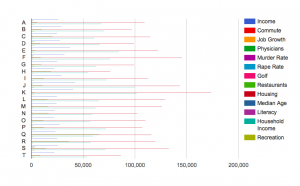
First, the bar chart appears very crowded. It is difficult to interpret all the data at the same time, and thus to effectively compare them. Also, the units of measurement differ for each data type, which also complicates comparison—average housing prices may seem extremely high in comparison to number of restaurants, but it is not necessarily relevant or helpful to compare these things. Finally, the scale differs for each data type, rendering some bars scarcely visible. Because housing prices are so much larger than murder rates, the latter data type appears tiny on the bar chart, when in reality murder rate has a large influence in a much different way than a housing price. While it is interesting to view all the data in one visualization, it is hardly more illuminating than viewing the data in Excel.

At this point, I started to create bar charts incorporating only a few data types. I realized that it was most effective to compare data types with the same units of measurement, or at least those with similar scales. For instance, since the numbers of golf courses and recreation facilities, respectively, are on a similar scale, a bar chart comparing them is easier to interpret than my first bar chart. best-city-in-florida-recreation-and-golf
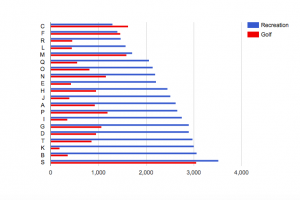
It becomes clear that, in general, there are more recreation facilities than golf courses, and that the number of golf courses seems to vary more from city to city than does the number of recreation facilities. However, despite the similarity of units and scale in these data types, comparing them does not necessarily illuminate anything significant about relative quality of life in each city. The fact that one city may have significantly more recreation facilities than golf courses may not affect every city resident equally, or even factor into quality of life much at all.

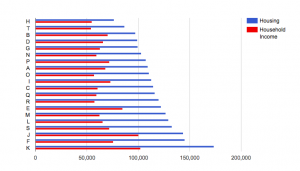
It is only when you can see a correlation between variations in each data type that comparing data begins to illuminate something about quality of life. In comparing housing prices to household incomes, I adhere to my notion that the units and scales of each data type should be similar while also tracing a thematic similarity between the two data types. For instance, I would expect household income to generally increase with housing prices in each city. Yet the bar chart reveals that this is not always the case:
screen-shot-2016-10-23-at-5-15-41-pm

While the city with the highest housing price has a greater household income than the city with the lowest housing price, this is not the result of a consistent trend. As a result, I am able to conclude that while overall quality of life may not be lower where there is a greater disparity between household income and housing price, another factor (for instance, a lower murder rate) may have to improve quality of life in order to compensate for this discrepancy.

Finally, it is probably simpler to view a data visualization that features only one data type. Separating household income and housing price into separate bar charts allows you to notice differences within one particular data type, allowing for a more in-depth understanding of each. However, while the bar chart with two data types is perhaps more difficult to interpret, it allows for more direct comparison of each than if I were to simply compare two different bar charts.

Since I am new to creating data visualizations, I was a little confused by the data summarization function. Though the tutorial recommended using it, the “summarize data” button did not seem to make any difference in how the data appeared on the charts, other than requiring me to specify minimum, maximum, average, or sum for each value.  I am wondering if summarization makes more of a difference with more complicated datasets, or if I am just missing something.