Course blog

W7 – Mapping Twitter Data

I have always been fascinated with web mapping, so this week’s readings were particularly interesting. I really enjoyed the presentation of Alan McConchie and Beth Schechter’s, “Anatomy of a Web Map.” It’s interesting to see the progression of web maps from static images to interactive tile-based layers to multi-level data-driven interfaces for exploring the world. I have seen maps load tiles before, but I was surprised to learn that these are raster images. I had always assumed maps used vector tiles for scalability. I was also impressed by the amount of free and open source tools, libraries, and Application Programming Interfaces (APIs) available. The level of customization achieved through Stamen and TileMill is incredible. My favorite custom tile sets include “Ísland” by Konstantin Käfer, “Shadow Play” by Tom MacWright, and “Baltimore Retro” by Mapbox. I would love to build a custom tile set if I had the time and resources.

This week’s readings also appealed to me because I am building a custom map for my group’s final project. My first mapping idea for our topic, Food Trucks of LA, involved GPS tracking devices on food trucks. However, GPS devices are too expensive to supply each truck with their own device and there is little value in tracking only one or two at a time. Although most food trucks have regular schedules, they communicate their location to followers via social media (primarily twitter). The various Twitter APIs are free to use and well documented, so some kind of Twitter-Google Maps mashup seemed appropriate for our small budget project. I couldn’t find any mapping tools online that supported twitter data, so I asked Miriam. She recommended I speak with Yoh Kawano, campus GIS coordinator and member of the Digital Humanities Collaborative at UCLA. Yoh’s project “Mapping Twitter” ( http://gis.ats.ucla.edu/sandbox/maptwitter/ ) was very close to how I had envisioned my food truck map to work. It displays the “what and where” of Twitter via Google Maps API and real-time Twitter data. After meeting with Yoh, he agreed to help me make my map and graciously offered to share his code with me. The main difference between our maps is how the twitter search function works. Yoh’s site uses keywords to search all tweets within a user-defined radius while my data is restricted to only the most recent tweets from a list of popular food trucks in LA. Yoh’s code includes custom JavaScript functions that parse and display the JSONs (JavaScript Object Notation) returned by PHP (PHP: Hypertext Preprocessor) queries to Twitter. I have been tweaking Yoh’s user search function to display the location of each food truck tweet. The biggest challenge so far is that less than 1% of all tweets are made on geo-enabled devices. An even smaller portion of these geo-tagged tweets is made from the trucks’ actual location and not in-route. Further testing is needed to assess the feasibility of using geo.coords to track the locations of food trucks in LA.


Google Maps Mashups

In “The Introduction to Web Mapping”, Jim Detwiler provides a history of web mapping,  how it evolved throughout the years, and  also provides details of each category of web maps. By doing so, Detwiler’s ultimate goal is to teach others how to build mapping mashups which initiated once Google took advantage of the new technology Ajax in order to launch Google Maps. It was really interesting to read about how Google Maps came about because it is such a popular and useful tool that is integrated into the most widely used search engine. Through Google Maps, hackers were then able to figure out how to layer other useful information on top of the maps. This practice, which Detwiler calls “mashup”, caused an explosion of custom mapping applications. This knowledge sparked my curiosity as I wondered about all the different possibilities and ideas that can go into using maps to serve various services and not just to use them to figure out where to go.

If you visit http://taxiwiz.com/?lang=en, you can figure out how much a taxi ride is going to cost by plotting your route from “A” to “B”. I thought that this was really cool because transportation is a big issue these days especially in big cities like Los Angeles, New York, and San Francisco. Moreover, there are many smartphone apps that you can use to call cabs over to pick you up such as Uber so TaxiWiz can potentially be of great use because we can figure out if our trip to our destination is worth the price.

taxiwiz

After doing a search of google map mashups, I was able to see so many different ideas that people came up that utilized maps to serve many different functions. One example was HousingMaps, which popularized the idea that apartment or house finding was best done through online maps. HousingingMaps, layered open apartments and houses on a map of U.S. cities for searchers to browse easily. Craigslist took this idea and implemented their own version and popularized it as a result. Another mashup that I found to be interesting was Pothole Season. This map shows you where all the potholes are for certain cities or areas and also provides driving directions so that you can avoid them. Users can report the location of unmapped potholes. Pothole Season is also available as a smartphone app. This app would be especially useful for motorcyclists and people who ride scooters because potholes can be devastating to their vehicles.


Web Mapping In Politics

Screen Shot 2014-11-17 at 11.17.51 AM
CNN.com

Ever since I can remember, local and national political election results have always been represented, in some way, through maps. It’s one of the more common ways media has been able to convey information to its viewers. Of course, the data represented in these maps can often be inaccurate, which is something we discussed in past lectures. Though I do not want to focus my post on this particular aspect, it’s just goes to show how powerful data visualizations used in media can easily reach the masses and relay incorrect information.

I definitely developed an interest in politics at an early age, and always watched election results on TV while at home. Now that the internet has become my generation’s more common way of accessing information, media outlets have shifted and included more of this access to election results online. The internet is how I now keep up with election results, simply because I don’t have a TV with me here at college.

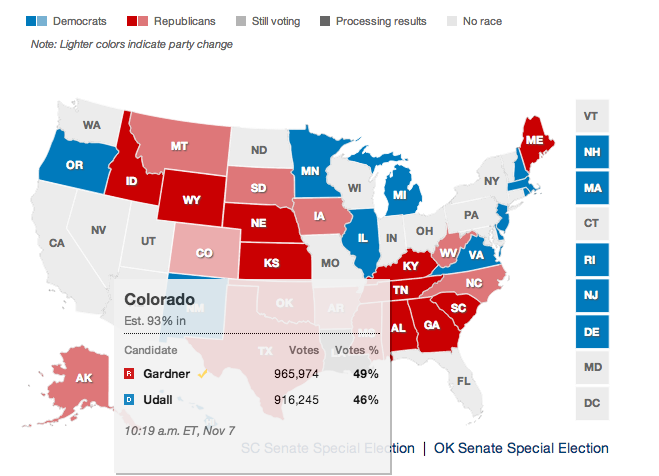
Maps, in my opinion, are one of the best visualizations for elections. I think it would be odd to show results without the classic outlined map of the United States with each state turning red or blue as results are confirmed. There’s some sort of novelty in that. Because I had work during the recent 2014 Midterm Elections, I went online to check results. From CNN to the LA Times, it seems like every news outlet used “maps” in some way or another to relay election results.

Interactive: When I hovered over Colorado CNN.com
Interactive: When I hovered over Colorado
CNN.com
How LA Voted In the recent 2014 Midterm Elections Interactive Map LAtimes.com
How Counties Voted Interactive Map
LAtimes.com

And I noticed something very important about these map visualization: the election map results I often saw on TV were also being included on websites, and in an even better way. It allowed me to access all the information (e.g. election result numbers) for the particular states or counties I cared about. Interactive continent maps allowed for the user to personalize his/her experience while using the map, versus a television with a reporter looking at specific areas that a viewer might not care about as much.

It’s very interesting to see how important web mapping has played in the history of politics and how it has affected how viewers expect to see results shown. For me, it’s just not right to not include a map visualization. There’s some part of me that enjoys seeing whether not this swing state will go red or blue this time. And honestly, it’s a little bit odd to think about elections in that way.

Sources:

https://www.e-education.psu.edu/geog863/book/export/html/1904

http://www.cnn.com/election/2014/results/race/senate

http://graphics.latimes.com/2014-election-supe-3-precincts-map/

Web Mapping Technologies

bigmap1

Throughout history maps have been an integral part of society. It is an innate aspect of human nature to want to document the world around you—to make life easier to navigate and explore. Obviously, since digital technology didn’t exist back in 600 BCE. the earliest world maps were paper maps. These early maps were hand crafted as opposed to digitally created maps we have today. The vast advances in technology today allow us to create extremely detailed and informative web maps. Once the Internet was created, using the Internet to publish maps has become very advantageous. According to Jim Detwiler, in his article “Introduction to Web Mapping,” “Among these advantages [of mapping on the Internet] are that they are usually cheaper and less time-intensive to produce, easier to distribute to a wide audience and easier to update and maintain… they allow for the possibility of interactivity…and connections to related information though hyperlinks.” Maybe most importantly, as stated by Detwiler, “One could also argue that Internet-based maps have increased public awareness and demand for maps.” This increased exposure to maps, because of access to the Internet, has led many innovative minds to create new apps, programs, and advanced technologies, which benefit our inventive, resourceful, mechanized society.

google-earth-update

Because of innovative mapping technologies, today we have apps like Google Earth, Google Maps, and Waze. Google Earth is an advanced mapping tool that “is a virtual globe, map and geographical information…It maps the Earth by the superimposition of images obtained from satellite imagery, aerial photography and geographic information system (GIS) 3D globe” (Wikipedia). One of its most interesting and useful features is that it “displays satellite images of varying resolution of the Earth’s surface, allowing users to see things like cities and houses looking perpendicularly down or at a bird’s eye view.”

google-maps-ios-handson-2

Google Maps is a service that I personally use almost every day. As many know, it is a “desktop and mobile web mapping service application and technology provided by Google, offering satellite imagery, street maps, and Street View perspectives, as well as functions such as a route planner for traveling by foot, car, bicycle (beta test), or with public transportation” (Wikipedia). This application is extremely useful for me personally, since I am not from Los Angeles and when I need to go somewhere I’ve never been before it provides me with a route for car, bus, or foot.

la-fi-tn-why-new-waze-feature-helps-google-map-001

Waze is an app that is extremely useful in cities with high traffic density, like here in Los Angeles. Waze, according to their website, works by “after typing in their destination address, users…drive with the app open on their phone to passively contribute traffic and other road data,” which then provides users with new routes to avoid traffic, police traps, etc. These three apps, along with the multitude of others are prime examples of the impact of web mapping.

Works Cited:

http://en.wikipedia.org/wiki/Google_Earth

http://en.wikipedia.org/wiki/Google_Maps

https://www.waze.com/about

Week 7: My House Could Have Burned Down (Again), and I Wouldn’t Have Even Known It!

Near the end of summer vacation, before I arrived back at UCLA for the start of the fall quarter, I was spending some time at home with my parents. It was probably about three or four in the afternoon, when my dad stepped outside on our patio to start grilling his dinner. Suddenly a very familiar smell flooded our living room—it smelled like a fire.

For those of you who have never experienced a summer wildfire first hand, its smell is very distinct. It’s different from a campfire or a fireplace in the winter. I stepped outside and saw bits of ash reigning down as Cal Fire planes started to fly by overhead and breathed in the heavy, hot air.

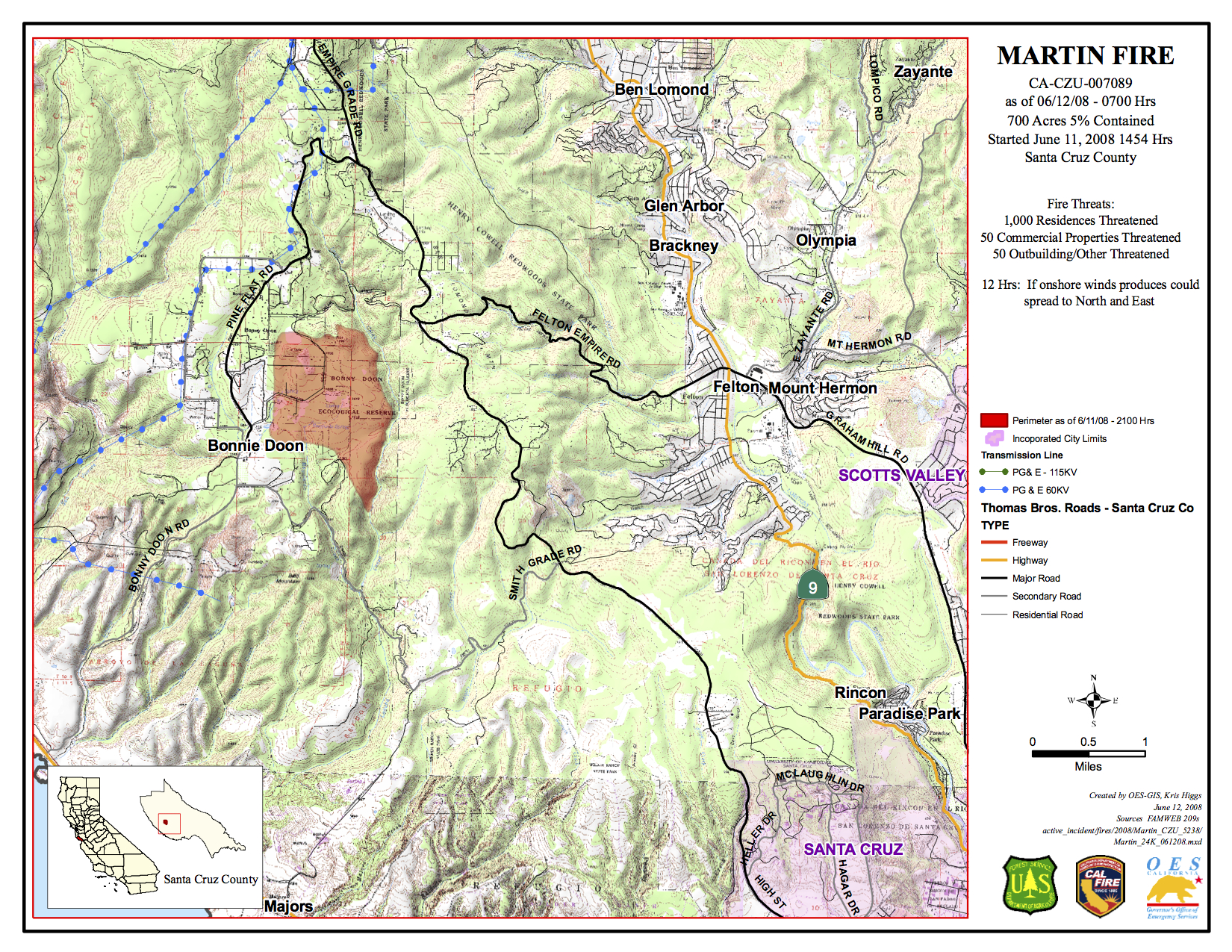
This scene was all-to-familiar to me, because in 2008 my house actually did burn down because of the Martin Fire (named after the road I live on). My house is situated up in the mountains, about a 20-minute drive from UCSC in Santa Cruz, California.

incidentfile273_534
2008 Martin Fire summary downloaded from Cal Fire’s archived fire database.

The reason I’m bringing all this up in this week’s posting is because the very first thing I did after I realized what might be going on was jump on Cal Fire’s Incident Information page in order to view their California Statewide Fire Map. In his article regarding the history and basics of web mapping, Jim Detwiler explains how dynamically-created web maps “are generated on the fly when the user loads the associated web page.” Cal Fire’s incident map should be considered a dynamic map because of the “real-time” updates it provides its viewers about fires currently burning in the state of California.

However, back in September when I was hurriedly searching their page to find information about a fire that was clearly happening only a few miles away from me at most, I found nothing about it. This is an interesting example about how in many ways, the data presented on dynamic maps or other online information repositories should perhaps be approached from more often a more “digitally humanistic” vantage point of awareness and interpretation. Just because a visualization is put up online and supported by a government website does not give it total authority or accuracy.

Because we couldn’t find any news at the time online, my parents decided to drive down the street and see if they could find any information about what was happening. About half an hour later they returned and told me that there was an electrical shortage about 3 miles down the road, which sparked the fire. Luckily, Cal Fire crews responded within 20 or 30 minutes of the outbreak and the fire was so small it didn’t spread more than a few acres. I tried searching again for the incident while writing this post, and I still couldn’t find anything about this fire online.

I think this is a great example of how we as digital humanists need to remain critical of all data that claims to be concrete or total in any way. Regardless of any certainty that is claimed, I think interpretation is crucial, because the majority of the time there’s probably some piece of information that’s missing.

Week 7 Blog Post

I recently read a New York times article that argues technology might be changing the attention spans of students and how they learn. This seems to have been an opinion since the introduction and continued mass use of technology. Because of our constant connectivity to digital entertainment and forms of communication, technology has made “reality, by comparison, uninteresting”.

The digital world is more interesting than the real world in many aspects: it has theme music, is presented in heavily edited flashes, is dramatic and stimulating, and like reality can sometimes even be interacted with. The Times article cites the research of Dr. Dimitri Christakis who studies the impact of technology on the brain: “we are experiencing a supernatural stimulation that teachers might have to keep up with or stimulate”. I thought this approach was interesting. He is suggesting that teachers adjust their strategy to better suit the changing learning habits of their students. As we continue to become more reliant on technology—to communicate, interact and learn—it makes sense to me that we best learn how to use and interact with these newly developing tools.

After having read this article I couldn’t help but laugh, as the first “article” I read for this week was one that didn’t look much like the traditional journal article at all. I was drawn to The Anatomy of a Web Map and proceeded to click through the entire presentation, instead of first picking a 9-page article. It was super interesting to learn about the formation and evolution of digital mapping systems, and gave me a much broader perspective and appreciation for GIS systems. It’s crazy how a concept like “tiles” can completely change the usability of a digital tool! I have no previous background in programming, but was exposed to a GIS-type software in an environmental science class last year. We used the software to predict landscapes over time, by changing different human-made inputs such as pollution or waste disposal. It was an incredibly valuable experience: we were able to actually interact and see what we had been learning in lecture and through our readings actually happening. I think this deeper level of interaction in an invaluable tool, and as Dr. Christakis suggested, I think teachers could evolve their methods of teaching and examination to better utilize digital tools and our new approach to interacting with the world, digitally.

In addition to using these digital tools—especially mapping tools—as educational assets, they can also be used as public tools. City planners can interact with spaces digitally, so as to better plan our urban infrastructure; environmental scientists can track and predict landscape changes; the directionally challenge (like myself) can make their way around town; and public service agents and doctors can more easily track disease.

In this video Steven Johnson, who recently published an Op-Ed piece on the Ebola Crisis in the New York Times, discusses how mapping has historically been a tool for tracking and controlling disease, and how it remains a valuable tool today.


Week 7: Intro to Web Mapping

Screen Shot 2014-11-17 at 10.24.43 AM

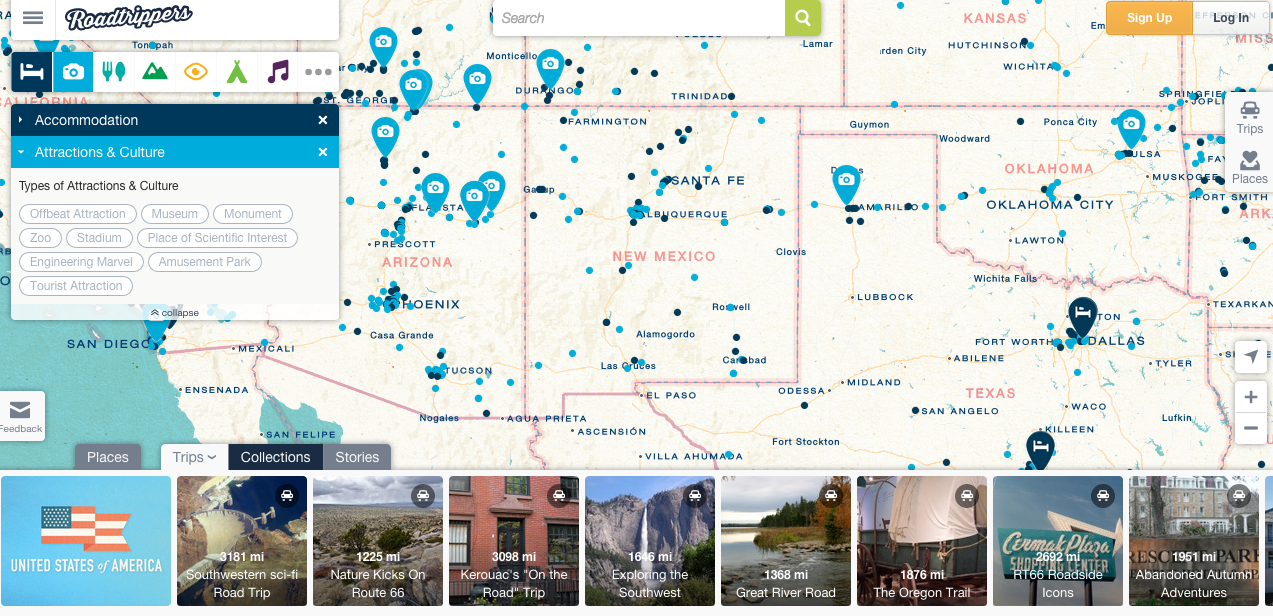
Jim Detwiler talked about all the different types of web mapping, and it was really interesting to think about mapping websites I’ve used and realize what type of mapping it was. Web mapping is used so much nowadays! You can find it anywhere, and we often use it a lot (Google Maps, anyone?). I thought a really cool website to talk about is Roadtrippers.com. It is a super interactive website where one can find different places to visit/lodge/eat around the United States. The different options and features available make this a super interactive web map. You can personalize which city you’d like to visit, and you can even look at different routes! The fact that one can choose a route makes this also an analytic web map. It gives you options to “scenic routes” and also has pre-made routes depending on what type of activities you enjoy. Not only is this website interactive and analytical, it is also collaborative. Each site can be reviewed by others who have visited therefore each location has a “heart” with a number out of 5. There are also “stories” that one can look through, which gives further suggestions on where to go (example: America’s Six Most Insane Oddest Natural Wonders).

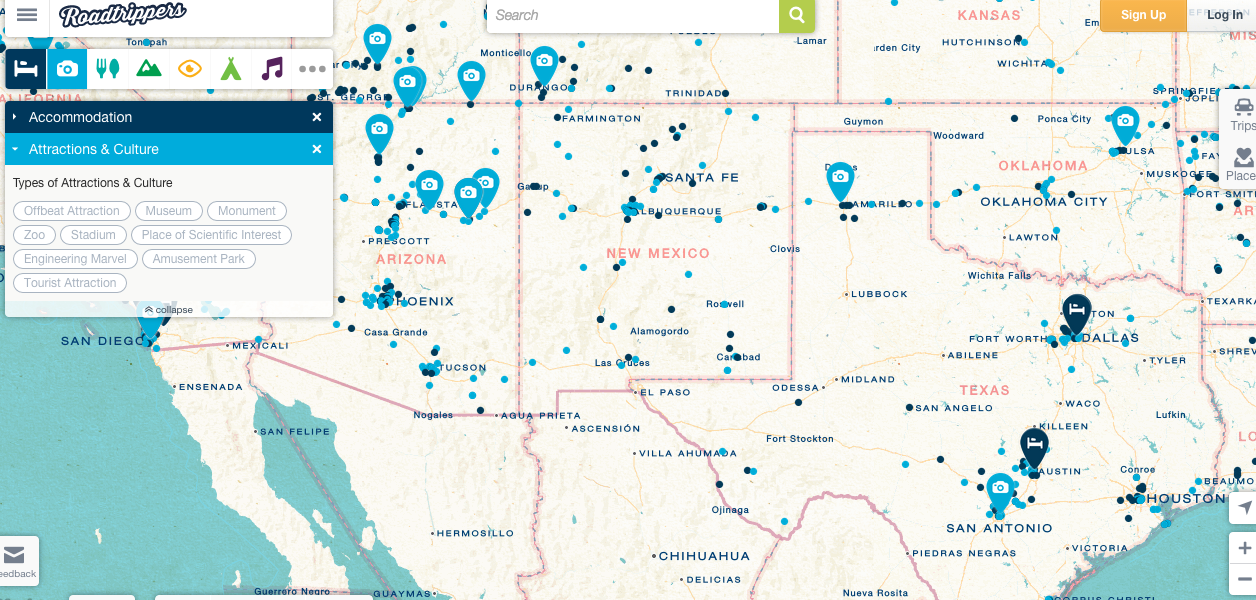
Roadtrippers is an amazing tool that uses many different types of web mapping, making it super interactive, customizable, and collaborative for anyone to use. All these features do have a downside, although. I feel like the website has A LOT going on and it sometimes gets a big confusing and overwhelming. When you first go on the website, you don’t really know where to go first. It is necessary to just click around the website to know what feature you’d like to use. The “trips,” “collections,” and “stories” options are all similar and all work towards the same goal, so at times it may seem a bit repetitive. Nonetheless, the website has many amazing features. For example, when you want to find accommodations, you click on the blue bed icon and little blue dots appear on the map. You can narrow your search further by clicking on the different types: hostel, chain hotel, spa, cottage/cabin, etc.


You can also click multiple icons, let’s say accommodations (in blue) and attractions (in light blue) and they’ll both appear on the map so you can know which ones are near to each other so you can efficiently plan your trip.

Screen Shot 2014-11-17 at 10.22.45 AM


Overall, the website may be a BIT too much, but still very cool and helpful nonetheless.

Week 7: Maps and Apps

I thoroughly enjoyed going through the “Anatomy of a Web Map” presentation by Alan McConchie and Beth Schechter. It covered many major and informative points without making it feel like a long read. I’ve now learned the appropriate way to describe web maps as they load in raster of vector tiles and the different components that make up a cohesive map. It’s eye-opening to think of how far we’ve come from the MapQuest days and of the possibilities when one can layer on different pieces of information within certain locations and have them load quickly for the user. There are plenty of apps now with the ability to track real-time locations of multiple objects to make our lifestyles even more efficient than ever.

screens-4

screens-2For example, there is an app called Glympse that I taught my Dad how to use because he sometimes worries about my drive back and forth between LA and my hometown. Its interface allows you to send a “glimpse” of where you’re headed, your location as you’re heading towards your destination, and (sometimes unfortunately) the speed in mph you’re traveling. Although apps are a different medium of maps, it’s still amazing that we’ve advanced this far and that it’s all made possible because of new interactive web mapping technology.


Furthermore, other open-source tools were briefly mentioned in the presentation that illustrates how one can manipulate and feed certain data into a map to relay one’s argument. From Jim Detwiler’s article of “The Introduction to Web Mapping,” I learned about the advantages and disadvantages of using certain types of web-mapping tools. In particular, the public API providers already supply the base layers so the developer would only have to add more information on top. However, the downside is that if the base layers are not to the developer’s liking, it can’t be changed. Also, they are not very compatible with complicated data sets that involve a large amount of polygon data.

Picture 2

This reminded me of a map that my urban planning professor had shown our class that used a Google Maps API and the 2010 census to map out every individual’s race and ethnicity. The visualization is basically an American snapshot of the racial diversity in every neighborhood of the country and is composed of 308,745,538 color-coded dots. From a zoomed-out perspective, one can see how clustered certain colors are even though there are sporadic splashes of varied dots. However, upon closer inspection of the interactive map, one can see in more detail, the network of specific races in context of the different cities.

https://www.glympse.com/

http://demographics.coopercenter.org/DotMap/index.html

Instagram (again) and Web Mapping

After reading about web mapping and GIS this week, I again am reminded of the social media app Instagram that I wrote about last week. In addition to being a great example of a social network some people use almost everyday, Instagram also serves as an example of how web mapping has been adapted for the benefit and leisure of these social networks. When the GPS feature is turned on with any smartphone, the phone itself uses the geographic information collected to keep track of where each individual photo was taken. When a person posts a picture on Instagram, the app uses this data to place the picture on a map according to where the data says the image was taken with startling accuracy. For example if you look at my account, you can see all the places I have been in Southern California that I have posted about online. You can tell where I spend most of my time by seeing where the most number of posts come from.

instagram map

When I zoom in over Los Angeles, and UCLA specifically, you can see exactly where on campus and in Westwood I was when I took the photo and uploaded it to Instagram.

IMG_2672

Every time I add a post, a new image appears on the map, thus making this a real-time, dynamic web map that is constantly being expanded.

The adaptation of web mapping for personalized use has proved to be very effective and many examples are now a part of our daily schedule. Google Maps get us to our destination, Find My iPhone helps us track down lost or stolen phones, different calendar apps track down the location of events and lay them out on a map for their user, and Yelp scans local restaurants and rates them based on user reviews and distance from you. However, the application of web mapping for individual use does cross some privacy boundaries of personal privacy. For example, if one were to have their Instagram account public, anyone could look at their personalized picture map and figure out exactly where he or she lived. Helicopter parents have a whole new way of tracking their teens by using the Find My iPhone app to follow their movements 24/7 and looking at the GPS location data attached to their smartphone photos. As with any new technology, boundaries must be set when it is applied to one’s personal life.

Week 7: Pokemon in Google Maps?!?!

AR

This week’s reading consisted of several articles that discussed Geobrowsers, such as Google Earth, and their functions.  Goodman’s, What Does Google Earth Mean for the Social Sciences, argues that these Geobrowsers can aid social scientists “both as tools for visualization and as subjects of research”.  Furthermore, the reading discusses both the capabilities and limits these programs have in displaying as much visual information as possible of the Earth.  New methods are required to allow Google Earth, and programs alike, to achieve the depth necessary for social scientists to make serious use of what these visual representations can offer, while finding ways around cutbacks that seem to hinder the data needed.

After finishing the reading, I was reminded of what Google had done back in March of this year.  With April Fools in mind, Google announced a challenge to the public that involved both their map app and Pokémon.  In order to be qualified as a “Pokémon Master”, representatives of Google allowed individuals to find Pokémon scattered across Earth that could only be seen with their application open and in use.

The video provided by Google shows an exaggeration of how to catch these Pokémon of which are found at various locations.  Unfortunately, the AR technology that is present throughout this video was not a feature during the challenge.  Instead, the task merely required a simple click once a Pokémon was located on the map.  Nonetheless, the concept and the encouragement for others to explore seemed to be a neat idea in itself.

This small example does reemphasize Goodman’s discussion of Geobrowsers’ limitations and the need for improvement.  While we have the world displayed on these programs, I can’t imagine they are complete.  Even during the reading, Goodman discusses how imaging, especially when zoomed-in, and rendering non-visual elements meet obstacles that may prevent social scientists from seeing properties of interest.  Therefore, by possibly having these immersive scavenger hunts, Geobrowsers would be able to obtain denser data that otherwise would not be possible from distant satellites.  Furthermore, by enabling VR technology, not only would we see the world in a new way, but bridge the distance closer between the physical and digital world.


Sources:

1. Goodman, Michael – What Does Google Earth Mean for the Social Sciences

2.http://www.huffingtonpost.com/2014/03/31/google-maps-pokemon_n_5064473.html

3. Youtube video provided above