Instagram (again) and Web Mapping

After reading about web mapping and GIS this week, I again am reminded of the social media app Instagram that I wrote about last week. In addition to being a great example of a social network some people use almost everyday, Instagram also serves as an example of how web mapping has been adapted for the benefit and leisure of these social networks. When the GPS feature is turned on with any smartphone, the phone itself uses the geographic information collected to keep track of where each individual photo was taken. When a person posts a picture on Instagram, the app uses this data to place the picture on a map according to where the data says the image was taken with startling accuracy. For example if you look at my account, you can see all the places I have been in Southern California that I have posted about online. You can tell where I spend most of my time by seeing where the most number of posts come from.

instagram map

When I zoom in over Los Angeles, and UCLA specifically, you can see exactly where on campus and in Westwood I was when I took the photo and uploaded it to Instagram.

IMG_2672

Every time I add a post, a new image appears on the map, thus making this a real-time, dynamic web map that is constantly being expanded.

The adaptation of web mapping for personalized use has proved to be very effective and many examples are now a part of our daily schedule. Google Maps get us to our destination, Find My iPhone helps us track down lost or stolen phones, different calendar apps track down the location of events and lay them out on a map for their user, and Yelp scans local restaurants and rates them based on user reviews and distance from you. However, the application of web mapping for individual use does cross some privacy boundaries of personal privacy. For example, if one were to have their Instagram account public, anyone could look at their personalized picture map and figure out exactly where he or she lived. Helicopter parents have a whole new way of tracking their teens by using the Find My iPhone app to follow their movements 24/7 and looking at the GPS location data attached to their smartphone photos. As with any new technology, boundaries must be set when it is applied to one’s personal life.

Week 7: Pokemon in Google Maps?!?!

AR

This week’s reading consisted of several articles that discussed Geobrowsers, such as Google Earth, and their functions.  Goodman’s, What Does Google Earth Mean for the Social Sciences, argues that these Geobrowsers can aid social scientists “both as tools for visualization and as subjects of research”.  Furthermore, the reading discusses both the capabilities and limits these programs have in displaying as much visual information as possible of the Earth.  New methods are required to allow Google Earth, and programs alike, to achieve the depth necessary for social scientists to make serious use of what these visual representations can offer, while finding ways around cutbacks that seem to hinder the data needed.

After finishing the reading, I was reminded of what Google had done back in March of this year.  With April Fools in mind, Google announced a challenge to the public that involved both their map app and Pokémon.  In order to be qualified as a “Pokémon Master”, representatives of Google allowed individuals to find Pokémon scattered across Earth that could only be seen with their application open and in use.

The video provided by Google shows an exaggeration of how to catch these Pokémon of which are found at various locations.  Unfortunately, the AR technology that is present throughout this video was not a feature during the challenge.  Instead, the task merely required a simple click once a Pokémon was located on the map.  Nonetheless, the concept and the encouragement for others to explore seemed to be a neat idea in itself.

This small example does reemphasize Goodman’s discussion of Geobrowsers’ limitations and the need for improvement.  While we have the world displayed on these programs, I can’t imagine they are complete.  Even during the reading, Goodman discusses how imaging, especially when zoomed-in, and rendering non-visual elements meet obstacles that may prevent social scientists from seeing properties of interest.  Therefore, by possibly having these immersive scavenger hunts, Geobrowsers would be able to obtain denser data that otherwise would not be possible from distant satellites.  Furthermore, by enabling VR technology, not only would we see the world in a new way, but bridge the distance closer between the physical and digital world.


Sources:

1. Goodman, Michael – What Does Google Earth Mean for the Social Sciences

2.http://www.huffingtonpost.com/2014/03/31/google-maps-pokemon_n_5064473.html

3. Youtube video provided above

Week 7: “I Honestly Don’t Know How We Managed So Well Without GPS”

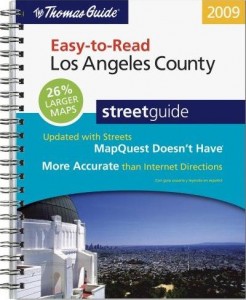
picture-242Thomas_Guide_Los_Angeles_County_Easy_to_Read_2009


Traditional maps are said to date back 8,000 years ago as cave drawings in Ancient Mesopotamia. Fast forward through the 16th and 17th centuries when cartographers realized that the world is not in fact flat, all the way up to the digitization of maps, it is undeniable the incredible transformation maps have made in the past 20 years, let alone the past 8,000.

Upon reading through the Anatomy of a Web Map presentation by McConchie and Schechter, I found myself nostalgic of the times when I was younger and watched my parents input addresses into MapQuest online. The more I thought about how useful MapQuest was to my family in the early 2000’s, the more I wondered how the heck did people get around to unknown locations before the invention of web maps? Of course there were paper maps, but how were people able to account for traffic, or choose the quickest routes to a location with just a paper map? I proceeded to text my mom the same question and she promptly responded…

“We used Thomas Guide, or went to AAA to get specific city maps. Every gas station worker/owner would give you directions, but I honestly don’t know how we managed so well without GPS.”

The same could be said about the invention iPhones. Every American seemed to be able to function quite well upon the era of the “flip phone,” but ever since Steve Jobs’ legendary technological invention, individuals have no idea how they would be able to carry out their lives without this device in their presence each and every day–myself included. We are a generation that is becoming more and more dependent on new technologies, and in effect, we are seemingly less functional if we are ever not in the presence of these devices. In Information Studies 20 last year, Professor Srinivasan forced us to take a “Digital Detox” day, where you were not allowed to use any technology for a full 24 hours. Based off a camp in Northern California where campers are stripped of all technologies in order to find their personal peace again, the assignment really taught myself and all my fellow classmates how much of a presence these devices are in our everyday lives. At the end of the day, we need to be able to detach ourselves and “unplug” from the digital environment in order to ensure the only presence we have is not an online one.

Week 7: Web Map Anatomy and Hoon Kim’s Broadway Soundscapes

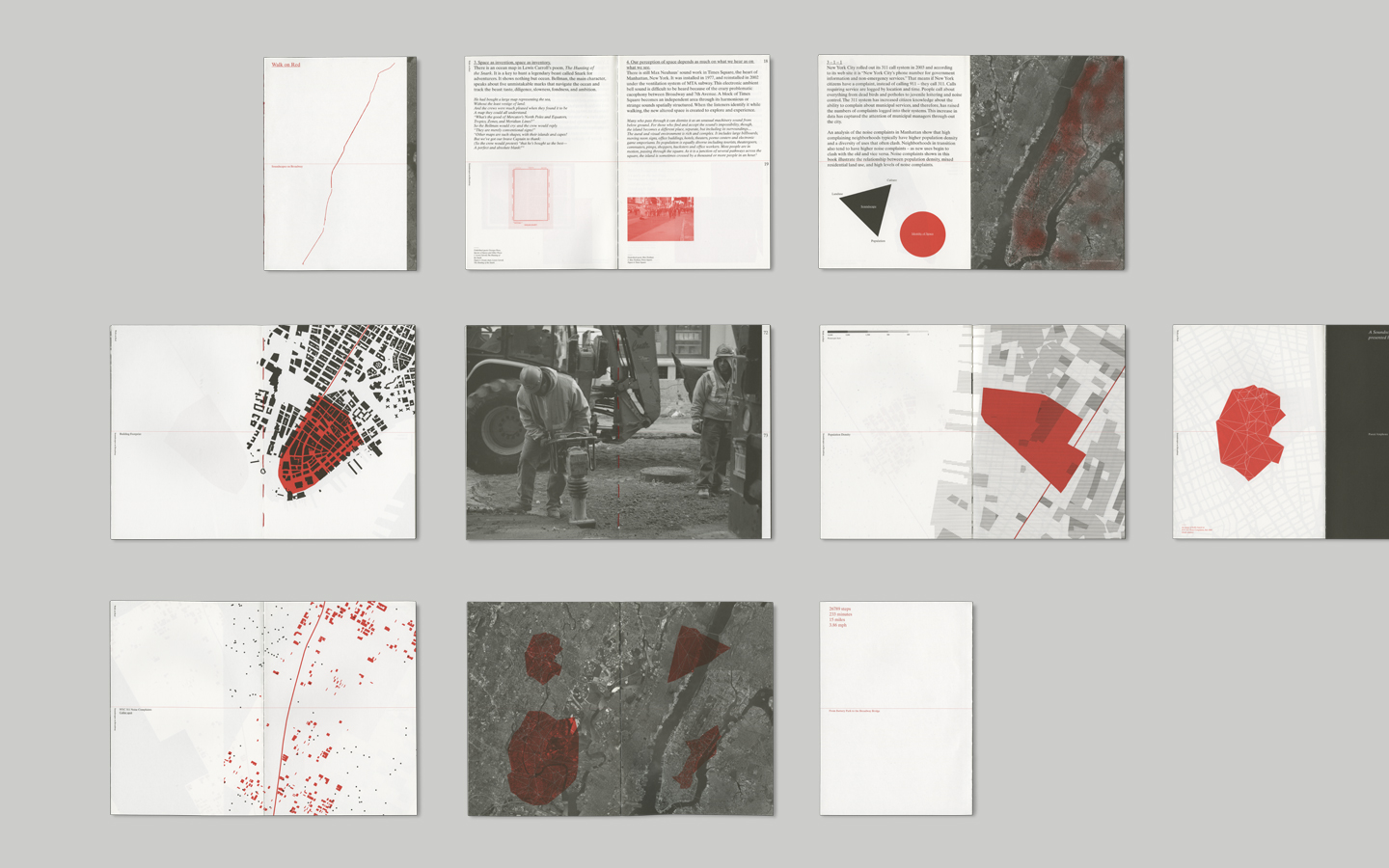
walk-01

http://whynotsmile.com/project/walkshow.html

Alan McConchie and Beth Schechter provided a very minimal, but informative presentation on the basic structure of a web map via the hackable “Big” system which I fully enjoyed. First off, I truly appreciate this presentation tool and the way it implements minimal hacking to whip up a browser-based presentation that can be shared easily and quickly. I hope to see this form of presentations to be utilized and accessible by a simple click of a hypertext.

Moving on to the content of the presentation, McConchie and Schechter basically dissect the anatomy of a web map, comparing it to the likes of our own human body and how we have systems that are interconnected. They then go more in depth about the layers that create this multi-layered data cake of a creation. Being able to identify and dissect each layer allowed me to approach web maps with more confidence. I’m especially glad to be learning about what makes a web map since there is a definite trend of creative map design that may look geographically accurate, but are in fact based on the designer’s subjective associations which lean more towards a mind map.

Data and content layers definitely sparked my attention since I felt that this was where the creative direction came in. Data layers can essentially be simply points, lines, and polygons marking the tiles that formulate the base layer. However, I can see the vast potential with data layers and its design direction. I also realized at this point that the addition of data layers is ultimately establishing the narrative and objective of your web map. The base layer is your map and your data layers are your pins and tacks.

Although my reference is not a web map, designer Hoon Kim and Sarah William’s research collaboration used various geo-reference data like satellite images and documentary data like NYC 311 Noise Complaints which are logged by location and time. The result of this research was “Walk on Red EX1”, a book and exhibition that showcases an analysis of the registered noise complains in Manhattan in correlation to population densities and mixed property usages around four Manhattan neighborhoods including SoHo, Wall Street, Midtown, and Inwood. Although ambitious, “Walk on Red Ex1” is a very intriguing attempt to visualize the geo-spatiality of sound related events. Kim and Williams utilize the data layers of found web maps of the Manhattan neighborhoods to serve their objective of analyzing and visualizing the neighborhoods’ unseen soundscape. I can definitely see this project expanding into a web based map which would be a nice way to tie up the loose ends of this project seeing that the research for this project first began with web map references.

Week 7: Mapping

webmapping

Every time you’re going for a drive to an unfamiliar place chances are you’re going to open up the maps app on your smartphone to avoid the struggle of getting lost. Jim Detwiler’s Intro to Web Mapping provides a brief history and understanding of these web maps. He looks at the advantages, which include that web maps are cheap, easy to constantly update, readily accessible, and interactive. A con he pointed out that at times they are not as reliable as the good old-fashioned paper maps. Most notably if you are stuck in an area that is distanced from an internet connection or phone service, or the possibility of the map server being down. I was doing a bit of research on GPS, which stands for Global Positioning System, and learned that it was created the US Defense Department was originally meant to be kept a secret from the public. It was developed back in the 60s but was not deemed fully operational until 1995.

It got me thinking of all the apps we use today that use mapping systems. Tinder, the popular matching making app, uses GPS to connect users within a specific radius. Apps to find food such as Yelp and Urbanspoon connect users not with other people, but retail stores and restaurants. Even Instagram offers a ‘geotag’ options that allows users to show their followers where the photo was taken.

I remember when I was just a little kid, we would whip out our trusty Thomas Guide when going for a road trip. I was content just flipping through the pages to find our location and destination and never thought there would be a faster or easier way created in my lifetime. That transitioned to printing out MapQuest instructions from my PC to take with me on foreign drives for soccer games. Then finally today I sit with my iPhone in my lap as my good friend Siri reads off directions through my car’s speakers. It’s amazing to see the progression of mapping in our devices how in just a few years it went from everyone using fold out paper maps to a little handheld device that can riddle off directions.

For my last GE requirement I was looking at taking Geography 7, which is titled Introduction to Geographic Information Systems (GIS), so this week’s articles gave a welcomed introduction to the subject. I know for our project we are looking at using web mapping when looking at the locations of past Olympic Games, which I hope we execute well.

Link 1

Link 2

Link 3

Disaster Relief Through Google

In Michael F. Goodchild’s piece titled “What does Google Earth Mean for the Social Sciences?” he begins my mentioning that Google Earth “presents a subject for social research in its own right” as well as the need to “address some of the issues identified in the earlier social critiques of cartography”. Google Earth has provided each and every person with the ability to explore the world’s geography at the touch of a few buttons. Google Earth has found ways to avoid daunting problems associated with mass amounts of data required to display the millions of data elements that create the picture of earth’s surface. They are able to store data locally, which is made possible through requiring users to download the program. The ability for users to view the earth in different levels of detail allows for the analysis of a certain location from many different aspects. All of these tools have rendered Google Earth as a great tool for research at both the scientific and explorative levels. As we continue to make technological advancements, the exploration of our world, and what lies beyond it, has become increasingly more tangible with these types of geographic information systems.

Google Earth allows for the integration of unique layers within its program to access different information. For example, updates related to current earthquakes can be integrated through a live access feed. This helpful concept directly relates to the idea behind Google Crisis Map. This tool that is integrated within Google Maps puts “critical disaster-related geographic data in context” by using the map program to highlight the key areas that are affected in real-time. It is also able to integrate links to fundraising sites or help hotlines during major times of crisis around the world. This allows for users to stay up to date on current disasters and all of the different ways they can ensure their safety as well as the safety of others. The ability to interact with this data and both contribute and download it instantly, shows the potential that these geographic information systems have to help the world. This level of disaster-related broadcasting and communication would never have been possible without this type of system. Its ability to efficiently define the spatial and geographical data has aided social-science research exponentially, and will continue to keep users up to date on all of the major events occurring on a given day.


Sources:

  1. http://www.google.org/crisismap/weather_and_events
  2. Michael Goodchild, “What Does Google Earth Mean for the Social Sciences?”

Where did MapQuest Go?

Accessibility to step-by-step directions from point A to point B has gone from being a luxury to a necessity since the early 2000s. When I was younger, I remember being entrusted with our family Thomas Guide, an old and quite thick booklet of maps we kept in our car to navigate freeways and streets on long car trips. As I got older, we stopped carrying around the Thomas Guide and transitioned to using the internet to map out our journey in the most efficient way possible. When planning these trips, MapQuest was our go-to route planning site.

il_570xN.439968747_ahrl
I think my family actually owned a copy of this 1994 LA County Thomas Guide. Now it’s old enough to be considered vintage and is available for purchase in an Etsy shop.

As Jim Detwiler writes in “Introduction to Web Mapping,” MapQuest helped break new ground in the age of digital mapping technology. It was part of the first generation of sites in the web mapping industry and even when other websites started to outpace it, the site continued to update its services. When Google made its map interface public so did MapQuest, and from there, a whole new generation of custom mapping applications was born.

I recall using MapQuest as my default mapping website up until around 2009 or so when I decided Google Maps offered a more convenient service. (This convenience was mostly due to the fact that Google was the homepage for my family computer and it was far easier to click on the “Maps” tab than it was to type MapQuest’s URL.) A 2009 Business Insider article addresses MapQuest’s decline at this time and comments on the increasing site space being devoted to advertisements, while Google Maps kept its interface clean and to the point. The article also goes on to give MapQuest some advice to turn their company around and return to its role as a leading online map service, a key point being that presentation of the site is important (something we can all relate to now after learning about the importance of data visualization techniques).

It’s been a few years since 2009 now, so I wanted to go back and see how MapQuest is doing and how the site has evolved over time. The layout of the site is very similar to the (now) older Google Maps layout, with directions and options on the left side and a map on the right. There was one momentary flaw in MapQuest’s direction system; when I inputted “UCLA Young Research Library” on both sites I was met with an unexpected surprise. Google Maps gave me a direct image of UCLA’s campus with YRL pinpointed on it but MapQuest got confused and gave me “related” locations in Pennsylvania. Only 2400 miles off.

Screen Shot 2014-11-16 at 10.58.35 PM
Google Maps search result


Screen Shot 2014-11-16 at 10.58.58 PM
MapQuest search result


Week Seven: Women in GIS

Sara McLafferty’s, “Women and GIS: Geosptial Technologies and Feminist Geographies,” discusses the intersection between feminism, GIS technologies, and the impact of these technologies in women’s lives. McLafferty mentions the shift from a “pro-techonology” stance to an “anti-technology” stance within gender and technology discourse, primarily caused by the view that technology merely “perpetuate[s] and reproduce[s] gendered social relations” rather than liberating women from said constructs. However, there is a more nuanced view that “acknowledges technologies can have both positive and negative impacts at the same time…[these] vary among diverse social groups.” The way in which technologies are either positive or negative depend exclusively on why these technologies develop, and “how, where, and by whom [this technologies] are used.” Negative uses of technology can be most prominently seen when technological tools are used in attempts to control or monitor others for the sake of exerting power or dominance.

McLafferty mentions the increasing presence of geographical technologies within the realm of surveillance and monitoring. She mentions “closed-circuit TV cameras, high-resolution satellite imagery, tracking devices, and cell phones” as examples of specific instances of surveillance-monitoring equipment. However, since the publication of McLafferty’s article in 2006, cell phones have become capable of much more, and thereby contain more sensitive information. The sheer amount of data collected and retained within smartphones can lead people with malicious intentions desiring access over them. This is especially likely to happen with women who are in domestic abuse situations.

mspy
Cyberstalking victims often don’t know they’re being tracked through their own phone because spyware apps like mSpy use misleading labels (labeled “android.sys.process” here) and don’t take up much data. NPR

In NPR’s report, “Smartphones Are Used To Stalk, Control Domestic Abuse Victims,” the various ways abusive partners use technology for negative use is discussed in detail. According the report, “cyberstalking is now a standard part of domestic abuse in the U.S.” Many abusive partners use spyware and other tools to monitor domestic abuse victims who either attempted to leave and are in shelter situations, or are still within the abusive relationship. Many domestic abuse counselors require new arrivals to participate in a “digital detox,” which requires a complete shut down of a cellphone’s GPS and Wi-Fi, as well as staying away from Facebook. This is because:

Eighty-five percent of the shelters [NPR] surveyed say they’re working directly with victims whose abusers tracked them using GPS. Seventy-five percent say they’re working with victims whose abusers eavesdropped on their conversation remotely — using hidden mobile apps [such as MSpy]. And nearly half the shelters [NPR] surveyed have a policy against using Facebook on premises, because they are concerned a stalker can pinpoint location.

This NPR report is a modern day example of geoslavery, “in which the master coercively or surreptitiously monitors or exerts control over the location of another individual.” While tracking can be beneficial for parents wanting to make sure their children are safe and accounted, when used by the wrong people for the wrong goals, the results can be horrifying, as seen in NPR’s example. This report shows the ways technology can be used to control and surveil woman in an exclusively gendered way.

Sara McLafferty, “Women and GIS: Geosptial Technologies and Feminist Geographies”

Aarti Shahani, “Smartphones Are Used To Stalk, Control Domestic Abuse Victims.” NPR. NPR, 15 Sept. 2014. Web.


Week 7: Mapping and GIS

This week I very much enjoyed reading Introduction to Web Mapping. In Spring 2014 I took Geography 7, Introduction to GIS, here at UCLA. I really enjoyed this class and hoped to incorporate some of what I had learned in that class into what I was creating for my digital humanities project. Although I had at least heard most of the information in the lesson, it was a very good refresher.

In Geography 7, I learned the basics of QGIS and created a new project each week, and they continued to get hard and harder as the weeks progressed. By the end of the quarter I was able to make a project that I was extremely proud of. In this project I had downloaded a map with all of the voting districts in California and chose on in the Los Angeles area to focus on. I then found the voting information from the 2012 elections. After linking this information to the map, I was able to create many versions of a static map. These included maps based on results from the 2012 General election in terms of voter registration, voter turnout, and voter political preference. With this information, I then created maps that showed precincts to either target or avoid when campaigning in an upcoming election, based on my earlier previous maps.

At the time of creating these maps, I didn’t refer to them as static web maps, but after reading this article, I realized that is what they were. In addition to being static though, these maps are also personalized because, although the data collected represents a snapshot in time, I created the color scheme, classification method, title, legend, scale bar, and other aspects that can be created in QGIS.

The most new information for me, involved the history of Internet mapping because in Geography 7, we had mostly focused on how to actually map. I am constantly impressed by virtual map technologies like Google Earth and Microsoft’s Virtual Earth, so it was incredibly interesting to see how these systems developed. It is hard to believe that this many steps in virtual mapping have been made in the only 21 years since the first Internet map viewer was produced in 1993. Although I don’t understand the coding being referenced in each of the progressions from generation to generation, I can understand, in words, some of the capabilities that were developed. I am very excited for this week because we will be talking about something I am at least slightly familiar with and eager to help my group with that.

Below I included some examples of the maps that were included in my Geography 7 class that I described.

FinalMap3 FinalMap4 FinalMap5 FinalMap7

Wikimapia

As of this year, since I am living further from campus, I have started riding my bicycle to school, which means sticking to designated bicycle riding areas (i.e., not Bruin Walk) if I don’t want to get a ticket, but also finding spots to lock up my bike. Surprisingly, this can be difficult, especially when you are not thinking clearly because this will be the third time you are late to work this week or because you slept through your alarm and want to catch at least the last five minutes of discussion so you can get marked for attendance. Not that either of those have ever happened to me. While reading “Anatomy of a Web Map” and Jim Detwiler’s “Introduction to Web Mapping,” I was dying to see if there would be any online interactive maps that would revolutionize my life completely introduced. Well, this isn’t completely true, but I checked out OpenStreetMap and was thoroughly impressed with the site. OpenStreetMap allows users full control, much like Wikipedia, to edit the content on the site. I registered with the site (which is for free), and allowed the site to find my location (hopefully you all are okay with this too), and boom. Of course at first it just looks like your average web map, but it is user friendly, not only in navigation, but also in the data that it presents. Different landmarks, buildings, and fields are labeled with appropriate symbols; pedestrian walkways are also distinct from roads. Sure, most of this information can be shown on other web maps, but then I saw the bicycle symbol for bicycle parking. Victory! Finally, a resource where I can locate bicycle parking spots for my convenience so I never have to worry about finding a spot to lock my bike when I only have five minutes to get to class or work and waiting for the elevator always takes at least four. What this really means is that a map like this is open to possibilities. Take a look at Wikipedia. You can find information you never even knew existed in a simple search and click of a button. Professors may not like it when you cite Wikipedia, but it definitely more often than not points you in a great direction, whether this is by providing resources or simply making you think in a certain way. Just like Wikipedia, OpenStreetMap has the same possibilities since it is ran by the users. Unlike other public API maps, this map can be some personalized and humanized that it could even help you find the nearest toilet. This would require a smart phone app, which probably already exists, but this is not the point, it is the principle. This map could be a great tool for tourism: tourists would be able to know all the hidden gems and lore of where ever they go, as long as users took time to contribute. I will take stand and do my part, starting with bicycle parking spots. Will you?

Screenshot 2014-11-16 18.51.03

Take a look here at an ATM point; also notice the bike symbols, and how many people have edited it (bottom left corner)