Week 9: 3D modeling and cross-cultural interfaces

This week’s topic of 3D modeling brought me back to my late elementary school days when I would play computer games like Roller Coaster Tycoon, which allowed you to build and maintain an amusement park. It’s funny to think that that game is my go to example when thinking about 3D modeling, but at the time the franchise started to take off back in 1999, it seems like it was a relatively untapped subject. The nostalgia that the sheer title of this week’s topic brought got me excited to dive into the readings.

RT

Something that quickly stood out to me was how Diane Favro noted how “researchers experimenting with new technologies” create simulations. Her piece “Meaning in Motion. A Personal Walk Through Historial Simulation Modeling at UCLA,” provided a brief history of the evolution of 3D modeling at UCLA, with an emphasis on its role in a roman architecture project. It’s awesome to see that with today’s technology we have the ability to recreate intricate, anicent architecture. I was really intrigued by the points she made, and coupled with the positive reviews of her courses by other students, I may have to take one her classes before graduating.

Straying a bit from the topic, I wanted to point out how the concept of 3D printing has always fascinated me, so I decided to do a little background research on it. The SparkNotes version  is that through additive processes, successive layers of materials are laid down under computer control. Objects of any shape can be created, and are produced from a 3D model or some other electronic source.

Last year I took an Egyptian religion class with Professor Dieleman, which I really enjoyed and would recommend to anyone trying to knock out that elusive Philosophical + Linguistic Analysis general education requirement. During one of the classes we looked an interactive, online Egyptian model of the ancient Karnak, which virtually allowed the user to walk around in a first person mode. Even though I found the readings very informative and interesting, being able to use this interactive model as an additional learning tool was definitely a welcomed change of pace. This week’s readings have made it apparent how crucial 3D models are in the field of digital humanities, and it’s definitely exciting to follow where it will progress. I haven’t thought too much about 3D modeling in respect to our group project, but it has the potential to be a solid addition if we can figure out how to purposefully implement it.
Link 1

Link 2

Link 3

Week 8: Interfaces and user experience

Interface

This week’s reading really hones in on the correlation of a simple digital interface with captivating its viewers. People love simple–this is why apps such as Instagram and Snapchat have done so well. I’m much more inclined to use an app or website that it is not too cluttered with ads or unnecessary add-ons. Jesse James Garrett describes the key aspects of a website layout—the surface, skeleton, structure, and scope. My cousin works for the NFL down in Culver City as a digital strategist consultant, and I’ve drove down to see exactly what he does a few times recently. He works on many of the topics brought up in Garrett’s “Elements of User Experience.” While corresponding with the digital departments of all of 32 teams, he helps improve the teams’ websites to raise the traffic and user engagement through changes in the skeleton and structure.

In a study done by Google in August 2012, it was revealed that users judge websites as aesthetically pleasing or not within 1/50th-1/20th of a second. The study also showed that websites deemed “visually complex” were rated significantly lower than their simpler counterparts. “Highly prototypical” sites, which had layouts that were commonly associated with sites of a similar category, had the highest ratings in the study. Another article I read by Thomas Walker was making the argument for why simpler is better. It also came with condensed instructions on how to make a simpler website that visitors will enjoy. He said to consider cognitive fluency, which says that the brain prefers to think about things that are easy to think about. This applies to a website because you should put place items where visitors have grown accustomed to finding them. When choosing images and inserting columns of texts, you should aim for one large one over a bunch of little ones. Something he said that really resonated with me was to not view your site “as a unique snowflake piece of art,” but instead a “composite of all the best stuff.” I’m going to be sure to forward this article to my project group so we can consider his tips when making decisions for our website regarding the Olympic Games. This week’s reading remind me of when I worked as a website administrator for a soccer club, I was told by my supervisor the acronym KISS. This stood for “Keep it simple, stupid,” and I’m planning on taking it to heart when working on our site.

Link 1

Link 2

Link 3

Week 7: Mapping

webmapping

Every time you’re going for a drive to an unfamiliar place chances are you’re going to open up the maps app on your smartphone to avoid the struggle of getting lost. Jim Detwiler’s Intro to Web Mapping provides a brief history and understanding of these web maps. He looks at the advantages, which include that web maps are cheap, easy to constantly update, readily accessible, and interactive. A con he pointed out that at times they are not as reliable as the good old-fashioned paper maps. Most notably if you are stuck in an area that is distanced from an internet connection or phone service, or the possibility of the map server being down. I was doing a bit of research on GPS, which stands for Global Positioning System, and learned that it was created the US Defense Department was originally meant to be kept a secret from the public. It was developed back in the 60s but was not deemed fully operational until 1995.

It got me thinking of all the apps we use today that use mapping systems. Tinder, the popular matching making app, uses GPS to connect users within a specific radius. Apps to find food such as Yelp and Urbanspoon connect users not with other people, but retail stores and restaurants. Even Instagram offers a ‘geotag’ options that allows users to show their followers where the photo was taken.

I remember when I was just a little kid, we would whip out our trusty Thomas Guide when going for a road trip. I was content just flipping through the pages to find our location and destination and never thought there would be a faster or easier way created in my lifetime. That transitioned to printing out MapQuest instructions from my PC to take with me on foreign drives for soccer games. Then finally today I sit with my iPhone in my lap as my good friend Siri reads off directions through my car’s speakers. It’s amazing to see the progression of mapping in our devices how in just a few years it went from everyone using fold out paper maps to a little handheld device that can riddle off directions.

For my last GE requirement I was looking at taking Geography 7, which is titled Introduction to Geographic Information Systems (GIS), so this week’s articles gave a welcomed introduction to the subject. I know for our project we are looking at using web mapping when looking at the locations of past Olympic Games, which I hope we execute well.

Link 1

Link 2

Link 3

Week 6: Social Network Analysis

SNA Graph

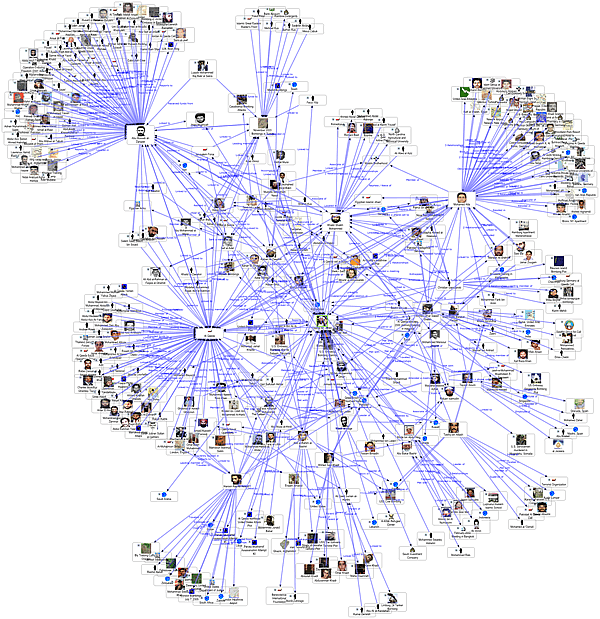
This week’s readings got me interested in the science behind social network analysis. Network theory involves nodes, which represent individuals within the network, along with ties, which show the various ways these individuals come together. This could be through a number of factors, including friendships, organizations, hobbies, and other topics of that nature. A social network diagram shows nodes represented by points, and ties as lines. Social network analysis has been able to provide a mathematical way of analyzing human relationships. For example, management consultants have implemented it with their business clients for what they call Organizational Network Analysis. Scott Weingart’s blog post “Demystifying Networks” looks at how networks are being created so frequently that it’s difficult to keep up with the network’s true meaning. His definition of network as “a net-like arrangement of threads and wire” gives an easy visualization to what is actually a complicated subject. His use of authors and books set a simple stage for me before diving into wide array of social network analysis topics.

Team Sports

While typing in “social network analysis of…” on Google, the first auto fill options were “…terrorist organizations in India, …Alice and Wonderland, …a criminal hacker community.” I didn’t know where to start; all the options seemed equally obscure but attention grabbing. After looking through a few of these various, unorthodox topics that could be studied through social network analysis, I stumbled across, “The Application of Social Network Analysis to Team Sports,” by Dean Lusher. The study allowed for the simultaneous examination of social relations with the individual-level qualities from members of the team. By incorporating a range of attitudes, behaviors, along with other individual-level attributions, an examination was reached on how these may affect and be affected by team structures. Players were asked whom they considered friends on their team along with whom they saw as the most influential. After, they were asked who they viewed as the ‘best’ player on the team, and anyone who received more than five notes was denoted with a black node. The image above shows how the ‘best’ players on a team formed their own group that was connected, but still separate from the other white nodes. This illustration shows two social networks (friendship and influence) coupled with an individual-level attribute (playing ability). It was interesting to see a digital angle applied to this very human subject.

Link 1

Link 2

Link 3

Week 5: Racial Profiling and Chartjunk

chartjunk

“The Real Face of White Australians,” takes a look at the struggles of non-Europeans who dealt with harsh racism in Australia. Today, I would like to think we live in a place that’s a bit more accepting, but this article got me thinking about the college admissions process and its association with race. Thinking back to filling out college apps around this time two years ago, certain schools only allowed one box to be checked in the ‘ethnicity’ part of their application. Coming from a French dad and a Filipino mom, I found myself a bit confused on how to pick which race to claim an association with. I would do some quick research on the school demographic to see where I could possibly fit into a minority, and ‘Pacific Islander’ emerged as my go-to option. I felt that these online checkboxes were too binding, and portrayed a stigma of racial categorization. As we’ve discussed in class, computers are not fully able to grasp ‘human’ concepts such as race, shown by the inadequacies of the facial detection script from the article. All structures have their imperfections though, and it would be an intriguing argument to see how human intervention would fair in this system. (link 1 + link 2)

Secondly, I wanted to transition over to “Humanities Approaches to Graphical Display,” by Johanna Drucker, which delves into the importance of data visualizations usage in Digital Humanities. The concepts of ‘data’ and ‘capta’ are the driving forces behind data interpretation from a digital scope. Data surrounds us, acting independently without human interpretation, while capta has to be taken and constructed. (link 3)

Drucker stresses why a “graphical expression of interpretation” is so important in the visualization of data. Personally, I can attest that visuals help me learn better than simply staring at a set of numbers. An interesting issue brought up regarding data visualizations is when a creator goes too far in their design of a set of data. If you check out the currently trending BuzzFeed site, some articles have graphs and data sets that are almost indecipherable because of the addition of unnecessary graphics. This has been coined as “Chartjunk,” which refers to all of the visual elements in charts and graphs that aren’t necessary to understand the information the graphs are portraying, Chartjunk distracts the viewer from the necessary information, and shows how data visualization can go horribly awry. I’m definitely going to share this article on how to avoid Chartjunk to my group as we put together our website as part of the final group project. (link 4)

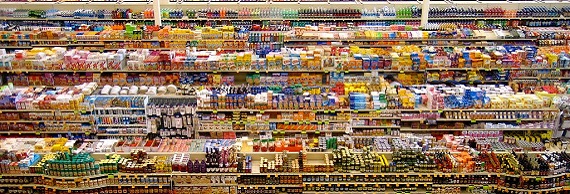
Everyday Databases

blog post 3

Last week, I was sitting in my apartment talking to my roommates about future jobs and why our friends who graduated last year all migrated north to San Francisco. We brought up one of our friends, Danny, who recently got a job with Google. We were looking through some questions Google asks in their interviews, and one was: “How would you explain a database in three sentences to your eight year old nephew?” An answer we found online and really enjoyed was:

“A database is a machine that remembers lots of information about lots of things. People use them to help remember that information. Go play outside.”

The point of this question is to see if the applicant can take a complex idea and translate it in a simple, dumbed-down language. While reading through “Databases,” by Stephen Ramsay, I realized it might actually take a lot more than three sentences to accurately portray the importance of databases. Ramsay defines the purpose of databases “to store information about a particular domain,” and having the capability for one to “ask questions about the state of the domain.” The Relational Model, Ramsay notes, finds a relationship between individual data points, opposed to just storing these sets of data. Under the header ‘database design,’ Ramsay uses American novels as his the subject for his fictitious database. With the use of primary and foreign keys, links are formed between the various data points, which point the user toward the desirable output.

I was scrolling through my iTunes this morning and noticed how it acted as a database for all my music, and how it could be categorized in various ways: song title, artist, genre, etc. Shortly after, I headed over to Trader Joes to pick up some groceries and realized as they scanned every item, the price is being looked up in a database that’s based on the Universal Product Code. The UPC refers to the usage of barcodes that stores use in order to track items in the store. I learned every time I make a phone call, the caller ID information has to be retrieved from some sort of database. Even most of our cars have a little database inside that makes the light come on when it’s time to ‘Check Engine.’  These databases make our society function, and it’s hard to imagine how everyday life would run without their assistance.

Works Cited:

Business Insider

Stephen Ramsay: Databases

Week 3: DDC to Netflix

DDS


As we take a more in-depth look at methods of classification, I reminisced about a visit to my elementary school library, where I was first introduced to the Dewey Decimal System. Sat down in front of the librarian at the tender age of 11 or 12, she explained to us how they used this relatively simple system to categorize their awe-inspiring collection of books. First established back in 1876, then revised and expanded through over 20 major editions, the Dewey Decimal Classification (known as DDC, link) is a system of numbering books based on content. Information is divided into ten broad areas, and then from there these groups are broken up into smaller and more specific topics. Topics are given call numbers, which you can look up to see what books the library has on this topic. For example, “Tigers” are given the call number 599.756.


I enjoyed all of this week’s articles, but “How Netflix Reverse Engineered Hollywood” definitely stood out for me from the selection. Paired with my nostalgia involving my elementary school library, I couldn’t help but think of how far classification has progressed. The article featured how Netflix creates obscure, but helpfully user-specific genres for its subscribers. The site uses a “real combination: machine-learned, algorithms, algorithmic syntax” (link). The hybrid human and machine intelligence implemented by this system shows the development of classification as the world gravitates toward a digital focus. Netflix partially abandoned a system that depended solely on numerical values, like ratings, broadening their scope to involve a bit of human introspection.


While topics in the DDC are very broad, like “500 Math and Science,” or “800 Literature,” this article highlighted the outside the box methods used by Netflix, such as “quanta” and “microtags” to classify their film collection and personally tailor recommendations for their users. Other user-friendly digital media sites have come to prominence in recent years, especially in the music industry. For example, Pandora’s Music Genome Project has attempted a similar formula to achieve what Netflix has, but they haven’t yet reached the success of their movie-streaming counterparts. 8tracks also comes to mind with their widespread selection of ‘tags,’ where you can find a playlist tailored especially for a certain activity, such as “classical + studying,” or “electronic + gym.” It’ll be interesting to see who branches out next and tries to add their own personal spin to classification.

Week 2: Metadata across the pond

bm

This week’s readings brought me back to my studies abroad at the University of Sussex in England. After completing an economics course to fulfill requirements for my UCLA major, I had the choice of many intriguing electives for the second half of the summer session. One class in particular, titled “Museums & Material Culture,” stood out, so I decided to give it a shot. Other than weekly field trips to museums around the country, we spent class time focusing on how curators make decisions on which objects to display, and how to classify them into different categories. As soon as I started to dive into the article “Classification and its Structures,” it reminded me of this museums course. Sperberg-McQueen defined ‘classification’ as having the purpose to first of all group together objects with shared properties, coupled with the ability to distinguish between things “which are different in ways relevant to the purpose of the classification.” This definition brought back memories of our field trip to the British Museum in London, where a curator sat us down and gave us a lesson on how they classify their massive collection of objects. While my time browsing objects in museums was spent looking at physical collections instead of digital images, both pertained to deciding what information is relevant, along with taking into account how information can be divided, and the long-term implications of decisions made by a curator, which is similar to someone who sorts out a digital archive.

As I continued to read through the articles, I kept thinking of the curator at the British Museum. Annie Gilliland’s article “Setting the State,” which focuses on the increasing amount of metadata available, reminded me of the vast database the museum boasts. Back in 1998, the British Museum began to put its massive collection online, which allowed viewers to click through about 260,000 exhibits (link). Now that the museum’s collection has expanded to eight million objects, the database has grown accordingly. The process of information analytics is utilized to produce the metadata, which can be worked on in order to find similarities between various objects.

Meticulous attention to the creation of metadata has become crucial in today’s digitally obsessed world, paired with the vast expansion of digitally accessible information. With a collection that is commonly regarded as the largest and most comprehensive in the world, careful systematic utilization of metadata has proved to be of the highest importance for the British Museum.