Week 7 – Hush Hush Sweet Charlotte

7

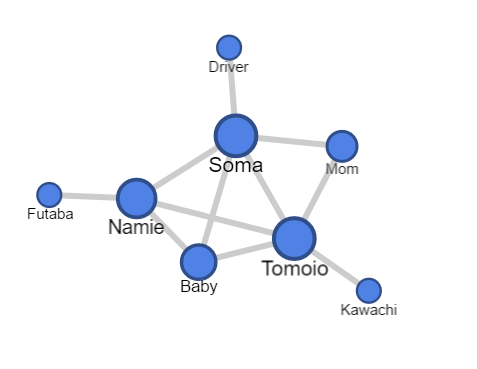
I created this chart in order to illustrate the interactions between various characters from the story Hush Hush Sweet Charlotte. For my character chart, the connections were made if the two characters either spoke or physically touched each other. Through this chart, I believe it will be easy to conclude who the main characters of the story were- Soma and Tomoio- since they had the most connections with other characters. However, other than that fact, this chart doesn’t really relay much information. Actually, the chart doesn’t even accurately portray who the main characters were in the story. Although both Soma and Tomoio did play a big role in the story, the story actually revolved more around Soma and the Baby with Namie and Tomoio playing the 2nd lead roles. This could potentially be solved by making Soma and the Baby’s nodes a bit bigger in comparison while also increasing the weight of the connection itself (maybe could be shown by changing the color of the connection). Furthermore, the presence of the sub main character in the story changed as the story continued; although Tomoio did play a big role in the beginning of the story, his presence was eventually replaced when Namie came into the story. This sort of information could be easily shown if we were able to show the node size and connection weight changing over time.

Week 6 – Caribbean Cholera Map

I decided to take a look at the Caribbean Cholera Map. There wasn’t any background information provided related to the creation of this map so my analysis will be just based off of the map itself.

The map timeline did not really provide much humanistic insight on the cholera outbreak. The timeline mainly consisted of the duration of different cholera outbreaks with occasional descriptions of newspaper headlines related to the outbreaks. It also included instances of different hurricanes and tropical storms. Looking at this data, I’m under the impression that the creator was only concerned about looking at the cholera outbreak as a whole during the time period 1833-1872. The only descriptive information about the outbreak comes from the perspective of a newspaper reporter and even so the newspaper reports were trying to summarize the cholera outbreak into a couple of sentences. In a way I felt like I was reading a doctor’s diagnosis of a patient- short and straight to the point, only including information relevant to the illness. Seeing that the creator also information about the hurricane and the storms, I also predict that the creator was trying to find a relationship between the outbreak and the different types of storms. This timeline does a good job on reporting the patterns of the cholera outbreaks in the Caribbean – although I do wonder if the cases shown on the map were the only cases-  and maybe even showing the relationship between the outbreak and the different storms. On the other hand, it doesn’t do a good job on what the life might have been like in the areas that did have the outbreaks. However, it might have been difficult to portray that information on a map that tried to illustrate the cholera outbreak across the entire Caribbean. An alternative to solve that problem is to find a specific location to report on. Then it would be easier to depict the details of the outbreak and the impact that it had on the different societies; the map could include the pictures from that time and have a density map to portray how many people had been affected by the outbreak. I do think that this method also has additional problems since it would be getting rid of the potential to relay information about the Caribbean as a whole.

Week 4 – Data Visualization NY Philharmonic

Our group was assigned the New York Philharmonic data set which included the dates of different performances from early 1800’s to the early 1900’s. Once receiving it, one aspect that I was interested in was to see if there was a trend of amounts of performances throughout the years. Thus, I decided to make a visualization based on that question. I used the google fusion table to create this visualization.

data

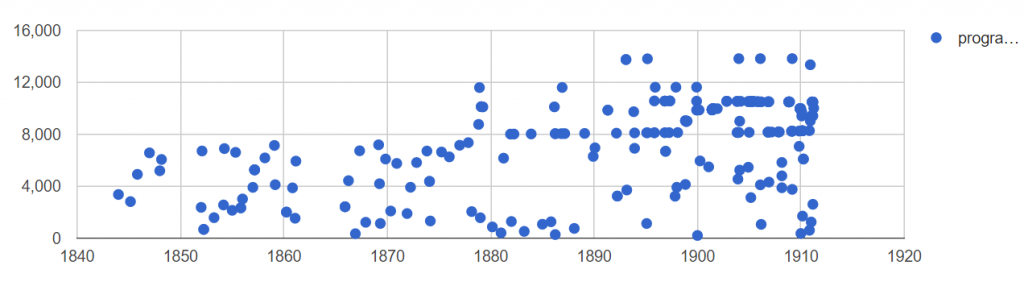
From this visualization, we’re able to see how many different performances there were throughout the years. It could be a bit hard to interpret the data, but to make it simple, all you have to understand from this visualization is that each point represents a different performance- you can ignore the vertical position of the points. I wish I could have created a bar graph that would have explicitly show the number of programs per year but I didn’t know how to alter the data to show this, so the closest I could get was to plot the different performances by the ID.

From this visualization we can see that there was an increase frequency of dot plots as the years went by which signifies that the New York Philharmonic added more shows towards the end of the 1800’s. We can also see that towards the end of 1800’s, it seems like the New York Philharmonic started playing annually, unlike in the early 1800’s. One surprising thing I found was that the New York Philharmonic did not play at all during the years 1849-1852 and 1862-1685. It made me wonder if the data set is missing or if this was true. If it was true, it would be interesting to know why the Philharmonics did not play during these years.

Another interesting aspect that would be interesting is to color code each plot depending on which group performed. This data set showed that there were 4 different groups that performed (NY Philharmonics, NY Symphony, members of NY Philharmonics, musicians from NY Philharmonics). Currently, this visualization doesn’t show any distinction between these groups, so it would be interesting to see if there was a trend on when these groups performed.

Week 3 – City Revenue

I looked at the City Revenue data from the L.A. Controller’s Office. This data set was displayed on a spread sheet which contained the description about what type of department the revenue was coming from and the data relating to revenue. To be more specific, each record constituted of:

Different descriptions:
Fiscal Year the data was collected, The department name, revenue source name, fund name, revenue class name

Different types of codes:
Revenue source code, revenue class code, and the department code

Revenue Data:
Adopted Revenue, Amended Revenue, Revenue Budget, Revenue Collection, % Revenue Collected, Fund.

From my perspective, I don’t think this data set succeeded in focusing on individual people or even individual group, rather their goal seemed to be recording the amount of revenue different types of department was bringing in and a bit of information about what type of business that department is under. Especially after reading Wallack and Srinivasan’s article about ontology, it seems like there’s a huge disconnect between the data gathered by the city vs data that would be helpful for the people within the communities that this data is extracted from. With this type of data, it would be most useful for government officials or anyone in general who are seeking to find out what types of department bring in certain amount of revenue. Seeing that the goal of this data set was to just relay budget vs collected revenue, the data set was able to fulfill that goal. The data set was only provided information about the revenue in relation to a department within the city, which I thought was disappointing. I think the data set could have also included information about the people associated with these department.

Although the data set gets pretty specific on showing the different revenues each department brings in, there’s no information in the data set that relays what businesses these departments are part of and where they are located. I am aware that the data came from businesses within the L.A. county, but L.A. county itself is a huge region. There could be a department of building safety in both Westwood, CA and Pasadena, CA. The location of these department could have a huge impact on how much revenue they bring in. Furthermore, the type of business are associated with also plays a huge role in the amount of revenue they can bring in.

If I was trying to collect data about the city revenue so that anyone could easily access it and get an idea about the revenue each county brings in, I would first exclude all the different types of codes within the current data set since it provides almost no additional information to the layman. I would then include the location and the name of the businesses each department is under. I might also add in what the average amount of income is for that county so people could get a general idea how well the business is doing relative to the county’s economy. It may also be useful to include how many department each county has as well as the county population to see if  each county had enough of the said department.
Week 2 – Walt Disney Productions Publicity Ephemera

For this assignment I looked at the finding aid for Walt Disney Productions Publicity Ephemera, 1938-198x. The finding aid basically acted like a general manual for all the artifacts in the collection. Rather than giving the specifics of each piece, we were given the general break down of the pieces and an a brief overview of the Walt Disney company. Through these information we would probably be only able to write an essay regarding the creation of the company and the famous works it created rather than the details of the artifacts itself. The only thing that we could discuss relating to the artifacts would be what the artifacts contains, the names of the different films that Disney created and where these artifacts are currently located. Other than these facts which were explicitly written in the “Scope and Content” and “Physical Location,” one thing that we could put together is the order in which each of the films were created. Another potentially interesting topic we could discuss is how the artifacts were organized. It was pretty interesting to see that all the files relating to the film “Big Red” was not organized into one box. To me it would make more sense to keep all of the materials with the same topic together in one box and then organize it by different folder numbers, however it seemed that this archive didn’t really organize it in this manner. The files could be found all over the place – box 1, 10, 11. Even though the finding aid does not mention as to why they ordered it this way, it would still be interesting to analyze this and see if there was any patterns to how they organized their files.

Considering that the finding aid only elaborated on the company history and the overall contents of the artifacts, there are many parts of the archive that remains unknown. One of the biggest issue for me was that I was barely able to get any information about the individual artifacts itself. I’m not sure if this is because finding aid is supposed to only give a brief run-down of the archive, but it was still bit disappointing to not learn much about the artifacts itself. It would have been nice to know at least why the archive only contained some of the movies created by Disney, why they only collected artifacts until the 1980’s and why the files that referred to one movie weren’t all located in the same box. It would also have been interesting to read about why they began creating this collection. I don’t think it would have been too difficult to address these questions, just adding a couple of more section in the finding aid would have sufficed- however, I’m not sure if that would have violated the traditional finding aid format.

Week 1 – Photogrammar

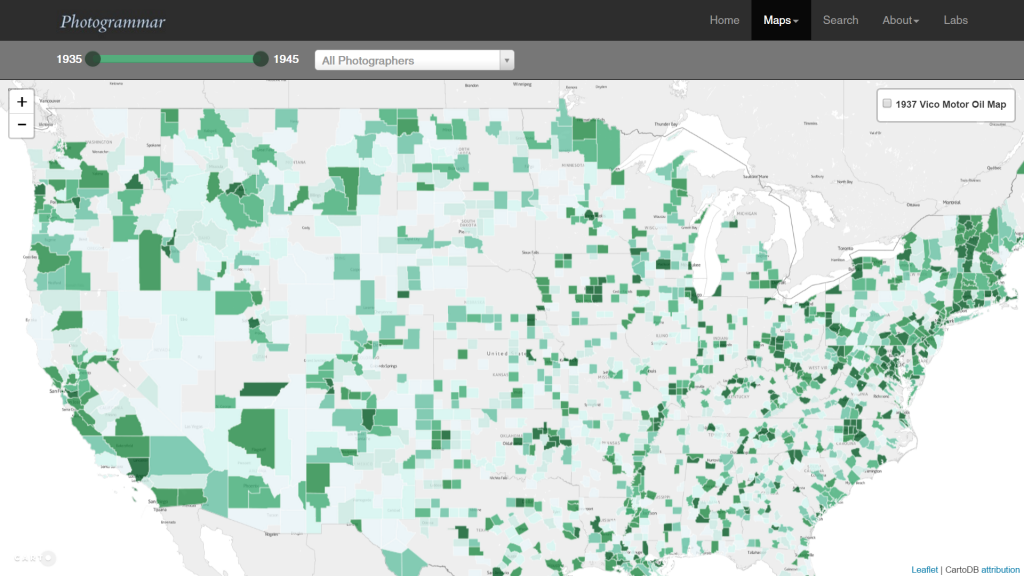
photogrammerPhotogrammar takes the photographs collected by FSA-OWI from 1935-1945 and organizes the pictures by region, time and photographer to help give a better visualization of the state of the country during the Great Depression and World War II.

While there were 170,000 photographs in the FSA-OWI’s collection, also known as “The File,”– which is currently maintained and cataloged by the Library of Congress– Photogrammar only incorporated 90,000 of the photographs in their project.

The photographs were sent to the collection as negatives and from there the negatives were developed by FSA-OWI, Stryker and other sources. These developed photographs would have been scanned by the Photogrammar team in order to upload it to the web. The team then had to parse Paul Vanderbilt’s Lot Number System in order to get the accurate information about each photograph. By parsing the information, they were able to assign related tags to each picture (12 main tags and 1300 sub tags). They were also able to group the pictures in 3 main categories: by photographer, year, and location. The team expressed that although some of the identification were easy to make out, such as the photographer name, some identification, like the call number, was difficult to figure out. However, later on they discovered it signified the order of the photographs, allowing them to put the pictures back into its original strips. This was a breakthrough as it allowed people to follow the photographer’s point of view and allow the people to feel as if they were also going on the journey with the photographer.

This project was created with the help of Vizzuality who incorporated Leaflet and CartoDB together. Aside from them, the main way the team presented these artifacts was by mapping them on an interactive US map. From the start, people are able to see which areas were more documented than the others. Then we are given the choice of narrowing down our options by filtering through the years or by the photographer. Filtering by photographers was especially interesting because it allowed the viewers to see where the photographer’s work was concentrated at or if they were on the move, it allowed us to get an instant view on how they traveled across the country. Once clicking on the location, we are then given list of small thumbnails that are related to our filtered search. This layout helps the viewers get a quick view on the state of the region that they are looking at. This in my opinion is a nicely designed interface as it allows the viewers to get an overall understanding without having to go through every picture, while still giving us the option to learn more about each picture by clicking on a specific one.