Origins
Photogrammar is a site created by Yale which seeks to be a digital platform that organizes the 170,000 photographs from 1935-1946 created by the United States Farm Security Administration and Office of War Information (FSA-OWI). These photos were originally taken as method to building trust and support for government programs for the Roosevelt Administration during the Great Depression Era. They were undertaken by the Historical Section of the Farm Security Administration as way of documenting the United States at one of its worst periods of time, as well as a way of documenting the successful administration of aid relief.
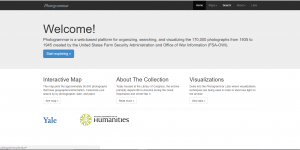
In terms of raw navigation the site starts out with a helpful welcome page that lists options for how to begin exploring the collection, finding out about its background, and for finding new experimental tools as well.
Sources:
The collection used to build Photogrammar includes 170,000 overall photographs. 88,000 of these are printed and placed in the office of the FSA-OWI. 77,000 of the photographs were printed by Roy Styker’s Historic Division of the Farm Security Administration. The other 11,000 come from other sources.
In terms of overall collection origins, the database has grown to include six different collections. The majority of the photographs from the Farm Security Administration collection and Office of War Information collection. The other collections include the Office of Emergency Management-Office of War Information Collection, the American at War Collection, the Portrait of America Collection. All these collections are overall organized and cataloged by the Library of Congress.
Processes:
In terms of data processing, the Photogrammar tool had a lot of help with the fact that the Library of Congress had already digitized the photograph collection for them. The team instead had to to organize the overall data into a database that could then sort out geographic and classification information into an easily searchable format.
Presentations:
The Photogrammar team uses a variety of tools to organize and display the large amount of data that they are using.
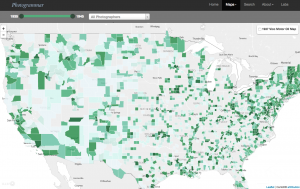
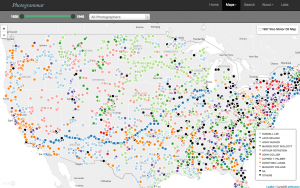
In terms of the main visualization used, the Photogrammar site uses two different versions of its mapping visualization to show the photograph locations in county and dot format.
County:
Dot:
One of the tools they use is CartoDB which is used as a database that serves as the primary mapping mechanism for the site due to its scalability and balance of raster and vector data formats.
A second tool that they use is called Leaflet. This is used for its capabilities as an Open-Source JavaScript Library for Mobile-Friendly Interactive Maps. The library provides an excellent general library for creating dynamic graphs.
Another tool they use is a Treemap to serve as visualization of the original classification system designed by Paul Vanderbilt in 1942. 88,000 of the photographs were assigned using this classification system which uses 12 main subject headings and 13000 sub-headings which lead into various sub-sub headings.
A fourth major process/tool used on the Photogrammar site is the Metadata Dashboard. The dashboard is used as an interactive tool to display the relationship between date, county, photographer, and subject in photographs from individual states using the already categorized metadata of the photographs.
Very nicely broken down!
Great job! I also did Photogrammar, but only included one photo – I like that you decided to include pictures of both of the different maps the project created. Perhaps a picture of the metadata dashboard would have been more useful than a picture of the home page? Great analysis!
I really enjoyed this blog post. I thought it was extremely well organized and easy to follow. I did not do this database, but from reading your comments, I feel familiar with it already. I also very much appreciated how you broke down the different tools used and explained what each tool was for. I have no doubt this information will be extremely helpful in the future!
Your post offered a clear vision on a sophisticated database. Even though I had no prior knowledge about Photogrammar, it felt extremely powerful and convenient to use thanks to your structured post. I like the way you combined corresponding screenshots with concise demonstration of the tools, and the site itself provides excellent background information for new viewers as well. Thanks for sharing!
When I originally looked through this database, I found the wealth of information very overwhelming, but after reading your post I now understand what the purpose of the project was. Your carefully crafted breakdown of the sources as well as the tools and techniques used made it very easy to comprehend the material. The photos you included helped me gain a clearer understanding of the data as well.