Course blog

Pondering User Perception

Everything in this world has some type of design or format affiliated with it. In Jesse James Garrett’s presentation titled “Elements of User Experience” she keys in on the idea of user experience design as being “the design of everything with human experience as an outcome and human engagement as a specific goal”. This definition applies to almost every aspect of our day-to-day lives, as we are constantly interacting with our surroundings. User experience design has been revolutionized and transformed by the constant technological advancements in our society. Companies plan out their web design and layout in order to project a certain image and mood that parallels their values. This layout, consisting of a surface, skeleton, structure and scope according to Garrett, is seen by the user and interpreted to form an overall perception. Deliberate choices are made when laying out the skeleton of a website, in order to enhance user experience as well as provide them with information in a logical way.


Screen Shot 2014-11-23 at 7.15.43 PM


For example, the image above of a typical Gmail inbox is much more complex than it appears to be. The surface of the site needs to be simplistic as well as visually appealing in order to ensure the user is not confused during their initial visits to the site. The specific skeleton of the site in this instance needs to be very carefully laid out, in order to allow for the user to quickly find new mail and be able to sort through the different sections and additional applications. Certain individual customization features are available to the user, but the basic skeleton and structure must be carefully organized and laid out by Google to ensure a positive user interface experience. As Garrett states in her presentation, there is a fine line that separates the two views of a product as information as well as technology. In this example, Google first focuses on the information side of the spectrum to project the hard data to the user. The technology side of the spectrum is observed as the individual components of the site that make the content available. Different people will form different perceptions of each and every website, illustrating the importance of a site’s surface, skeleton, and structure to provide a solid foundation for the user to interpret. Different content requires unique structure, but the overall feeling of the website will ultimately be determined by the omnipotent user.


Sources:

1. Jesse James Garrett, Elements of User Experience, http://www.slideshare.net/openjournalism/elements-of-user-experience-by-jesse-james-garrett

Week 8: The Eight Commandments of Interface Design

Reading “Shneiderman’s Eight Golden Rules of Interface,” I understood the rules as sort of commandments for basic user interface that every website should use if they want to see good results. To assess each of these rules, we’ll take a look at a website known as sharkrobot.com, which sells shirts, hoodies, posters, keychains, wallets, hats, and books. About a month ago, the youtuber that I mentioned in a previous blog post, natewantstobattle, hosted a charity stream on Youtube in which he would play either Pokemon X and Y or Super Smash Brothers for the Nintendo 3DS with viewers. Aside from all the good fun, Nate was selling a T-shirt called Zoroark’s Cove (which can be seen below) through Shark Robot just for that one day and all of the profits that he made from it went to the Leukemia and Lymphoma Society. The reason he did this was because a childhood friend of his introduced him to video-games but unfortunately died to Leukemia around the age of twelve and Nate felt bad that he could not thank his friend for his success because that exposure to the video-game world is what led to the creation and rise of his channel. Hearing this, I supported the charity stream by buying the shirt (which I received but the size was too small so I sent it back and am currently waiting for anew one) from Shark Robot.

https://fbexternal-a.akamaihd.net/safe_image.php?d=AQDokQgUqqESz8wk&w=155&h=114&url=http%3A%2F%2Fcdn.shopify.com%2Fs%2Ffiles%2F1%2F0284%2F5558%2Fproducts%2FZoroark_s_Cove_-_Shirt_medium.jpg%3Fv%3D1413230547

At the time, I just visited sharkrobot.com to buy the shirt, but after reading “Shneiderman’s Eight Golden Rules of Interface,” I decided to see how each of those rules is put into play here. The reason why I chose this website is that I feel like shopping websites satisfy the fourth rule the best. If you can find another example that uses the third rule, let me know. Anyway, the first rule strive for consistency, is very straightforward and goes back to when Miriam was talking about controlled vocabulary. The second rule says that an interface should enable frequent users to use shortcuts which I cannot really see on Shark Robot, but to be fair I can’t think of another example from the top of my head and perhaps I have not explored the website enough to know whether it provides shortcuts for frequent users. Next is offering informative feedback which I can testify for seeing as how I gave the website feedback about one of my orders because a week and four days had passed before the shirt arrived at my house. The fourth rule, which was mentioned above states that the interface should design dialogue to yield closure. The way I understand this rule, there should be a beginning, middle, and end action and the best example I could think of for this is the process of buying something over the internet. Depending on the website there will be a different amount of steps but all of them ask for personal information and credit card information.

The fifth rule is offer simple error handling and from what I’ve seen, there aren’t any errors on the website. Rule number six says to permit easy reversal actions which I cannot really see but again, I haven’t explored the website enough to encounter it. Next is support internal locus of control and everything seems fine in this department. There aren’t annoying pop-ups or imposing features. The final rule states reduce short-term memory load which is also in order because the pages are stable and links do not open other pages. Overall, this website seems to follow these basic rules.

Week 8: Challenges in Interface Design

The readings this week focused on interfaces, and there was a lot of focus on how interface design shapes the user experience. Certain pieces even attempted to determine the fundamentals of interface design, which could be referenced regardless of how innovative the designer chooses to be with the interface. None of the articles really use language that restricts the concept of “interface” to operating systems and webpages, and we did see examples of creative interfaces with “The Knotted Line” and “Freedom’s Ring,” which experimented with layout and multimedia use. However, advances in technology have created the potential for interfaces with less obvious “surfaces” that often require an even greater degree of interaction.

I found an article that describes several different examples of next-generation interfaces, many of which employ a tactile component. Some of the technology discussed is already fairly prevalent, but almost none of it seems capable of replacing more traditional interfaces. Certain examples, like gesture interfaces and brain-computer interfaces, seem like they would never be able to deliver consistent results while others, like the Tangible User Interface and wearable computer, seem to improve very little on what is already available.

The article posits that the development of different user interfaces helps to create a more immersive computing environment. But it could be challenging to find routine uses for some of these interfaces. Even “smart watches,” which seem to be the most ubiquitous of the listed interfaces, are fairly limited to displaying email notifications and the day’s weather. In a way, the issues that can come up in adapting next-generation interfaces for commercial use are reflected in people’s reactions to the two websites we were supposed to explore for this week’s reading.

“The Knotted Line” especially was visually very interesting, and while the content was probably equally important, I do not think I was alone in finding navigation of the site challenging and the content difficult to access. While a more stimulating interface seems to complement a virtual exhibit like “The Knotted Line,” its interface would probably not be adapted for a website that is intended for more regular use. I am sure there are examples of creative and interactive design elements successfully integrated on less thought-provoking platforms, maybe even on a smaller scale, but I have difficulty believing that some of these interfaces would be accepted for mainstream use.

Week 8: Apple’s OS X Yosemite, a ‘Hike’ in the Right Direction

os_x_yosemite_roundup

For weeks now, my MacBook Pro has tested my patience by constantly reminding me to install the new software update for my laptop: OS X Yosemite. I was reluctant to update because firstly, I thoroughly believed that I didn’t have enough time to restart my computer and install the software (assuming it would take two hours to download), and secondly, my hard drive crashed over the summer and I was afraid that such a large installment would mess with the functionality of my laptop. I was also subconsciously unwilling to adapt to all the new changes the new layout and design would propose. We become so comfortable with the ‘known’ that anything new or seemingly foreign is undesirable. I finally caved into the download when my Google Drive browser was deemed incompatible with the current software that I had, so I was forced to update. To my surprise, the download took less than 20 minutes and none of my applications, documents, or bookmarks were deleted in the process. I had heard horror stories from friends updating to the new OS X Yosemite and losing all their precious documents, so I was very relieved to see that everything was right where I left it. The new streamlined design is more simplified than ever. However, as a self-proclaimed ‘neat-freak,’ I enjoy the simplicity and think it leads to a less cluttered user experience. I find it interesting how in the past, we have put so much focus into making the user experience progressively more realistic, and then all of a sudden switch gears to a flat design. The Flat vs. Realism debate is graphically depicted on flatvsrealism.com and has a very captivating approach to compare and contrast the two design preferences. Realistic textures and luminosity triumph in realism, where simplistic lines, colors and shapes are the focus in flat design. In 2014, flat design is definitely the more popular choice, at least when it comes to Apple’s preferences. As stated in Shneiderman’s  8 Golden Rules of Interface Design, consistency is key with design and terminology and Apple has definitely made that it’s focus for their new software. Between the new iOS 7 & 8 updates, and the new OS X Yosemite software, Apple has ensured that their brand is consistent, accessible and recognizable. They are pioneers on the technological front, and I don’t see that status changing anytime soon.

Week 8

This weeks readings, particularly the Elements of User Experience by Jesse James Garrett, led me to believe that creating interfaces can be associated with creating online profiles.Understanding the user experience design as “the design of anything with human experience as an explicit outcome and human engagement as an explicit goal” easily lends itself to the understanding this as a form of a personal profile.  The workings and ideas behind creating a profile is more than simply putting words into boxes. Rather, one has to think about the image they want to present to the world.  The perception of oneself that is presented changes for different mediums of expression.  For example, on a dating website a person will highlight different attributes of themselves compared to a LinkedIn profile.  When broken down into its frameworks, user experience design can be classified as strategy, scope, structure, skeleton, and surface.  When creating a personal profile we follow these steps to ensure that the image we want to portray is clearly shown.

Kirshenbaum’s questions can be employed in this topic is we consider the importance of the skeleton, lending to his question about what aesthetics role in interface design is.  In personal profiles there is room for innovation and individuality, however one is kept within the constraints of the structure and skeleton.  This restraint causes people to conform their own individual understanding of themselves into what the skeleton has determined is important.

Linkedin-advanced-search

The structure of a sight completely determines the how effective, or ineffective that sight can be.  If the sight is unclear and confusing to maneuver, then it will be quickly replaced by a different more dynamic site.  Similarly, if a personal profile, on LinkedIn for example, is disorganized and the individual is not clearly understood, then employers will ignore it and move onto the next option.  People and companies are now being defined by what they can portray on a simple website, rather than their entire content.


Week 8: Interfaces

Digital Humanities has greatly advanced the humanities fields, making it accessible to a larger range of people with visualizations such as mapping, graphs, and interactive mediums. It allows scholars to reach a new dimension, and does not restrict them to simple text fields. But sometimes, I feel, simplicity is best.

While Evan Bissell and Eric Loyer’s project “The Knotted Line” offers a great interactive timeline with paintings and informational links, to me, it was very confusing. At first I was not sure if it was chronological, but as I explored more I realized it was. The squiggly lines and the act of having to expose the paintings yourself was very difficult for me. At times the small informational red dots were hard to find and it made for a very confusing tool. Since it is set up in a timeline form, I think it would have been more efficient to at least display the years throughout, so the viewer can easily land on a certain year that they are interested in.


When telling history, especially if you are trying to reach an audience who is not familiar with the digital age very well, it can be easier to simplify. I personally think that digital humanities can make certain studies more accessible to the public with visualizations, but if the digitization is done in a simplistic way. “The Knotted Line” would be a tool that would have to be used by a group more advanced with digital tools.

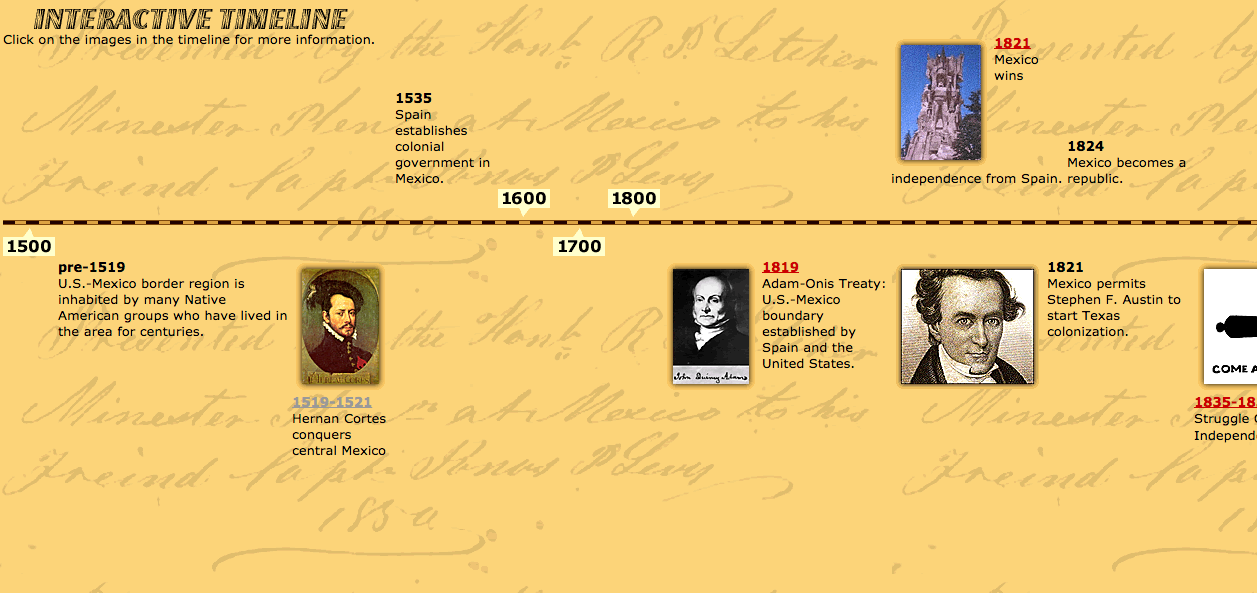
Screen Shot 2014-11-23 at 1.42.40 PM


I found a website, http://www.pbs.org/kpbs/theborder/history/interactive-timeline.html, that timelines border history in a concrete and simplistic way. Each pinpoint is clickable and sends you to a different page where it informs you of that certain event. It is easy to use and provides information in an efficient way. The years are clearly displayed, there are photos attached, and one can easily scroll throughout the timeline.

Timelines are a great way of displaying information to an audience in an visualized way. With every type of digital tool, there is a certain audience in mind. Not every tool will resonate with everyone. While I think that The Knotted Line is a very cool tool, it can only be used by a certain, digitally savvy, audience.


Week 8: Retro Camera Controls

camera_interface

The first example of an interface that I thought of was the controls on a camera, which are historically specific. Classic SLRs and rangefinders like the Nikon F and Leica M had very simple, mechanical controls: a shutter release button, a shutter speed dial on the body, and an aperture ring and a focusing ring on the lens. Beginning in the ’80s, camera controls became electronic. The interface was freed from the limitations of mechanical systems, and it shifted to an interface based on buttons and one or two dials whose function changed depending on the exposure mode. However, for the last several years, there has been a retro trend to bring back some of the physical controls from the past. For example, the Fuji X100T and X-T1 have a shutter speed dial and an aperture ring just like classic cameras, as well as an additional exposure compensation dial that some cameras with more modern controls even have, such as the Sony A7ii.

In the chapter “‘So the Colors Cover the Wires’: Interface, Aesthetics, and Usability,” Matthew G. Kirshenbaum asks “What role, then, should aesthetics have in interface design?” His answer to this question is to create what David Gelernter calls “deep beauty,” the “idealized integration of form and function.” This idea has roots in the Bauhaus, which influenced the design of the Leica M, and is frequently reiterated in online discussions where cameras are noted for being beautiful or ugly. In the case of camera interfaces, it’s a matter of creating a user experience where the photographer “feels in control” of the camera. The exercise of control is set in opposition to the “laziness” and “uncertainty” of automation, which was once advertised as liberating the photographer from the distracting, time-consuming process of setting controls so that they could pay full attention to the task of taking photos. It is interesting that both types of camera interfaces claim some sort of transparency, the first making it easy to see and change settings on the camera, the second making it easy to ignore the camera. The fact that people have preferences for different types of interfaces shows that we do live in an “interface culture” as Steve Johnson asserts. They are a matter of taste and aesthetics, not something that’s merely utilitarian. As Kirshenbaum argues, interfaces are “where representation and its attendant ideologies are most conspicuous…where we deploy our most creative features and imaginative flourishes.” The rings and dials on cameras like the Fuji X100T are highly visible aesthetic statements about usability, and combined with its specialized function and stylish industrial design, succeeds in creating “deep beauty.”

Web Design

Starting with knotted line, it is important to understand how crucial a good web layout is. This particular program in my opinion is incredibly frustrating as there are no instructions and it does not cooperate as I would like it to. I only barely get an understanding of what they are trying to argue which makes the whole website useless. I found the Freedom’s Ring website slightly more easier to understand as it provided some instruction before launching you into the interactive website. Comparing these to the 8 rules, it is a good example of what is functional and impossible to work with. I feel like a good website is self explanatory and can be navigable without training or assistance. One example that comes to mind is the obvious Facebook. One of the common jokes I hear in regards to Facebook’s design is that in the first week everyone complains when the layout is altered yet no one remembers anything the week after. To me, this is a testimony of a good layout that is easy to adapt to and can be altered when necessary.

The problem with designs is that if they are made too simplistic, the design can be considered ugly and made for children. If the design is too complicated, no on will be able to understand it. Of course no designer is particularly proud of following a set pattern made by a website creator company and therefore many attempt to design there own. The best websites are the most used and are usually shopping websites like Amazon. In fact, I must assume that most shopping websites all have common themes like gender, age, and clothing type divisions along with search ability, store locations, and return policies. With this situation I do not think all of these websites agreed to these categories in a large meeting but I think that happenstance and previous consumer responses have led many companies to adopt the same standards. For this reason feedback is important to designing the ideal website and this same feedback can lead to many similar website designs. That also makes me wonder about copyright. Is it possible for a company or an individual to hold copyright for a specific design or terminology. How specific does it have to be in order to claim it as your own? Either way, the web layout is the main attractor for a website and the thing that keeps people coming back.

Constructing Memory as Space: 9/11 Memorial as a “Cultural Elaboration of Landscapes”

9-11


2014-09-11 21.31.22

This week’s Dunn reading examined the construction of space as artefact in the historical sense- with reference to how the “digital dimension accelerates and simulated the fundamentally creative process of historical reconstruction”. While this is discussed in the more historically rooted disciplines of archaeology and classics, the notion of constructed space reminded me of my visit to MoMA this summer, featuring an exhibition on “Conceptions of Space” that I relate to my experience with the 9/11 memorial. Some of the spaces mentioned in the exhibition were:

Envelope Space- A result of height restrictions and other building regulations in modern cities. Building’s outer limit, rather than the function of its interior, is the guiding principle of design. Envelope organizes creation of architectural space and has theme in its own right

Fictional Space- architects conceive space out of imagination and use stories to help their ideas unfold

Space on Steroids- pioneering contemporary designs often combine references to historic buildings with groundbreaking spatial experiments. Architects often seek to create new and vital experiences of space unrelated to a building’s functions. Even if diverse practical needs must be met, space and its interaction with architecture’s existing repertoire of forms and spatial possibilities can be the main focus of the design process

Spaces of Assemblage- artists adopt creative strategy called assemblage i.e. grouping found or unrelated objects. Juxtapose different forms, volumes, other spatial elements and by repurposing preexisting construction components.

Performative Space- design that crosses boundaries between architecture, installation art and props for performance

In the various ways explored, architects are able to rely not only on precedents, but present needs and future projections to think about a building, and how its design would shape human interaction and experience that would contribute to a productive “cultural elaboration of landscapes”.

While I did not take any pictures of the architectural exhibits, the exhibition also made me think about the 9/11 memorial and the thought put into engineering it. As a historical event that is close to the hearts of many Americans, the herculean task to build a structurally meaningful and symbolic memorial to represent history while being aware of the practical limitations of a crowded city like New York was perhaps daunting. While not necessarily performative, the resultant two light beams shone were purposive in that it served as remembrance and recognition in respect. It had a spatiality that was palpable, balancing a modest unintrusiveness (lights could be switched off) without neglecting to remind of past constructions of space, as opposed to merely “representing and describing them”. It was an endeavor that balanced a past occurrence with the need to address the current climate and future

The quote Dunn places at the beginning of the article therefore becomes exceptionally poignant- “That was how I saw it then, and how I continue to see it; along with the five senses. A child of my background had a sixth sense in those days, the geographic sense. The sharp sense of where he lived and who and what surrounded him”. The relation and interactions of people in a given space give it value, and the sixth geographic sense empowers one to situate himself as a constituent of his surroundings. As such, the notion of space becomes important in constructing identity- the way it is presented and permits us to interact with it not only help us understand things around us better, but offers us a more robust understanding of ourselves.

The Effect of Crowd and Cloud on GIS Technology

monroeGIS (1)


The development of geospatial technologies has been exploding in the government and consumer markets, creating social impacts ranging from user-generated maps for mobile applications to solutions to disaster management[1]. Although until the recent past it was majorly specialists that used GIS to create maps in the back room, today untrained users can also routinely access sophisticated GIS via the Internet on their PCs, laptops, mobile phones or dedicated geospatial devices. Mark Reichardt, president of the Open Geospatial Consortium (OGC), said that they’re “seeing this movement of geospatial and location-service functionality seamlessly into the business decision cycle and business tools and consumer services” and that it’s the crowd and the cloud leading that movement. On the consumer market end, GIS application is often combined with Global Positioning System, better known to us as GPS, and is heavily used for mobile applications to add maps to their services so users can find nearest restaurants or gas stations. The government is also beginning to use the GIS technology outside their back room, for projects such as Pacific Disaster Center that created DisasterAware Platform, which “continually monitors information feeds from meteorological and geological agencies and delivers information and alerts in real time to subscribers. Users can share analyses and situation reports and can query the underlying databases of DisasterAware, which has a presence on Twitter.” Other similar devices such as WebMapSolutions is built to reduce the impact of a disaster and its long-term results through coordinated multi-agency response system, where the relief activities include rescue, relocation, service repair, providing temporary shelter and emergency health care, as well as suggesting recovery solutions focusing on rehabilitation through providing detailed pictures of the disaster and its impact and its assessment. Jack Dangermond, president of Esri, a geographic information system company, said, “GIS is being exposed on the Web, through browsers and through mobile phones. That’s making it more accessible and usable. It will spread through whole new audiences. Executives who want to look at sophisticated geographic information and do sophisticated geographic analysis can do so through a mobile device.” The GIS technology today isn’t limited to specialists and engineers, and the crowd learning to use the system to apply it to user-generated contents, bringing it into the consumer market end, is reshaping the future and bringing the places closer and smarter, making it available for day-to-day use.


References:

[1] New GIS Colutions for Disaster Management