Week 8: Responsive Interaction

While reading about design in terms of user experience rather than visuals, I thought about Google’s “Material Design” spec, for which Google won a 2014 UX Award. It was recognized for its ability to “add clarity to user-initiated events by creating strong visual connections from user input.” This Google spec is about establishing visual language, new possibilities with mobile design, and “meaningful motion.” As in, meaningful design that has the purpose to help the user’s experience be more intuitive and pleasant, rather than gimmicky. There is a section specifically about design responding when interacted with by the user, which is an interesting cross between experience and visual design in my opinion. I kept thinking about Shneiderman’s “Golden Rules” of designing with your users in mind. Google’s spec is basically a guide to their language, and to the logic behind it. It explains why their designs react and interact the way they do, and is also interesting because many of the designs are made in a way to not be noticeable by the users, so seeing them as a blatant design shows just how smart they are. The “Responsive Interaction” section is a guide on consistency in actions, the number one rule of Shneiderman. It combines with two other rules – feedback for actions, and making users the initiators of actions – to become a successful guide to achieving this “meaningful motion” they mention. Consistency is important because the user needs to know what their actions are doing, and what the hierarchy of their content is. Buttons should react the same way when pressed, transitions should be consistent and subtle, hover functions should indicate active content the same way, and windows (browsers and pop-ups) should be layered according to a system. If something is suddenly different, the user will expect a different action to occur, and if there is no reaction from the design, the user will think their action didn’t get processed. This is why feedback on actions is important, and why designing them needs to be part of the ux process. It can also make the experience of using your website enjoyable for your users, and make them want to click on more things, which leads them to discovering more of your content! These reactions from the design are part of the interactive design process, but they are also very dependent on their visual design. A ux designer can decide that there needs to be a shadow under a window, for example, but the look of this shadow (subtle, gradient, behavior) is just as important in the user’s experience of it.

http://www.google.com/design/spec/animation/responsive-interaction.html#responsive-interaction-material-response

Week 8- Interface and Attention Span: Who else is addicted to Serial?

While doing the readings this week, I got stuck on the idea of attention span. What makes viewers stick with content? In Shneiderman’s “Eight Golden Rules of Interface Design,”  he describes ways to improve the usability of a site.  These eight rules have much to do with consistency and ease of navigation.  They seemed straight foreword and common sense: it would seem counter productive to not follow through with rules such as “offer simple error handling” or “reduce short term memory load.” Even though Shneiderman’s argument was centered around interface of website, it got me thinking how this interface applies to other digital mediums, such as podcasts.

In looking at The Knotted Line and Freedom’s Ring: King’s “I Have a Dream” Speech, I was struck by how these sites transcended the traditional notion of a website.  Navigation was guided in a way which provided narrative, yet was unique and engaging. Both sites were multimedia and though they provided a database of information for the viewer, it was clear that there first objective was to tell an engaging story.  Perhaps story, told through effective interface, is what produces attention span.

A chart from The Bold Italic showing different “hypothetical” tweets about the podcast, Serial

Serial is a new podcast produced by WEBZ Chicago and This American Life. As the name suggests, it is a “serial” and tells the story of a teen murder incrementally, one week at a time.  This podcast series has been widely successful and, of course, highly controversial.   There has been a lot of media attention to the series, specifically  as to why this podcast is so successful?  There has been much debate regarding the morality of the content, suggesting that the popularity of the podcast lies in an intrinsic human desire for voyeurism and the “unsavory.”  While I do not feel that I am educated enough to take on those arguments, I do want to say that I think a lot of Serial’s success may lie in interface.

A “parody” infographic from The Bold Italic about Serial’s popularity

I think that applying Shneiderman’s “Eight Golden Rules of Interface Design” to podcasts says a lot about the success of podcasts in recent years: they follow Shniederman’s rules pretty closely.  Podcasts “strive for consistency” in the sense that they are, like television shows, produced and distributed on a weekly basis.  They “enable frequent users to shortcuts” by virtue of their interface: pause, fast-foreward, rewind.  Podcasts are available at the users desire and can be archived for later use.  They “offer informative feedback” by the virtue of their existence.  Podcasts frequently, like traditional radio, answer listener questions and clarify in later episodes.  Podcasts are adapted to how the listener dictates the experience. Podcasts are “designed for closure” in that they have only a single function: the user listens to the podcast and then the podcast is over.   Podcasts “permit easily action reversal” because they can be listened, or rewinded, as many times as an individual desires. The “support inner locus of control” in that they are simple to use and feel easy to master: anyone can essentially download and listen to a podcast. (Serial even has a webpage to guide you through the process) In conclusion, good podcasts “reduce short term memory load.”  Most podcasts do not exceed an hour in length and are filled with “information recalls,” the purpose of a podcast is not to make the listener memorize the information, but rather to entertain.

In looking at a close analysis of “podcast interface,” I am perhaps a little convinced that popular entertainment has a lot to do with easily access.  Content is obviously king, but perhaps interface has a lot more to do with it than we think?  What about interface of discussion? Would we be talking about Serial as much without twitter or other social medias? I am curious if anyone else got hung up on the idea of interface behind “on demand” entertainment.  (Also, is anyone else listening to Serial? I am a little obsessed.)

Pondering User Perception

Everything in this world has some type of design or format affiliated with it. In Jesse James Garrett’s presentation titled “Elements of User Experience” she keys in on the idea of user experience design as being “the design of everything with human experience as an outcome and human engagement as a specific goal”. This definition applies to almost every aspect of our day-to-day lives, as we are constantly interacting with our surroundings. User experience design has been revolutionized and transformed by the constant technological advancements in our society. Companies plan out their web design and layout in order to project a certain image and mood that parallels their values. This layout, consisting of a surface, skeleton, structure and scope according to Garrett, is seen by the user and interpreted to form an overall perception. Deliberate choices are made when laying out the skeleton of a website, in order to enhance user experience as well as provide them with information in a logical way.


Screen Shot 2014-11-23 at 7.15.43 PM


For example, the image above of a typical Gmail inbox is much more complex than it appears to be. The surface of the site needs to be simplistic as well as visually appealing in order to ensure the user is not confused during their initial visits to the site. The specific skeleton of the site in this instance needs to be very carefully laid out, in order to allow for the user to quickly find new mail and be able to sort through the different sections and additional applications. Certain individual customization features are available to the user, but the basic skeleton and structure must be carefully organized and laid out by Google to ensure a positive user interface experience. As Garrett states in her presentation, there is a fine line that separates the two views of a product as information as well as technology. In this example, Google first focuses on the information side of the spectrum to project the hard data to the user. The technology side of the spectrum is observed as the individual components of the site that make the content available. Different people will form different perceptions of each and every website, illustrating the importance of a site’s surface, skeleton, and structure to provide a solid foundation for the user to interpret. Different content requires unique structure, but the overall feeling of the website will ultimately be determined by the omnipotent user.


Sources:

1. Jesse James Garrett, Elements of User Experience, http://www.slideshare.net/openjournalism/elements-of-user-experience-by-jesse-james-garrett

Week 8: The Eight Commandments of Interface Design

Reading “Shneiderman’s Eight Golden Rules of Interface,” I understood the rules as sort of commandments for basic user interface that every website should use if they want to see good results. To assess each of these rules, we’ll take a look at a website known as sharkrobot.com, which sells shirts, hoodies, posters, keychains, wallets, hats, and books. About a month ago, the youtuber that I mentioned in a previous blog post, natewantstobattle, hosted a charity stream on Youtube in which he would play either Pokemon X and Y or Super Smash Brothers for the Nintendo 3DS with viewers. Aside from all the good fun, Nate was selling a T-shirt called Zoroark’s Cove (which can be seen below) through Shark Robot just for that one day and all of the profits that he made from it went to the Leukemia and Lymphoma Society. The reason he did this was because a childhood friend of his introduced him to video-games but unfortunately died to Leukemia around the age of twelve and Nate felt bad that he could not thank his friend for his success because that exposure to the video-game world is what led to the creation and rise of his channel. Hearing this, I supported the charity stream by buying the shirt (which I received but the size was too small so I sent it back and am currently waiting for anew one) from Shark Robot.

https://fbexternal-a.akamaihd.net/safe_image.php?d=AQDokQgUqqESz8wk&w=155&h=114&url=http%3A%2F%2Fcdn.shopify.com%2Fs%2Ffiles%2F1%2F0284%2F5558%2Fproducts%2FZoroark_s_Cove_-_Shirt_medium.jpg%3Fv%3D1413230547

At the time, I just visited sharkrobot.com to buy the shirt, but after reading “Shneiderman’s Eight Golden Rules of Interface,” I decided to see how each of those rules is put into play here. The reason why I chose this website is that I feel like shopping websites satisfy the fourth rule the best. If you can find another example that uses the third rule, let me know. Anyway, the first rule strive for consistency, is very straightforward and goes back to when Miriam was talking about controlled vocabulary. The second rule says that an interface should enable frequent users to use shortcuts which I cannot really see on Shark Robot, but to be fair I can’t think of another example from the top of my head and perhaps I have not explored the website enough to know whether it provides shortcuts for frequent users. Next is offering informative feedback which I can testify for seeing as how I gave the website feedback about one of my orders because a week and four days had passed before the shirt arrived at my house. The fourth rule, which was mentioned above states that the interface should design dialogue to yield closure. The way I understand this rule, there should be a beginning, middle, and end action and the best example I could think of for this is the process of buying something over the internet. Depending on the website there will be a different amount of steps but all of them ask for personal information and credit card information.

The fifth rule is offer simple error handling and from what I’ve seen, there aren’t any errors on the website. Rule number six says to permit easy reversal actions which I cannot really see but again, I haven’t explored the website enough to encounter it. Next is support internal locus of control and everything seems fine in this department. There aren’t annoying pop-ups or imposing features. The final rule states reduce short-term memory load which is also in order because the pages are stable and links do not open other pages. Overall, this website seems to follow these basic rules.

Week 8: Challenges in Interface Design

The readings this week focused on interfaces, and there was a lot of focus on how interface design shapes the user experience. Certain pieces even attempted to determine the fundamentals of interface design, which could be referenced regardless of how innovative the designer chooses to be with the interface. None of the articles really use language that restricts the concept of “interface” to operating systems and webpages, and we did see examples of creative interfaces with “The Knotted Line” and “Freedom’s Ring,” which experimented with layout and multimedia use. However, advances in technology have created the potential for interfaces with less obvious “surfaces” that often require an even greater degree of interaction.

I found an article that describes several different examples of next-generation interfaces, many of which employ a tactile component. Some of the technology discussed is already fairly prevalent, but almost none of it seems capable of replacing more traditional interfaces. Certain examples, like gesture interfaces and brain-computer interfaces, seem like they would never be able to deliver consistent results while others, like the Tangible User Interface and wearable computer, seem to improve very little on what is already available.

The article posits that the development of different user interfaces helps to create a more immersive computing environment. But it could be challenging to find routine uses for some of these interfaces. Even “smart watches,” which seem to be the most ubiquitous of the listed interfaces, are fairly limited to displaying email notifications and the day’s weather. In a way, the issues that can come up in adapting next-generation interfaces for commercial use are reflected in people’s reactions to the two websites we were supposed to explore for this week’s reading.

“The Knotted Line” especially was visually very interesting, and while the content was probably equally important, I do not think I was alone in finding navigation of the site challenging and the content difficult to access. While a more stimulating interface seems to complement a virtual exhibit like “The Knotted Line,” its interface would probably not be adapted for a website that is intended for more regular use. I am sure there are examples of creative and interactive design elements successfully integrated on less thought-provoking platforms, maybe even on a smaller scale, but I have difficulty believing that some of these interfaces would be accepted for mainstream use.

Week 8: Apple’s OS X Yosemite, a ‘Hike’ in the Right Direction

os_x_yosemite_roundup

For weeks now, my MacBook Pro has tested my patience by constantly reminding me to install the new software update for my laptop: OS X Yosemite. I was reluctant to update because firstly, I thoroughly believed that I didn’t have enough time to restart my computer and install the software (assuming it would take two hours to download), and secondly, my hard drive crashed over the summer and I was afraid that such a large installment would mess with the functionality of my laptop. I was also subconsciously unwilling to adapt to all the new changes the new layout and design would propose. We become so comfortable with the ‘known’ that anything new or seemingly foreign is undesirable. I finally caved into the download when my Google Drive browser was deemed incompatible with the current software that I had, so I was forced to update. To my surprise, the download took less than 20 minutes and none of my applications, documents, or bookmarks were deleted in the process. I had heard horror stories from friends updating to the new OS X Yosemite and losing all their precious documents, so I was very relieved to see that everything was right where I left it. The new streamlined design is more simplified than ever. However, as a self-proclaimed ‘neat-freak,’ I enjoy the simplicity and think it leads to a less cluttered user experience. I find it interesting how in the past, we have put so much focus into making the user experience progressively more realistic, and then all of a sudden switch gears to a flat design. The Flat vs. Realism debate is graphically depicted on flatvsrealism.com and has a very captivating approach to compare and contrast the two design preferences. Realistic textures and luminosity triumph in realism, where simplistic lines, colors and shapes are the focus in flat design. In 2014, flat design is definitely the more popular choice, at least when it comes to Apple’s preferences. As stated in Shneiderman’s  8 Golden Rules of Interface Design, consistency is key with design and terminology and Apple has definitely made that it’s focus for their new software. Between the new iOS 7 & 8 updates, and the new OS X Yosemite software, Apple has ensured that their brand is consistent, accessible and recognizable. They are pioneers on the technological front, and I don’t see that status changing anytime soon.

Week 8

This weeks readings, particularly the Elements of User Experience by Jesse James Garrett, led me to believe that creating interfaces can be associated with creating online profiles.Understanding the user experience design as “the design of anything with human experience as an explicit outcome and human engagement as an explicit goal” easily lends itself to the understanding this as a form of a personal profile.  The workings and ideas behind creating a profile is more than simply putting words into boxes. Rather, one has to think about the image they want to present to the world.  The perception of oneself that is presented changes for different mediums of expression.  For example, on a dating website a person will highlight different attributes of themselves compared to a LinkedIn profile.  When broken down into its frameworks, user experience design can be classified as strategy, scope, structure, skeleton, and surface.  When creating a personal profile we follow these steps to ensure that the image we want to portray is clearly shown.

Kirshenbaum’s questions can be employed in this topic is we consider the importance of the skeleton, lending to his question about what aesthetics role in interface design is.  In personal profiles there is room for innovation and individuality, however one is kept within the constraints of the structure and skeleton.  This restraint causes people to conform their own individual understanding of themselves into what the skeleton has determined is important.

Linkedin-advanced-search

The structure of a sight completely determines the how effective, or ineffective that sight can be.  If the sight is unclear and confusing to maneuver, then it will be quickly replaced by a different more dynamic site.  Similarly, if a personal profile, on LinkedIn for example, is disorganized and the individual is not clearly understood, then employers will ignore it and move onto the next option.  People and companies are now being defined by what they can portray on a simple website, rather than their entire content.


Week 8: Interfaces

Digital Humanities has greatly advanced the humanities fields, making it accessible to a larger range of people with visualizations such as mapping, graphs, and interactive mediums. It allows scholars to reach a new dimension, and does not restrict them to simple text fields. But sometimes, I feel, simplicity is best.

While Evan Bissell and Eric Loyer’s project “The Knotted Line” offers a great interactive timeline with paintings and informational links, to me, it was very confusing. At first I was not sure if it was chronological, but as I explored more I realized it was. The squiggly lines and the act of having to expose the paintings yourself was very difficult for me. At times the small informational red dots were hard to find and it made for a very confusing tool. Since it is set up in a timeline form, I think it would have been more efficient to at least display the years throughout, so the viewer can easily land on a certain year that they are interested in.


When telling history, especially if you are trying to reach an audience who is not familiar with the digital age very well, it can be easier to simplify. I personally think that digital humanities can make certain studies more accessible to the public with visualizations, but if the digitization is done in a simplistic way. “The Knotted Line” would be a tool that would have to be used by a group more advanced with digital tools.

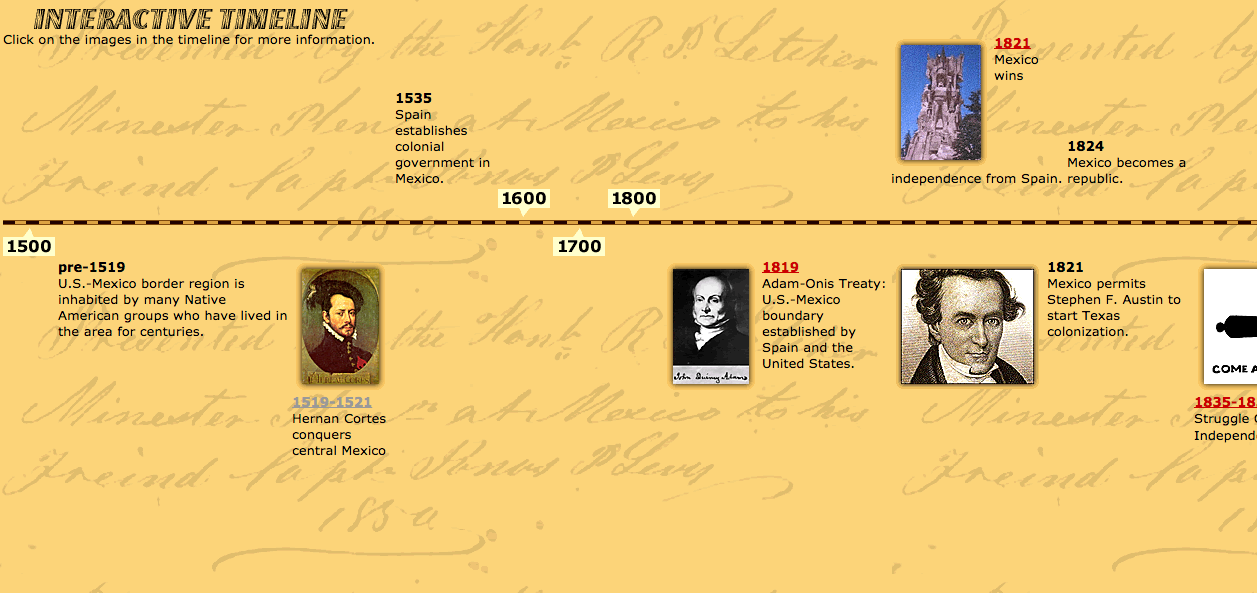
Screen Shot 2014-11-23 at 1.42.40 PM


I found a website, http://www.pbs.org/kpbs/theborder/history/interactive-timeline.html, that timelines border history in a concrete and simplistic way. Each pinpoint is clickable and sends you to a different page where it informs you of that certain event. It is easy to use and provides information in an efficient way. The years are clearly displayed, there are photos attached, and one can easily scroll throughout the timeline.

Timelines are a great way of displaying information to an audience in an visualized way. With every type of digital tool, there is a certain audience in mind. Not every tool will resonate with everyone. While I think that The Knotted Line is a very cool tool, it can only be used by a certain, digitally savvy, audience.


Week 8: Retro Camera Controls

camera_interface

The first example of an interface that I thought of was the controls on a camera, which are historically specific. Classic SLRs and rangefinders like the Nikon F and Leica M had very simple, mechanical controls: a shutter release button, a shutter speed dial on the body, and an aperture ring and a focusing ring on the lens. Beginning in the ’80s, camera controls became electronic. The interface was freed from the limitations of mechanical systems, and it shifted to an interface based on buttons and one or two dials whose function changed depending on the exposure mode. However, for the last several years, there has been a retro trend to bring back some of the physical controls from the past. For example, the Fuji X100T and X-T1 have a shutter speed dial and an aperture ring just like classic cameras, as well as an additional exposure compensation dial that some cameras with more modern controls even have, such as the Sony A7ii.

In the chapter “‘So the Colors Cover the Wires’: Interface, Aesthetics, and Usability,” Matthew G. Kirshenbaum asks “What role, then, should aesthetics have in interface design?” His answer to this question is to create what David Gelernter calls “deep beauty,” the “idealized integration of form and function.” This idea has roots in the Bauhaus, which influenced the design of the Leica M, and is frequently reiterated in online discussions where cameras are noted for being beautiful or ugly. In the case of camera interfaces, it’s a matter of creating a user experience where the photographer “feels in control” of the camera. The exercise of control is set in opposition to the “laziness” and “uncertainty” of automation, which was once advertised as liberating the photographer from the distracting, time-consuming process of setting controls so that they could pay full attention to the task of taking photos. It is interesting that both types of camera interfaces claim some sort of transparency, the first making it easy to see and change settings on the camera, the second making it easy to ignore the camera. The fact that people have preferences for different types of interfaces shows that we do live in an “interface culture” as Steve Johnson asserts. They are a matter of taste and aesthetics, not something that’s merely utilitarian. As Kirshenbaum argues, interfaces are “where representation and its attendant ideologies are most conspicuous…where we deploy our most creative features and imaginative flourishes.” The rings and dials on cameras like the Fuji X100T are highly visible aesthetic statements about usability, and combined with its specialized function and stylish industrial design, succeeds in creating “deep beauty.”

Web Design

Starting with knotted line, it is important to understand how crucial a good web layout is. This particular program in my opinion is incredibly frustrating as there are no instructions and it does not cooperate as I would like it to. I only barely get an understanding of what they are trying to argue which makes the whole website useless. I found the Freedom’s Ring website slightly more easier to understand as it provided some instruction before launching you into the interactive website. Comparing these to the 8 rules, it is a good example of what is functional and impossible to work with. I feel like a good website is self explanatory and can be navigable without training or assistance. One example that comes to mind is the obvious Facebook. One of the common jokes I hear in regards to Facebook’s design is that in the first week everyone complains when the layout is altered yet no one remembers anything the week after. To me, this is a testimony of a good layout that is easy to adapt to and can be altered when necessary.

The problem with designs is that if they are made too simplistic, the design can be considered ugly and made for children. If the design is too complicated, no on will be able to understand it. Of course no designer is particularly proud of following a set pattern made by a website creator company and therefore many attempt to design there own. The best websites are the most used and are usually shopping websites like Amazon. In fact, I must assume that most shopping websites all have common themes like gender, age, and clothing type divisions along with search ability, store locations, and return policies. With this situation I do not think all of these websites agreed to these categories in a large meeting but I think that happenstance and previous consumer responses have led many companies to adopt the same standards. For this reason feedback is important to designing the ideal website and this same feedback can lead to many similar website designs. That also makes me wonder about copyright. Is it possible for a company or an individual to hold copyright for a specific design or terminology. How specific does it have to be in order to claim it as your own? Either way, the web layout is the main attractor for a website and the thing that keeps people coming back.