
(Cross-posted on UCLA’s DH Bootcamp blog)
Edit: Dot Porter made a Zotero collection for this post! Thanks, Dot!
Many students tell me that in order to get started with digital humanities, they’d like to have some idea of what they might do and what technical skills they might need in order to do it. Here’s a set of digital humanities projects that might help you to get a handle on the kinds of tools and technologies available for you to use.
I’ve tried to include a few different types of projects, but it’s hard to provide a really representative list. If you’d like to see more digital humanities projects, you can find directories at art-humanities.net and DHCommons.
Here, I discuss:
- a gallery of primary sources
- a digital scholarly edition
- a mapping project
- a network visualization
- computer-aided text analysis
- a historical 3D model
- a longform, media-rich narrative
A Gallery of Primary Sources: Making the History of 1989

What it is
A collection of primary sources related to the fall of Communism in Eastern Europe, accompanied by teaching materials and interpretive essays.
What you’d need to know
- Omeka.org (which forms the basis of the site), or you could use Omeka.net if you aren’t so picky about the way the site looks and acts
- HTML and CSS (optional; to customize the way the site looks)
- PHP (optional; to customize certain site functions, like the way items display)
Get started
A Digital Scholarly Edition: The Willa Cather Archive

What it is
A carefully edited digital archive of the writings of Willa Cather, along with extensive scholarly essays, analysis, and multimedia galleries.
What you’d need to know
- TEI (the markup language designed for scholarly editing)
- XSLT or an XML publication system
Get started
A Mapping Project: The Negro Travelers’ Green Book
 What it is
A searchable map of the addresses contained in the 1956 Negro Travelers’ Green Book, which the user can filter by state or establishment type.
What you’d need to know
- Google Fusion Tables
- Google Maps
- Some JavaScript (to get the map to display properly)
Alternatives
There are almost too many mapping technologies to list, but some popular tools include Neatline (which you’d use together with Omeka), GeoCommons (a relatively simple mapping application), and ArcGIS (used for complex or large-scale mapping projects). If you’re serious about learning to build dynamic web-based maps, you’d be wise to learn the client-side language JavaScript (to control the way things show up on browsers), a server-side language like PHP (to interact with data), and the database language SQL (to manage your geospatial data). More mapping tools.
Get started
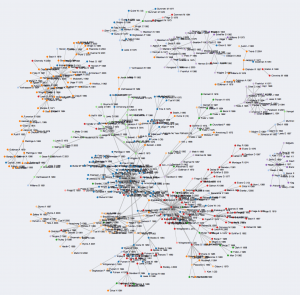
A Network Visualization: A Co-Citation Network for Philosophy
What it is
A visualization of the authors referenced together in a corpus of philosophy journals.
What you’d need to know
- D3.js, a JavaScript library for producing visualizations on the web.
- The programming language Python, for manipulating your data.
- A dataset. This one came from the Web of Science, which allows you to download citation data for academic articles.
Alternatives
You can make network visualizations without (necessarily) coding by using the web-based ManyEyes or the free Gephi or Cytoscape. Other tools for data visualization.
Get started
Computer-Aided Text Analysis: Topic Modeling Martha Ballard’s Diary

What it is
An analysis of a historical document that uses a statistical method called topic modeling to group together the “topics” found in a large set of texts.
What you’d need to know
- MALLET, a Java-based software package for text analysis (including topic modeling)
- R, a programming language for statistical analysis and graphics
Alternatives
The Topic Modeling Tool provides a simpler-to-use graphical user interface for topic modeling, as does Paper Machines (which produces topic models from your Zotero library). But topic modeling is just one kind of textual analysis. Find a rundown of different kinds of text analysis here. Often, people who are new to text analysis enjoy starting with the web-based Voyant Tools. I also like the Lexos suite. More tools for text analysis.
Get started
- Very basic strategies for interpreting results from the Topic Modeling Tool
- Special issue of the Journal of Digital Humanities on topic modeling
A Historical 3D Model: Digital Magnesia

What it is
A painstakingly researched re-creation of the Hellenistic city of Magnesia.
What you’d need to know
This particular model is created using the procedural modeler CityEngine.
Alternatives
The easiest way to create 3D models is probably with SketchUp. Serious 3D modelers often use Maya or Rhino.
Get started
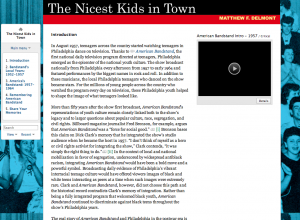
A Longform, Media-Rich Narrative: The Nicest Kids in Town
What it is
An essay, accompanied by photographs, video, and sound, that can be reconfigured by the viewer to be read in multiple ways.
What you’d have to know
Get started
August 30: Post edited to reflect that you don’t need Python to download Web of Science data. Thanks for the correction, Scott Weingart!
87 responses to “How did they make that?”
Miriam,
This is a great way to breakdown the front ends of projects to make them seem more doable.
One note, if you’re interested in adding to the Omeka section, we have some project case studies that help dissect what sections are tied to which pieces of Omeka: http://omeka.org/codex/Project_Planning_Case_Studies
Thanks for writing this up, it’s a great resource!
Sheila
Oh! This is so cool, Sheila! I see you even use the Making of 1989 site as an example. Perfect!
Wow — there’s amazing depth here, Miriam. I still only know how to do about a third of this; this page is going to be useful for people who aren’t necessarily newbies.
[…] fabulous Miriam Posner posted a great piece on her blog today that’s made the rounds on the Twitterverse. She gives a really useful […]
Thanks, Ted!
What Ted said. This is one of those great ideas that leaves you scratching your head wondering why it never existed before. Thanks!
If I can pick two nits (because, uh, what is DH if not nitpicky?), downloading the citation data from web of science happens by hand, you can’t automate that part, and the knowledge of stats required is pretty much zilch.
I’d love to see this turned into an ADHO (or similar) supported site, with a few monthly featured projects along with this style of “here’s what you need to know and how to know it” under the heading. Again, fantastic idea.
Oh, thanks, Scott! I’ve never actually used Web of Science data myself, to tell you the truth. I’ll fix the post. Love the ADHO idea! Maybe we (or someone else) should approach them with it.
[…] How did they make that? – Miriam Posner – 2013.08.29 […]
[…] those specific things are. It's shaped by (and owes a lot to) Miriam Posner's excellent “How did they make that?”, which really helped me when I was wrestling with the organization of what I wanted to say. This […]
Hello Miriam – This is fantastic! Thank you!
Hello, Miriam:
Just another big Thanks!
I come across these unbelievable web sites and think “I would love to use this framework, but insert my own particular data/subject” – but then get intimidated by their complexity. Your straightforward explanations and breakdowns give me a good starting place to expand my knowledge base. Thanks!
Just wanted to add another voice of gratitude for a good project. I’ll agree with Scott that this is something that might make a lot of sense to see as a series at ACH or DH Answers.
Even more, it’s making me think about an assignment that I could give my students this coming spring. Getting them to investigate not only the shape of DH projects but also the technical requirements of each strikes me as very useful.
Shoot, it ate my reply, Brian. Thanks for the kind words. This could be a cool assignment — I definitely had fun doing forensics on other people’s projects. You may have to do some work in advance, though, to get them prepared. I know some basic things (like that Python is a programming language, TEI is a markup language, and Omeka is a CMS) that your students may not know. So it could be a difficult task for them to figure out what’s what!
[…] think the “How did they make that?” resource that Miriam Posner created is a great way to approach DH projects and tools. I […]
[…] a series of talks on “What is the Digital Humanities.” In constructing this talk I’ve found Miriam Posner and Paige C Morgan’s blog posts on what digital humanists actually do very helpful in my research. […]
[…] for my Red Light District of Old Albuquerque (working title?) project. In a blog by UCLA’s Miram Posner, I ran across a project that maps the location of hotels and restaurants in the U.S. that were open […]
What a great resource – thank you! I wonder if you have similar recommendations for a digital history timeline, or could perhaps point me to a few good examples of projects that others have done?
Thanks very much!
Thank you Miriam for this empirical approach which is breaking down barriers between traditional historians and historians using digital tools. I will try to use it here at the European University Institute to foster the use of digital tools and answer research queries they have. Maybe looking for European History case-studies as alternative examples too. You gave us a great piece of open knowledge of yours to become familiar with DH methods ! I wish you would be next door here in Florence for hiring you for a classroom ….
[…] with which I can design something amazing. It was so exciting to read Miriam Posner’s post “How did they make that?” because it showed me concrete examples of the diversity of projects digital humanists are coming up […]
[…] would it mean to create a bootstrapping set of patterns for DH projects? Miriam Posner wrote a moderately high-level version of one, as did Paige C. Morgan. How can we build on or further […]
[…] be speaking this Thursday 3/27 at 6:30pm on reverse engineering digital projects. If you enjoyed the blog post of hers that we read earlier this semester, I’m sure the talk will be great. Note that you’ll […]
[…] My original “How Did They Make That?” post (with Dot Porter’s Zotero library!) […]
[…] talk was part of a series sponsored by CUNY’s Digital Humanities Initiative and built upon her August 29, 2013 blog post, “How did they make […]
[…] was really happy that my original “How Did They Make That?” post, which demonstrates how to build some common types of DH projects, got some positive reactions. I […]
[…] Did They Make That?” (Miriam Posner) the blog post AND the video! “Many students tell me that in order to get started with digital humanities, […]
[…] How Did They Make That? […]
[…] to Network Analysis by looking at a finished product that intrigues them, focusing on the “how did they make that?” question before delving into underlying theories and the technical competencies they need to […]
[…] Posner, Miriam. “How did they make that?” MiriamPosner.Com. Web. Aug. 29, 2013. […]
[…] Miriam Posner’s Blog […]
[…] http://miriamposner.com/blog/how-did-they-make-that/ […]
[…] very interested in the potential that technology has to offer. And why not? Look at all the amazing things that people are […]
[…] aspects of editing a digital edition of letters, see Miriam Posner’s helpful blog post, How Did they Make That?). Similarly, Charlotte Mitchell, Ellen Jordan, and Helen Schinske have collaborated to offer […]
[…] “The White Negro”? For assistance, see some examples, and read Morgan’s and Posner’s breakdowns about approaching various DH projects. Draft a plan to present to the class on Monday. […]
[…] to use technology really well even greater representations could be created. The blog post called How did they make that? by Miriam Posner goes into detail on a couple of different digital history projects and the […]
[…] DiRT Directory, the Programming Historian’s lessons directory, Miriam Posner’s “How Did They Make That?” and the dhresourcesforprojectbuilding’s list of digital humanities tools. […]
[…] presentations, grant applications, government reports, white papers, and, of course, other blogs. It is, without a doubt, the single most widely read piece of historical writing I have ever […]
[…] talk was part of a series sponsored by CUNY’s Digital Humanities Initiative and built upon her August 29, 2013 blog post, “How did they make […]
[…] The DHCommons Journal seeks submissions for a section dedicated to procedural descriptions of how to launch and/or maintain an exemplary aspect of a stable digital project. We encourage you to emphasize in your submission a component of the project that came out particularly well and/or represented a significant challenge (e.g. data visualization, accessibility compliance, data cleaning and preparation). Readers should be able to come away with a sense of how they could begin to tackle a similar challenge. In spirit, these submissions should be inspired by Miriam Posner’s “How did they make that<http://miriamposner.com/blog/how-did-they-make-that/>?”. […]
[…] The DHCommons Journal seeks submissions for a section dedicated to procedural descriptions of how to launch and/or maintain an exemplary aspect of a stable digital project. We encourage you to emphasize in your submission a component of the project that came out particularly well and/or represented a significant challenge (e.g. data visualization, accessibility compliance, data cleaning and preparation). Readers should be able to come away with a sense of how they could begin to tackle a similar challenge. In spirit, these submissions should be inspired by Miriam Posner’s “How did they make that?”. […]
[…] section is inspired by Miriam Posner’s “How did they make that?” post, which included a video companion (previously featured in the dh+lib […]
[…] How did they make that? | Miriam Posner’s Blog […]
[…] How Did They Make That? […]
[…] How Did They Make That? […]
[…] a useful outlines of the broad features of major genres of DH projects, see these blog postings by Miriam Posner and Paige Morgan; note also the “resources” tab of this ENGL 6130 […]
[…] on Digital Humanities projects and technologies, check out Miriam Posner’s blog post, “How did they make that?“. If you’re interested, I can point you to […]
[…] go-to for many, myself certainly included, is Miriam Posner’s How Did They Make That? blog post from 2013. Posner, coordinator of the DH program at UCLA, breaks down some typical project types, […]
[…] Posner’s excellent “How did they make it” blog […]
[…] from around the world, two “How Did They Make That?” features along the lines of those pioneered by Miriam Posner (http://miriamposner.com/blog/how-did-they-make-that/), and an editorial introduction outlining […]
[…] “How Did They Make That?” (http://miriamposner.com/blog/how-did-they-make-that/) […]
[…] statistics and other digital media fairly interesting. The first thing sites like Dirt Directory, How did they make that?, and Tales of an Indiscriminate Tool Adopter made me realize is how fascinating the creation of […]