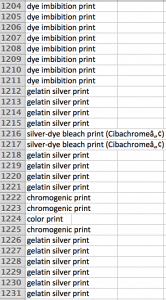
 (An example of random gibberish in row 1216.)
Our group got the photography collection of Carnegie Museum of Art. The dataset itself is comprehensive and provides us meaningful and creative insights to analyze photographs. However, one of the biggest challenges we have encountered is the systematic gibberish existed in the Excel cells. Our group was told that the gibberish might be caused by the software when it was transcribing specific art terms into digital text. Because of its randomness, It is tedious and time-consuming to clean the data.
As the result, I manipulated the medium columns of the dataset by deleting the random gibberish. Besides, since we had some repeated media, I also attempted to merge them accordingly. I calculated the quantity of different media with the text facet. I also used the edit option under text facet to replace the gibberish with the possible words I found online. I also used the cluster function to merge and re-cluster the terms suggested by OpenRefine. Other than that, I unified the terms to title case so it would be easier for other group members to read the data in the future.
Although the tutorial has guided me to solve most of the problems in my dataset, one problem remains unsolved: I found that lots of terms are derived media built on top on the basic media. For example, “gelatin silver print with hand applied text” is obviously a medium evolved from the basic medium, “gelatin silver print.” Hence, I hope I could sort out all basic media in order to categorize the derived media correspondingly.
It’s great that the program helped you clean your dataset and that you found it useful. The problem that remains does sound time consuming and complicated, but I hope you find a solution soon so that your group could get on with the project. Good luck!