My group is group 12 and our database is on the American classicists and archeologists. There is a lot of data on classicists and archeologists such as their name, date of birth, place of birth, main affiliation, final degree, etc.
The research questions we have so far are focused on gender, refugee status, birthplace, origin, and regions of granting institutions. We are looking at how these areas of interest have affected the classicists’ work and main affiliation.
We have a lot of missing data from our database and there are a few repetitions and mistakes, therefore using OpenRefine to clean up the data was pretty helpful. The columns I focused the most on cleaning were 1. a column titled “woman” which is basically classifying classicists by gender 2. a column titled “refugee” which answers yes if the classicist was a refugee 3. main affiliation 4. birthplace.
When using OpenRefine, I clicked on the arrow to work with the facets and chose “Text Facet” since most of the data is textual and not numerical. After OpenRefine focused on that specific column, I started combining like terms/names by trimming leading and trailing white spaces or fixing an obvious misspelling.
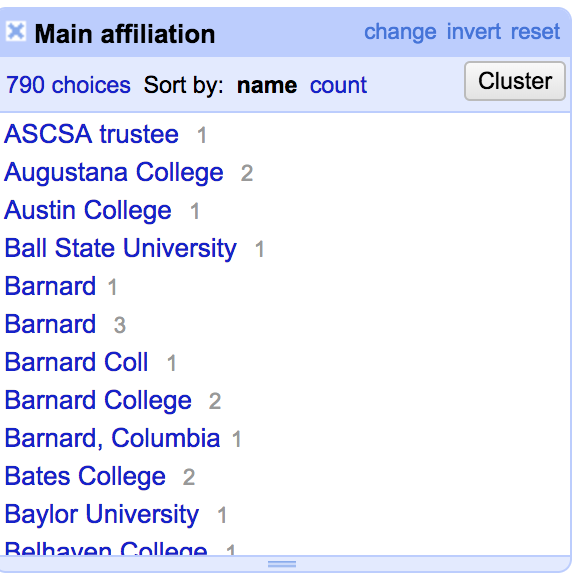
For example, for the main affiliation, we can see five different groups that are all the same Barnard College. To combine, I clicked on Cluster then edited the text to combine them together. Then kept going through the list to check if there are any other cases like this.
When looking at the geographical data, I realized that the database combined cities and states as if they were one and I used the splitting column operation on OpenRefine to separate the two. I think once we have a better idea of what we want to do with our data we would be able to use more of OpenRefine’s operations.
I would like to clean up the data a little more. We have a lot of missing data and none of our columns is more than 60-70% full and I’m not very sure if it is possible to do that without messing the analysis of the data.