Our dataset is about American Classicists & Archaeologists. The research questions we have come up with are as follows:
- Has the prevalence of female classicists increased over time?
- Do the regions of granting institutions have any effect on a classicists’ area of study? Has there been a shift in regional activity over time?
- Is there a trend in areas of study based on classicists’ affiliate institutions?
- How did the refugee status affect the classicists’ field of study?
- How did the birthplace and origin of classicists affect their main affiliation and/or work?
For the research questions we are working on above, there are following columns can be manipulated by OpenRefine so that data can be analyzed by other tools better:
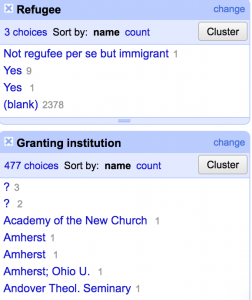
- Area of study & Granting Institution & Main Affiliation & Refuge: Use ‘Text Facet’ to see if there are terms been grouped separately with the same meaning, and combine them together.
- OpenRefine:
- On the Research area & Granting Institution & Main Affiliation & Refuge column, click the down arrow, then click Edit cells, then Common transforms. Finally, click Trim leading and trailing whitespace.
- Click on the down-arrow right next to the Research area column heading. Then select Facet, and then Text Facet.
- Click on Cluster to see if there is any terms have the same meaning, then edit the text to combine them together.
- Double check if there is any left.
- OpenRefine:

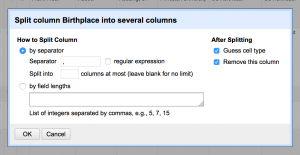
- Birthplace: divided into two columns, one with ‘Birth City’ and one with ‘Birth State’.
- OpenRefine:
- On the Birthplace column, click the down arrow, then click Edit cells, then Common transforms. Finally, click Trim leading and trailing whitespace.
- Click the down arrow next to the Birthplace, then Edit columns, and finally Split multi-valued cells. Enter a comma and space, since those are the two characters that lie between city and state. Then click OK.
- Then click on the down arrow, Edit column and then Rename two columns.
- Click on the down-arrow right next to the Refugee column heading. Then select Facet, and then Text Facet.
- Click on Cluster to see if there is any terms have the same meaning, then edit the text to combine them together.
- Double check if there is any left.
- OpenRefine:

Moreover, I am interested in how to ‘sort’ the data and when we gonna to use ‘transpose’ function. However, the most significant problem with our dataset is there is so many data are missing. We are going to talk with the subject-matter specialist as soon as possible.
This is so easy to follow and very well thought out. I also really appreciated that you presented your research questions at the beginning, making it a lot easier to understand why you were manipulating certain data in specific ways. I may low keyyyy save your post as a reference for my own group project because this is super awesome! Great job (: