Overview
For many, the medieval ages of the 14th century are an area of deep interest and historical insight. Similar to other historical periods, artifacts and images can facilitate an easier visualization of the events of that time period; thereby enriching this pursuit for knowledge. In particular, maps offer a unique opportunity to analyze a multitude of cultural, geographic, religious, and political perspectives of the world. In this week’s digital humanity breakdown, I will be unraveling the Hereford Cathedrals’ digitization of the world’s largest medieval map, the Hereford Mappa Mundi.
The Sources
As stated above, the interactive medieval map (found here ) is not one of pure fabrication and unfounded knowledge. Rather, the map being displayed is a representation of the Hereford Mappa Mundi, a medieval map of the 14th century. The original map is measured at 5’2″ X 4’4″, and is held to be the largest medieval map still in existence today. During its time of creation in the 14th century, map parchment was constructed out of animal skin. This map in particular was crafted out of a single sheet of vellum, otherwise known as calf skin. The content of the Hereford Mappa Mundi offers a valuable insight on how geography and culture was understood by Christian Europe during this time period.
The Processing
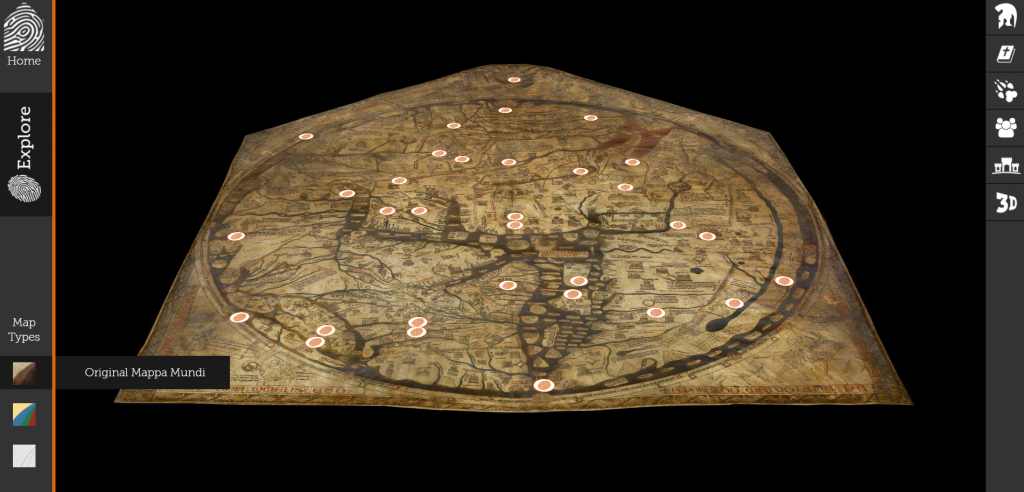
While the exact processing tools used to digitize this map are not publicly disclosed, there are a few methods utilized that can be assumed based off of the end product. Due to the nature of being an interactive map, the original Mappa Mundi was not just simply taken a picture of and pasted on a website. Rather, the map was most likely digitally scanned and rendered as a 3-dimensional object. Support for this 3-D rendereing comes from the fact that the digital map itself is not flat, but rather mimics the peaks and valleys of the vellum that it was crafted on.
The Presentation
As far as presentation goes, the rendered digital map received both cosmetic and informational additions in order to create the final digital humanities project.
Cosmetically, color enhancing software (perhaps through Adobe Illustrator or Photoshop) must have been utilized to bring out the vibrancy on the digital map. This comes from the fact that users are allowed to select a color enhanced version of the map when on the website. Having such a feature afford users the opportunity to see what the original map might have looked like when it was first created, rather than how it stands now.
Content-wise, clickable hot-spots in the form of fingerprints are added to the surface of the digital map, most likely through web design software and/or coding (CSS, HTML, JavaScript, Python). These hot-spots open up an informative toolbar on the right side of the map, allowing users to navigate key religious, mythical, geographic, and humanistic images across the map.
Conclusion
The digitization of the Mappa Mundi breaks down geographic obstacles, allowing people from every corner of the world to view its contents. While there is still something to be said about witnessing historic items in-person, this digital humanities project does a great job of preserving the essence of the original creation. Additionally, the subcategorization of map features aids in informing viewers that might not be so well-versed in the facts or significance of the medieval time period.
-Alex Gernes
I love the organization of your blog post. The section headers make it easy to follow as well as aesthetically pleasing to the eye. I also appreciate how although you did not know the exact processing because the site does not mention it, you used your own insight to break it down. I also think you did a nice job is explaining why the site is important and answer the question of why the creators choose to display the information in the form of a map.
I really like the format of this post: capitalize every first letter of the title, break down into five sections, the contents for five sections are not too long, etc. Overall, the post looks very clean and organized.:) Also, you have used more official explanation instead of “I think or my opinion” which made post looks more professional and comfortable to read. Nice job!
I appreciate how well-organized this post is; using headers to address the specific topics as assigned made it very easy to read. Your post was informative in the sense that you were able to infer which programs were used to create the website.